


Known Participant
August 13, 2025

P: v14.5 Lightroom has encountered problems reading this photo | Round circle ‘!’ warning on Images

  • August 13, 2025
  • 81 replies
  • 7641 views

OS: Windows 11
LrC VERSION: 14.5

A couple of days ago I upgrade to v14.5.
As for every update, I regurlay empty cache, optimise catalog, remove all previews and generate new standard ones (also, I wanted to test how was was the new option to use GPU for generating previews).
Never had a problem with this workflow.
After previews generation process was completed (1h 30m for 29.000 files, 23.000 jpegs and 6.000 raws) I got an error: for 21 RAWs the preview could not be generated. Looking in the catalog at those files, I realised they have an exclamation mark on a dark circle: this is not the missing photo mark. If I click on the exclamation mark, I see error "Lightroom has encountered problems reading this photo, you are not allowed to edit this image. "

Yet, I can still enter develop module and edit the photos without any problem: the editing history is there, I can zoom in at 100% (generating the 1:1 preview), I can change sliders, export... Everything... (PS: I do not use smart previews).


The 21 problematic photos are in different folders and have different dates.
The files can be opened by any other program, including Fast raw Viewer.

For a couple of problematic photos, I tried deleting the photos from file explorer, and the square light missing photo question mark replaced the round dark question mark.
I restored the files from three sources:
1- the original file
2- a backup from a second HD
3- a backup from Amazon Photos


In all three cases above the black round exclamation mark came back: this should prove that it's not a problem of corrupted files, I instead believe it's an issue in LrC.
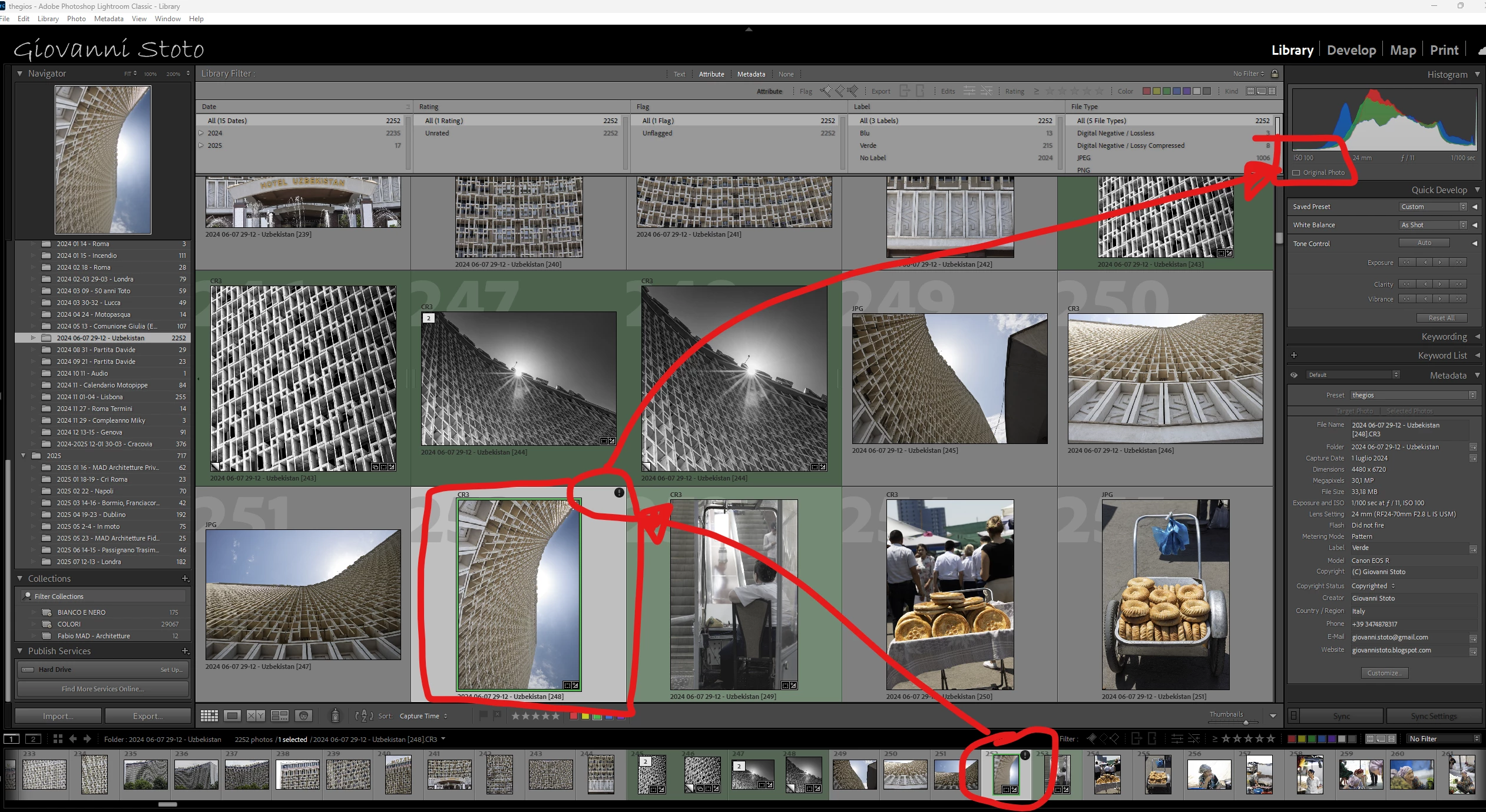
81 replies

Participating Frequently
September 7, 2025

I just found that even after reverting to version 14.4, I still get the exclamation point error when I try to make an AI mask, like select object. If I go to preferences, even though the GPU use was set to AUTO, when the error occurs, it is now changed to OFF with no option to turn it on.
So maybe it is related to camera raw 17.4?

Known Participant
September 5, 2025

No

jm68902488
Known Participant
September 5, 2025

Anshui has this bug issue been fixed in the 14.5.1 new release?

Known Participant
September 4, 2025

@AxelMatt yes but it was just to say that Adobe Is taking care they already have all the info and log.

AxelMatt
Community Expert
Community Expert
September 4, 2025

@Giovanni Stoto  Sorry, but we don't have the appropriate informations. You've send this infos to @Anshul_Saini. Ok, but he's an Adobe employee, but other participants including I are normal user as you are. We don't have access to the infos that you've send to Adobe.


My System: Intel i7-8700K - 64GB RAM - NVidia Geforce RTX 3060 - Windows 11 Pro 25H2 -- LR-Classic 15 - Photoshop 27 - Nik Collection 8 - PureRAW 6 - Topaz Photo AI
jm68902488
Known Participant
September 4, 2025

Yes had the same issues with 14.5.  Rolled back to 14.4.  Any news if this was fixed in 14.51?

Known Participant
September 4, 2025

@AxelMatt apologies why are we starting again from here, since we have all already provided this information to @Anshul_Saini who's taking care of everything?

My system is all up to date till the less significant driver, being myself an IT manager with 30 years of experience.

My System: intel i7-13700K - 64GB RAM - Geforce 4070 12GB - 1SSD PRO 1TB with OS and LrC Catalog, 1SSD PRO 4TB with Pictures - 1HD 7200RPM with Picture Backup  

AxelMatt
Community Expert
Community Expert
September 4, 2025

@Giovanni Stoto Is your system up-to-date? Do you have installed all recent updates and patches for the operating system and the device drivers, especially the graphic driver. If you have a NVidia graphic card installed, make sure that you are using the recent Studio version of the driver, not the Game Ready version.


Please provide a copy of your 'System Info'. This can be get from the LrC Help > System Info menu item. There's a copy button in the System Info dialog. Press this button and paste the info into your next forum post.


My System: Intel i7-8700K - 64GB RAM - NVidia Geforce RTX 3060 - Windows 11 Pro 25H2 -- LR-Classic 15 - Photoshop 27 - Nik Collection 8 - PureRAW 6 - Topaz Photo AI
Known Participant
September 3, 2025

@Anshul_Saini gotcha!

If I disable GPU for preview the ! disappears. As soon as I enable it, it comes back.

Anshul_Saini
Community Manager
Community Manager
September 3, 2025

Hi everyone,


I’ve received a note from the engineering team asking me to check something with you all. Could you please try the following and let us know the results?

  • Go to Preferences > Performance

  • Disable the option Use GPU for Preview Generation

  • Re-launch Lightroom Classic and check if the issue still occurs

In the meantime, the team is actively investigating, and all logs, files, and recordings shared so far are already attached to the bug report. Your continued feedback is very valuable.


Thanks,

Anshul Saini