


Known Participant
August 13, 2025

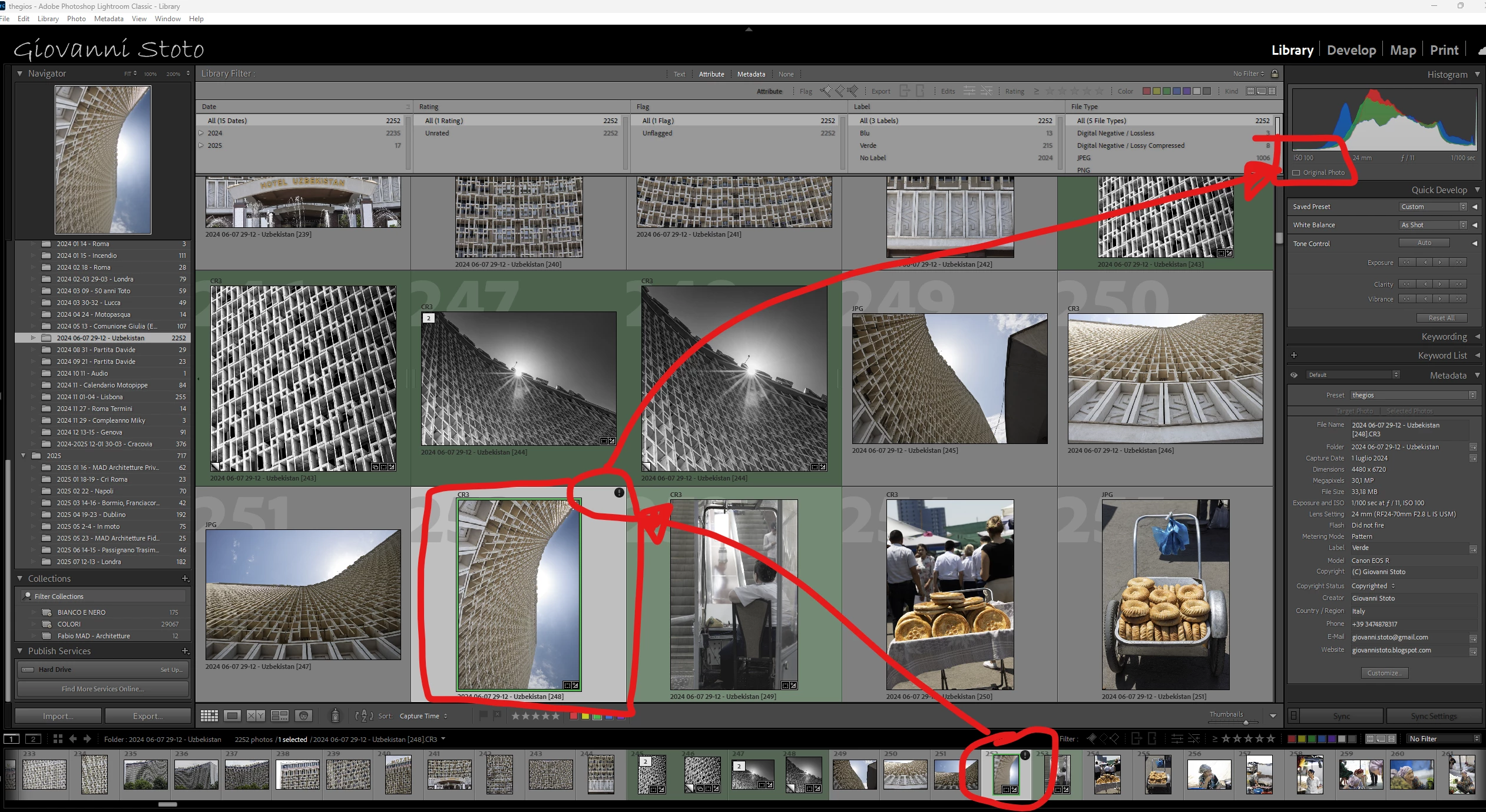
P: v14.5 Lightroom has encountered problems reading this photo | Round circle ‘!’ warning on Images

  • August 13, 2025
  • 78 replies
  • 6406 views

OS: Windows 11
LrC VERSION: 14.5

A couple of days ago I upgrade to v14.5.
As for every update, I regurlay empty cache, optimise catalog, remove all previews and generate new standard ones (also, I wanted to test how was was the new option to use GPU for generating previews).
Never had a problem with this workflow.
After previews generation process was completed (1h 30m for 29.000 files, 23.000 jpegs and 6.000 raws) I got an error: for 21 RAWs the preview could not be generated. Looking in the catalog at those files, I realised they have an exclamation mark on a dark circle: this is not the missing photo mark. If I click on the exclamation mark, I see error "Lightroom has encountered problems reading this photo, you are not allowed to edit this image. "

Yet, I can still enter develop module and edit the photos without any problem: the editing history is there, I can zoom in at 100% (generating the 1:1 preview), I can change sliders, export... Everything... (PS: I do not use smart previews).


The 21 problematic photos are in different folders and have different dates.
The files can be opened by any other program, including Fast raw Viewer.

For a couple of problematic photos, I tried deleting the photos from file explorer, and the square light missing photo question mark replaced the round dark question mark.
I restored the files from three sources:
1- the original file
2- a backup from a second HD
3- a backup from Amazon Photos


In all three cases above the black round exclamation mark came back: this should prove that it's not a problem of corrupted files, I instead believe it's an issue in LrC.
78 replies

Known Participant
August 29, 2025

@Anshul_Saini logs uploaded in the same folder sent via DM

Bob321
Known Participant
August 29, 2025

I confirm that the problem persists in version 14.5.1.
Some of these photos cannot be exported!
I need to work, so I have to revert to version 14.4 (Camera Raw 17.4).
Everything seems OK in this 14.4 version.

Known Participant
August 29, 2025

I confirm the sluggish UI as well

Participating Frequently
August 29, 2025

I am also seeing the same problem. Had to revert to a previous version so I could work with LR again. 
Adding to the problem described, the interface has slowed down immensly and many times the mask's overlay won't show even though it is set to "show always" and pressing the O shortcut won't do anything either.

Anshul_Saini
Community Manager
Community Manager
August 29, 2025

Updating Status

Participant
August 28, 2025

14.5.1 has the same bug


Anshul_Saini
Community Manager
Community Manager
August 29, 2025

Hi @Giovanni Stoto, @iTomDean, and @shayb68441784,


Thank you again for the detailed testing and examples. I’ve logged this issue with the product team so engineering can investigate further. I wasn’t able to reproduce the problem on my end, but I’ve attached all the details you’ve shared so far to the bug report.


To help the team isolate the root cause, could you please collect and share logs from your system after reproducing the issue? Here’s how:


Steps to Collect Logs

  • Close Lightroom Classic if currently opened.

  • Launch Lightroom Classic again.

  • Reproduce the issue.

  • Close Lightroom Classic immediately after closing the issue/ error modal appears.

On Windows

  • Lightroom log: %appdata%\Adobe\Lightroom\

  • Camera Raw logs: C:\Users\<username>\AppData\Roaming\Adobe\CameraRaw\

On macOS

  • Lightroom log: ~/Library/Application Support/Adobe/Lightroom/

  • Camera Raw logs: ~/Library/Application Support/Adobe/Camera Raw/Logs/

Note: Log files will have names like:

Adobe Photoshop Lightroom Classic Log Latest v0.txt

Adobe Photoshop Lightroom Classic Log Latest v1.txt

lrc_console.log (be careful not to confuse with lrcc_console.log under Lightroom CC)


You can upload these logs via DM (or a secure link), and I’ll ensure they’re attached directly to the bug report for engineering.


Best,

Anshul Saini

Inspiring
October 10, 2025

Lightroom Classis 14.5.1


I import all my files as Canon CR3.


I do all the processing I wish to do in Develop.


I then export the photos converting them to maximum size JPG.


I then import the finished JPG files which I continue to Keyword etc.


Everything is done on a day by day basis.


Over the past couple of weeks the very first photo in the JPG Import corrupts.


I then have to delete it, reexport it from CR3 and reimport it. The single JPG import works then fine.


Is there a cache I need to clear or something. I have been using Lightroom for around 10 years now, always in this same manner so I don't know what is wrong. I have changed nothing.


Inspiring
August 27, 2025

Yes, can confirm I have the same problem with 14.5. And I'm seeing comment from others who also are seeing it (see atttached). It's not just you. 

Known Participant
August 27, 2025

Thanks

Unfortunately 14.5.1 does nopt solve

Known Participant
August 27, 2025

@Bob321 and @WHO?!? 

Can you please submit yourselves a bug in the Bug session? And in your post reference this one?

This is ridiculous that no one here from Adobe is proving any feedback when it's obvious it's a bug.

@CMass has initially provided a useless comment proving that Adobe doesn't even read properly what people write: very unprofessional. And now she has disappeared because probably she doesn't know what to say.

I have been asking to move this post from discussion under bug, to no avail.

If only I could leave Lightroom! But after 15 years and thousands of picture, it's almost impossible...

Anshul_Saini
Community Manager
Community Manager
August 27, 2025

Hi @Giovanni Stoto,


Thank you for sharing the very detailed investigation, and thanks as well to @Bob321 and @WHO?!? for confirming similar behavior.


Would you all please update to the latest version of Lightroom Classic 14.5.1, which was released today, and let us know how it goes?

If the issue persists in v14.5.1, please copy & paste your system info from the Lightroom Classic Help menu > System info and share a few affected images via DM so I can pass them on to the product team for investigation.


Thanks again for your patience.


Best,
Anshul Saini

Known Participant
August 27, 2025

@Anshul_Saini 

14.5.1 does not solve the problem:


I have also ytried converting the image in DNG and copy/paste develop setings from raw to dng, and the problem appeared also on dng.

Since the problem was not there before (confirmed by others whom have downgrade and problema disappeared) I do not think kit is related to hw/sw components but here attached the system info.

Even if I share the affected images, they would be useless without the edits that generate the warning.

Known Participant
August 27, 2025

Any news here?

Known Participant
August 27, 2025

Do we have news?