
Known Participant
August 13, 2025

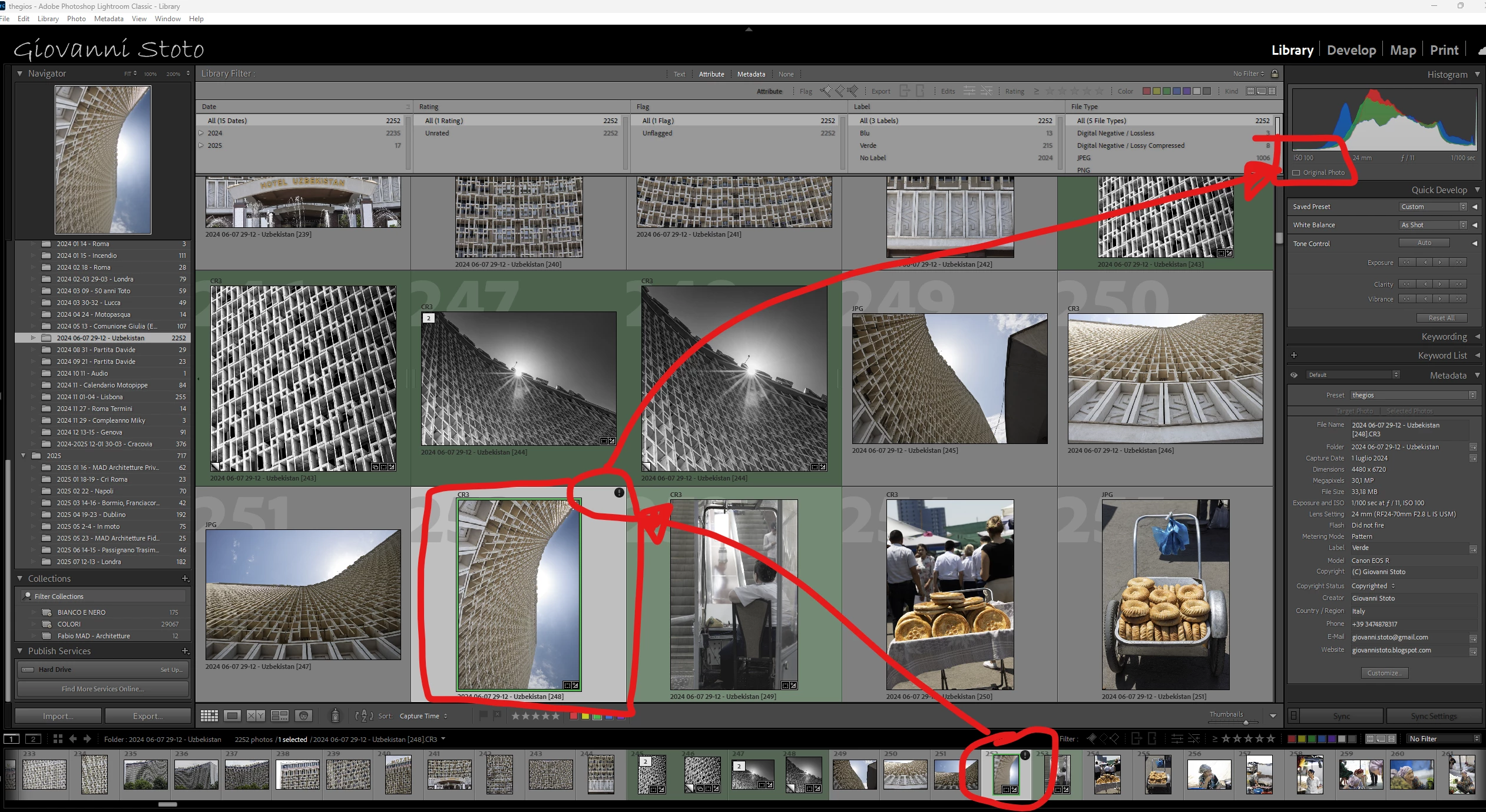
P: v14.5 Lightroom has encountered problems reading this photo | Round circle ‘!’ warning on Images

  • August 13, 2025
  • 81 replies
  • 7641 views

OS: Windows 11
LrC VERSION: 14.5

A couple of days ago I upgrade to v14.5.
As for every update, I regurlay empty cache, optimise catalog, remove all previews and generate new standard ones (also, I wanted to test how was was the new option to use GPU for generating previews).
Never had a problem with this workflow.
After previews generation process was completed (1h 30m for 29.000 files, 23.000 jpegs and 6.000 raws) I got an error: for 21 RAWs the preview could not be generated. Looking in the catalog at those files, I realised they have an exclamation mark on a dark circle: this is not the missing photo mark. If I click on the exclamation mark, I see error "Lightroom has encountered problems reading this photo, you are not allowed to edit this image. "

Yet, I can still enter develop module and edit the photos without any problem: the editing history is there, I can zoom in at 100% (generating the 1:1 preview), I can change sliders, export... Everything... (PS: I do not use smart previews).


The 21 problematic photos are in different folders and have different dates.
The files can be opened by any other program, including Fast raw Viewer.

For a couple of problematic photos, I tried deleting the photos from file explorer, and the square light missing photo question mark replaced the round dark question mark.
I restored the files from three sources:
1- the original file
2- a backup from a second HD
3- a backup from Amazon Photos


In all three cases above the black round exclamation mark came back: this should prove that it's not a problem of corrupted files, I instead believe it's an issue in LrC.
81 replies

Known Participant
August 27, 2025

@Bob321 and @WHO?!? 

Can you please submit yourselves a bug in the Bug session? And in your post reference this one?

This is ridiculous that no one here from Adobe is proving any feedback when it's obvious it's a bug.

@CMass has initially provided a useless comment proving that Adobe doesn't even read properly what people write: very unprofessional. And now she has disappeared because probably she doesn't know what to say.

I have been asking to move this post from discussion under bug, to no avail.

If only I could leave Lightroom! But after 15 years and thousands of picture, it's almost impossible...

Anshul_Saini
Community Manager
Community Manager
August 27, 2025

Hi @Giovanni Stoto,


Thank you for sharing the very detailed investigation, and thanks as well to @Bob321 and @WHO?!? for confirming similar behavior.


Would you all please update to the latest version of Lightroom Classic 14.5.1, which was released today, and let us know how it goes?

If the issue persists in v14.5.1, please copy & paste your system info from the Lightroom Classic Help menu > System info and share a few affected images via DM so I can pass them on to the product team for investigation.


Thanks again for your patience.


Best,
Anshul Saini

Known Participant
August 27, 2025

@Anshul_Saini 

14.5.1 does not solve the problem:


I have also ytried converting the image in DNG and copy/paste develop setings from raw to dng, and the problem appeared also on dng.

Since the problem was not there before (confirmed by others whom have downgrade and problema disappeared) I do not think kit is related to hw/sw components but here attached the system info.

Even if I share the affected images, they would be useless without the edits that generate the warning.

Known Participant
August 27, 2025

Any news here?

Known Participant
August 27, 2025

Do we have news?

Known Participant
August 27, 2025

What about news?

Known Participant
August 27, 2025

Any news?

Known Participant
August 27, 2025

News?

Inspiring
August 26, 2025

Bonjour,


Dans LrC 14.5.x pour certaines images (rarement toutefois), après avoir ajouté un masquage, sur la vignette de l'image (dans le module bibliothèque, ou dans le ruban du module développement), il apparait un point d'exclamation dans un cercle noir (!). 


Lorsqu'on clique sur ce point d'exclamation, un message indique que Lighroom a rencontré des problèmes lors de la lecture de cette photo et qu'elle ne pourra pas être modifiée. OR, elle est modifiable dans le module de développement.


J'ai supprimé la photo de Lightroom puis je l'ai importée de nouveau après avoir changé son nom : au départ pas de (!). Dès que j'ajoute un masquage, le (!) réapparait.


Les photos pour lesquelles j'ai constaté cette anomalie sont au format .psd.

L'ajout de masquage sur une photo au format .psd ne produit pas systématiquement cette anomalie.?


Que faire ?


Cordialement

johnrellis
Legend
August 27, 2025

If you share one of these .psds here, we can see if the issue occurs on other LR installations and file a bug report if necessary. Upload it to Wetransfer, Dropbox, Google Drive or similar free service and post the sharing link here.  Also, include a screenshot of the Develop window, including the masking panel, showing the mask that's causing the problem.

Inspiring
August 27, 2025

Hello,

I performed the test on my side: I imported the picture on my laptop and processed the picture on the same way as on my main computer. There was no issue on the laptop untilI modify the first mask created.

Then I performed the same operation on my main computer but in another catalog than the one I'm used to work with. Same thing: after having created two mask, if I modify the first one with the pencil to erase a part, the issue occurs: (!) is the displayed on the thumbnail.

Further, if I drop all the mask by deleting the last operations in the history, the (!) still remains.

I'm going to share the picture and screenshots of Develop panel.

Regards


Known Participant
August 26, 2025

Do we have news?

Known Participant
August 26, 2025

News?

Known Participant
August 26, 2025

Is there any news?