
Known Participant
August 13, 2025

P: v14.5 Lightroom has encountered problems reading this photo | Round circle ‘!’ warning on Images

  • August 13, 2025
  • 81 replies
  • 7641 views

OS: Windows 11
LrC VERSION: 14.5

A couple of days ago I upgrade to v14.5.
As for every update, I regurlay empty cache, optimise catalog, remove all previews and generate new standard ones (also, I wanted to test how was was the new option to use GPU for generating previews).
Never had a problem with this workflow.
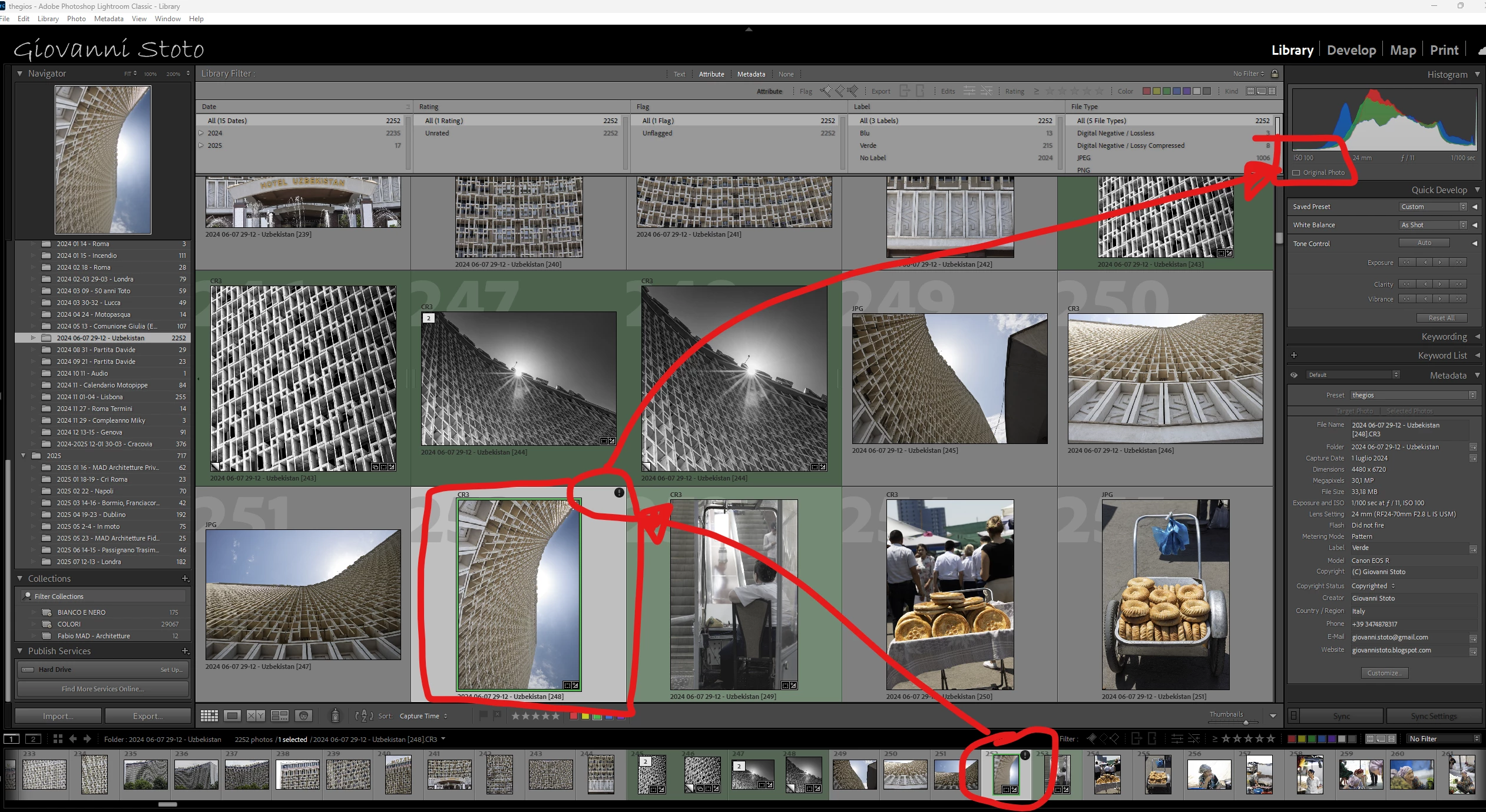
After previews generation process was completed (1h 30m for 29.000 files, 23.000 jpegs and 6.000 raws) I got an error: for 21 RAWs the preview could not be generated. Looking in the catalog at those files, I realised they have an exclamation mark on a dark circle: this is not the missing photo mark. If I click on the exclamation mark, I see error "Lightroom has encountered problems reading this photo, you are not allowed to edit this image. "

Yet, I can still enter develop module and edit the photos without any problem: the editing history is there, I can zoom in at 100% (generating the 1:1 preview), I can change sliders, export... Everything... (PS: I do not use smart previews).


The 21 problematic photos are in different folders and have different dates.
The files can be opened by any other program, including Fast raw Viewer.

For a couple of problematic photos, I tried deleting the photos from file explorer, and the square light missing photo question mark replaced the round dark question mark.
I restored the files from three sources:
1- the original file
2- a backup from a second HD
3- a backup from Amazon Photos


In all three cases above the black round exclamation mark came back: this should prove that it's not a problem of corrupted files, I instead believe it's an issue in LrC.
81 replies

Known Participant
August 26, 2025

Any news?

Known Participant
August 25, 2025

Any feedback here from Adobe?

Known Participant
August 24, 2025

Still waiting for a feedback from someone at Adobe 🤷🏻‍♂

Known Participant
August 23, 2025

Anyone here from Adobe?

Known Participant
August 22, 2025

Any expert human here who can take care of this annoying bug?

Bob321
Known Participant
August 22, 2025

Similar problem here since upgrade to Lightroom Classic version: 14.5 [ 202508061311-4cef2162 ]!

This very annoying problem seems to affect photos with "brush" masks, and only if the brush is used with "AutoMask ON".

After disabling the mask and restarting LRC, the photo is no longer in the  "Lightroom has encountered problems reading this photo" state.

This is definitely a bug relating to LRC version 14.5 or the corresponding Camera Raw version 17.5 [ 2318 ]!

Operating system: Windows 11 - Home Premium Edition Version: 11.0.26100

Please investigate and provide a fix quickly!

Known Participant
August 22, 2025

I.was 100% sure this was a big from day one, but you commen is a relief.


Luckily it's only a "fake warning" cos I can edit the photo without any problems, still...


Add that this upgrade is sluggish at UI level: even scrolling the right develop modules is horrible.

Known Participant
August 22, 2025

Can you please move this back to BUGS?
I am an IT MANAGER with 28 years experience and I have spent the whole mrning running tests, case by case, step by step, and I believe what I have found is indeed a bug of v14.5, considering that this was not a problem on previous version.
Thanks

Known Participant
August 22, 2025

Well... I found where the problem is, and still believe it's a LrC v14.5 bug.

Below the two problematic test images: by removing the brushes in the masks (one on top image, two on below image) the exclamation mark disappears.
Re-adding manually a similar brush in the same mask, the exclamation mark reappears.
If I completeky remove the whole mask and recreate it manually in the same way, the exclamation mark does not reappear.

Known Participant
August 22, 2025

OS: Windows 11
LrC VERSION: 14.5
NOTE: the problem below appeared only after upgrading to v14.5

21 RAWs (out of almost 30.000) have a round black exclamation mark: this is not the missing photo mark, which is square light.
If I click on the exclamation mark, I see error "Lightroom has encountered problems reading this photo, you are not allowed to edit this image".

Yet, I can still enter develop module and edit the photos without any problem: the editing history is there, I can zoom in at 100% (generating the 1:1 preview), I can change sliders, export... Everything...
PS: I do not use smart previews.


The 21 problematic photos are in different folders and have different dates.
The files can be opened by any other program, including Fast raw Viewer.

The files are not locked or protected.

The files are not in any synced folder: they are on a reliable professional and fast 4TB SSD that has been carefully re-tested without any issue.

For a couple of problematic photos, I tried the following:
- deleted the photos from file explorer

- the square light exclamation mark replaced the round dark exclamation mark
- restored the files from three differente sources:
 1- the original file
 2- a backup from a second HD
 3- a backup from Amazon Photos

- in all three cases above the black round exclamation mark came back


For both of the above photos I then run the following test:

- created a new folder
- copied there the two problematic pictures
- renamed them (just not to mess with file names)
- imported into catalog
- edited pictures
- no problem
- copied edits from original pictures

- pasted edits on newly imported pictures >>>> boooom! Exclamation mark appeared on newly imported pictures

- clicking on RESET for newly imported pictures did not immediately remove the exclamation mark

- played a bit with other pictures

- came back to newly imported pictures and exclamation mark was not there anylonger

The on one of the newly imported photo I run the following test:
- copied  and pasted edits one by one per group: the exclamation mark appeared only when I pasted masks 


[Double posts merged by moderator. Please do not double post!]

Known Participant
August 22, 2025

I doubled posts for two reasons

1. I cannot delete this one

2. I still believe this is a bug so wanted to remove from discussion and create it into bugs

Known Participant
August 22, 2025

I run this test:
- created a new folder
- copied there two of the problematic pictures
- renamed them (just not to mess with file names)
- imported into catalog
- edited pictures
- no problem
- copied edits from original pictures

- pasted edits on newly imported pictures >>>> boooom! Eclamation mark appeared on newly imported pictures

- clicking on RESET for newly imported pictures does not remove the exclamation mark

THERE IS OBVIOUSLY A BUG in new version of LrC

MassC
Legend
August 21, 2025

Hey @Giovanni Stoto, 

It looks like the file is missing, and you're editing the smart preview. If you move the photo outside of Lightroom Classic, it won't know where it is until you relink it. Try following the steps in this article:  https://adobe.ly/4mYtCfg

Let me know if that doesn't work. 


^CM

Known Participant
August 22, 2025

Have you properly read my comments?

First: this is not the file missing warning, which is square

Second: the file is there

Third: I don't use smart previews