
Known Participant
September 24, 2020

P: Video Import Error caused by MediaCore plugins

  • September 24, 2020
  • 18 replies
  • 770 views

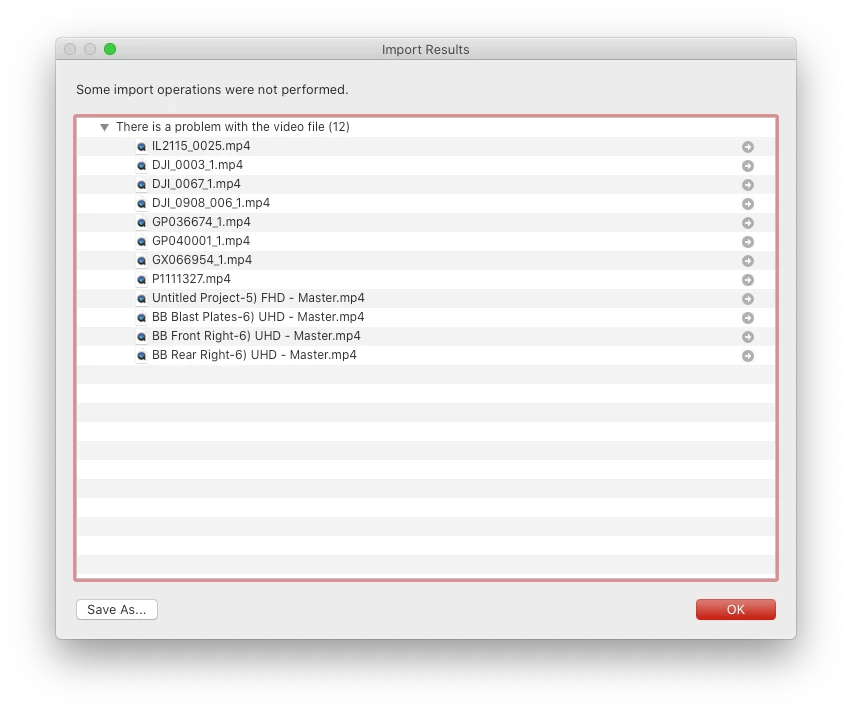
When I try to import video files into my catalog it tells me "There is a problem with the video file (12)".  There is no issue with my video files.  I removed a video that had previously been imported to my catalog with no issue and tried reimporting as a test and it would not import.  I received the same message.  I created a new catalog to test and same message and video would not import.  This is a recent issue as i have been able to import videos with no problems.  The issue is occurring on both my Mac Book Pro and my Mac Pro.


18 replies

Known Participant
September 28, 2020

I had an import video error before and that was related to a dynamiclink issue and had to do complete uninstall with the help of adobe support and that fixed the issue.  When i had that issue it told me in the import dialog that i had a dynamiclink error.  I am noticing that only one of the 2 dynamiclink processes is running in activity monitor link before when i had the dynamiclink error.  It is weird that both computers get the same error at the same time. 


Here is what my log file says:


Inspiring
September 26, 2020

I had the same issue, and after a few hours of investigation I found it was caused by MediaCore plugins crashing dynamiclinkmediaserver. I had the GoPro Reframe and Insta360Importer plugins installed in /Library/Application Support/Adobe/Common/Plug-ins/7.0/MediaCore.


Removing both plugins resolved the problem for me.

Log files I checked in the process:

~/Library/Logs/AdobeIPCBroker.log (indicated that dynamiclinkmediaserver was crashing)
~/Library/Application Support/Adobe/dynamiclinkmediaserver/13.0/Plugin Loading.log (indicated that third-party plugins were being loaded)


Running Lightroom Classic from the terminal also provides some helpful additional output that doesn't seem to be caught by any logging facilities.

Known Participant
September 25, 2020

On both computers im running


LrC 9.4

macOS 10.15.6 


None of the solutions provided have worked.

Adobe Employee
September 25, 2020

Michael, Please share your OS version, as well as Lightroom Classic version.


Did you try the troubleshooting steps from https://helpx.adobe.com/in/lightroom-classic/kb/troubleshoot-video-issues.html?


Rick Spaulding -
Legend
September 24, 2020

Darn...

I've posted this to our engineers for other ideas.

Known Participant
September 24, 2020

@Rick resetting the setting did not fix the issue

Rick Spaulding -
Legend
September 24, 2020

You might try resetting your preferences.


“Reset Procedure:

1. Close Lightroom.

2. Hold down [Alt/Opt]+[Shift] while restarting Lightroom.

3. Overwrite the Preferences when prompted by the dialog.

4. Close Lightroom.

5. Restart Lightroom.”


Let us know how that works.

gegjr
Inspiring
September 24, 2020
Show what I follow.
"In the End, we will remember not the words of our enemies, but the silence of our friends."~Martin Luther King, Jr.