

Todd Shaner
Legend
January 7, 2016

P: White Balance Eyedropper Tool No Longer Working Properly

  • January 7, 2016
  • 24 replies
  • 2633 views

The capability to use larger sample sizes with the White Balance Eyedropper tool was implemented in LR4:

http://feedback.photoshop.com/photosh...

This capability is no longer working properly in LR 5, 6, or CC 2015 and uses a fixed 5x5 pixel sample area regardless of 'Scale' or Zoom View settings. Please see the following test images for clarification. Tested with Windows 7 SP1.
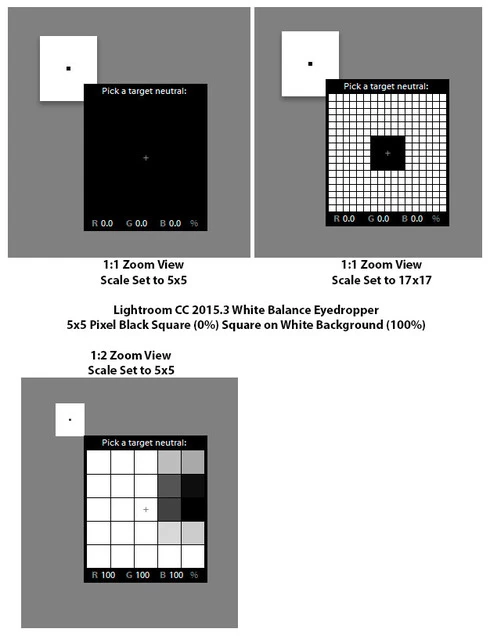
This topic has been closed for replies.

24 replies

Todd Shaner
Legend
July 19, 2017
Rikk, LR CC 2015.12 on my Windows 7 system behaves as described in my last reply above. The WB Eyedropper issue appears to be resolved, but the Histogram readings still use a fixed 5x5 sample area. This is the same sample area used by the mouse cursor. Not a big deal since the WB is set correctly using the Scale setting sample area. It would just make it less confusing if the Histogram readings also matched the Eyedropper tool's readings.
Rikk Flohr_Photography
Community Manager
July 19, 2017
Lightroom CC2015.12/6.12 was released today and should address this issue.  Please update your Lightroom to the latest version and let us know if you continue to see the issue. Thank you for your patience.

http://blogs.adobe.com/lightroomjournal/2017/07/lightroom-cc-2015-12-now-available.html
Rikk Flohr: Adobe Photography Org
Todd Shaner
Legend
June 30, 2017
Sorry for the delay–I've been on vacation with no access to a LR desktop. On my Windows 7 system the LR 6.12 Prerelease Update "fixes" the WB Eye dropper sample readings as follows:

1) The Eyedropper tool's RGB values  correctly show the "average value" for the selected sample size (5x5 through 17x17 Sample area) and NOT a fixed 5x5 sample reading. Good!

2) The Histogram RGB readings display the "average value" for a fixed 5x5 sample area. This is the same behavior as in LR 6.10. The Histogram's RGB values may differ from the Eyedropper tool's RGB readings .To avoid confusion it would be better if the Histogram displayed the same RGB readings as the WB Eyedropper.

3) The actual applied WB settings are correctly calculated using the Eyedropper Tool's sample area as selected in the Scale slider (5x5 through 17x17 selection). Good!

Todd Shaner
Legend
June 17, 2017
Yes, please sign me up.
Legend
June 16, 2017
Good morning. We'd like to invite you to our prerelease if you're interested in evaluating a fix for this issue. Let us know and we'll get you added.
Bob Somrak
Legend
September 20, 2016
Todd      Exactly what I am seeing.
M4 Pro Mac Mini. 48GB
Todd Shaner
Legend
September 20, 2016
Jeffrey, nothing seems to have changed in LR CC 2015.7. The WB Eyedropper tool's display and the Histogram RGB readings still show a fixed 5x5 sample area, but when the Eyedropper is actually clicked it applies the WB using the selected Scale sample area (5x5 up to 17x17). This behavior is identical to LR CC 2015.6.1.

LR CC 2015.7
5x5 82.4, 82.4, 82.4 square on 82.4, 82.4, 65.4 background with a 17x17 Scale WB Eydropper centered on 5x5 square. Note the readings are 82.4, 82.4, 82.4 and not the "average" of the 17x17 mixed sample area.
Bob Somrak
Legend
September 20, 2016
Jeffery,


What exactly was changed?  It appears to work the same a it did before.
M4 Pro Mac Mini. 48GB
Legend
September 20, 2016
ssprengel
Inspiring
August 11, 2016

The inconsistency between the WB sample area and the percentages-sample-area seems wrong to me.  But perhaps this is as designed, and an explanation can be found, in some internal documentation or developer's memories.

The worst thing to me would be that you can't tell the sample area is 5x5 and it is easy to assume it is the full WB-sample area or the single central pixel.

Are the percentages there to show us how off the WB is before clicking, or only there to verify it's been neutralized after clicking?

Is there some uneven weighting of the pixels in the full WB-sample area giving priority to the central area or are the WB-source numbers a straight average.  If there is central weighting and the 5x5 is the main contribution then maybe it's less not ok that the 5x5 area is what the percentages are based on but still the inconsistency is bothersome.