

Todd Shaner
Legend
January 7, 2016

P: White Balance Eyedropper Tool No Longer Working Properly

  • January 7, 2016
  • 24 replies
  • 2633 views

The capability to use larger sample sizes with the White Balance Eyedropper tool was implemented in LR4:

http://feedback.photoshop.com/photosh...

This capability is no longer working properly in LR 5, 6, or CC 2015 and uses a fixed 5x5 pixel sample area regardless of 'Scale' or Zoom View settings. Please see the following test images for clarification. Tested with Windows 7 SP1.
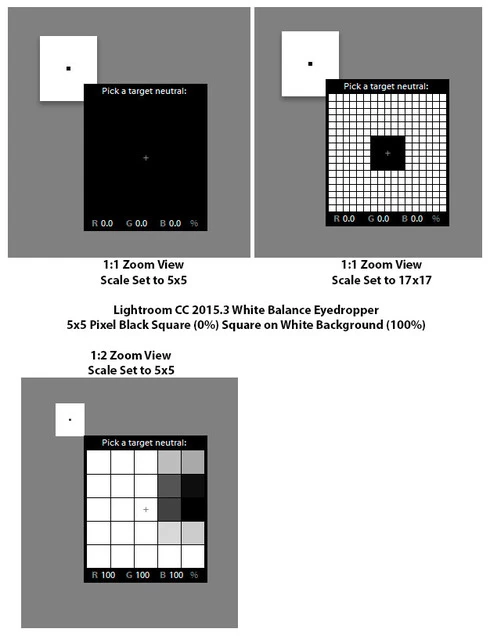
This topic has been closed for replies.

24 replies

Rikk Flohr_Photography
Community Manager
August 11, 2016
So, if I understand correctly, aside from the incorrect RGB values shown (for which a bug is filed). The issue is that the WB Loupe, while applying the white balance as-expected, based upon the scale slider setting, is not modifying the percentages shown in the WB loupe?  This makes it more difficult to choose the area to click upon?

On the Mac OS (El Capitan) this behavior is still the same as it was in LR 4.4. It appears that this behavior has not changed. If you can demonstrate otherwise, I would need your OS version and the Lightroom version where the Loupe tool is using the greater than 5x5 area for calculating percentages so I can verify. Can either of you provide that? If we can show it is a regression in behavior, I can file it as a bug. Otherwise, we are looking at making more of a feature request to get the changes implemented. 
Rikk Flohr: Adobe Photography Org
Rikk Flohr_Photography
Community Manager
August 11, 2016
It sounds like you might want to request the "change in the sampling size area" as a new Idea. 
Rikk Flohr: Adobe Photography Org
Todd Shaner
Legend
August 10, 2016
I agree. The WB correction applied to the Temp and Tint settings is correct and uses the the actual Scale setting area and not a fixed 5x5 area. Only the RGB numbers displayed in the eyedropper tool are calculated using a fixed 5x5 area. The displayed value should be calculated using all of the area selected by the Scale setting to avoid confusion.
ssprengel
Inspiring
August 10, 2016
Exactly.
ssprengel
Inspiring
August 10, 2016
Exactly.
Bob Somrak
Legend
August 10, 2016
Thanks Steve

I just posted similar results a few seconds ago and concur with your findings on what area the WB tool is using to set the WB when you click.  This may not be considered a bug but it is an unintuitive design.
M4 Pro Mac Mini. 48GB
Bob Somrak
Legend
August 10, 2016
  Rikk Flohr wrote "The active white balance sample area is limited to a 5x5 grid.  The loupe was modified to show greater detail but does not affect sampled pixel area size."

I agree the sample area for the number display "in the tool" is a 5x5 grid no matter what size the grid is  but the WB set when you click is set from the 17X17 (or other) size grid.  You can easily test this by setting the tool to 5x5 and set the WB, do a CTRL-Z and then set the tool to 17x17 and set the WB.  (the tool is NOT moved}.  The WB numbers for the two sizes in the Develop Panel will be different if your sample area has a lot of changes. 
If this is by design it is very unintuitive.  Beings Lr is reading the pixels from the larger tool to set the WB it should be easy to reflect this is the numbers the WB tool is displaying when the size is changed.  
M4 Pro Mac Mini. 48GB
ssprengel
Inspiring
August 10, 2016

My testing contradicts your first point about the WB sample area always being a 5x5 grid.

The PERCENTAGES are always computed from the 5x5 grid.

The WHITEBALANCE is computed from the full grid whatever it is set to.

This is demonstrated by test images over on what turned out to be a hijacked thread about something else so the discussion continued over here on the feedback forum:

https://forums.adobe.com/thread/2053829

You can clearly see the sampled WB is warmer with the 5x5 and cooler with the 17x17 because the larger sample area includes some yellow.

Do you have any demonstration images to show your conclusion?  It's possible it works differently in different computers.

Rikk Flohr_Photography
Community Manager
August 10, 2016
I tested a variety of scenarios using both Lightroom 4.4 and Lightroom CC2015.6.1. This is what I can report. 

Re. 5x5 Area for sampling: behavior hasn't changed on my system between Lightroom version 4.4 and CC2015.6.1.  The active white balance sample area for percentages shown is limited to a 5x5 grid.  The loupe was modified to show greater detail but does not affect sampled pixel percentage area size.

Re. Correct White Balance: Both Lightroom 4.4 and Lightroom CC2015.6.1 appear to be setting the WB sliders to the correct value.

Re. Incorrect RGB values shown: There is a difference in the RGB values shown for Lightroom 4.4 and Lightroom CC 2015.6.1.  A bug has been filed for this.
Rikk Flohr: Adobe Photography Org
Todd Shaner
Legend
August 10, 2016
"So the result is a 5x5 average for the % both under the WB dropper area and under the histogram." Yes.

"But the WB is still dependent on the full area, right?" Yes.

What's ironic is that viewing my original posted screenshots it appears the central pixel RGB value is what's being displayed....just as you stated at the LR forum post. That was with LR CC 2015.3. I can't duplicate this behavior with LR CC 2015.6.1. So is this a bug or an engineering change implemented after LR CC 2015.3 (6.3)?

In my opinion a single pixel reading has no practical value as I stated in my original request here: https://feedback.photoshop.com/photoshop_family/topics/white_balance_eyedropper_tool_option

The WB eyedropper RGB values are useful when measuring different areas of an image for WB consistency or even for color matching portraits and product shots. Knowing "exactly" what area is actually being measured (i.e. averaged) is important. All that needs to be done to fix this is to display the averaged RGB value for the Scale setting being used.