

Todd Shaner
Legend
January 7, 2016

P: White Balance Eyedropper Tool No Longer Working Properly

  • January 7, 2016
  • 24 replies
  • 2633 views

The capability to use larger sample sizes with the White Balance Eyedropper tool was implemented in LR4:

http://feedback.photoshop.com/photosh...

This capability is no longer working properly in LR 5, 6, or CC 2015 and uses a fixed 5x5 pixel sample area regardless of 'Scale' or Zoom View settings. Please see the following test images for clarification. Tested with Windows 7 SP1.
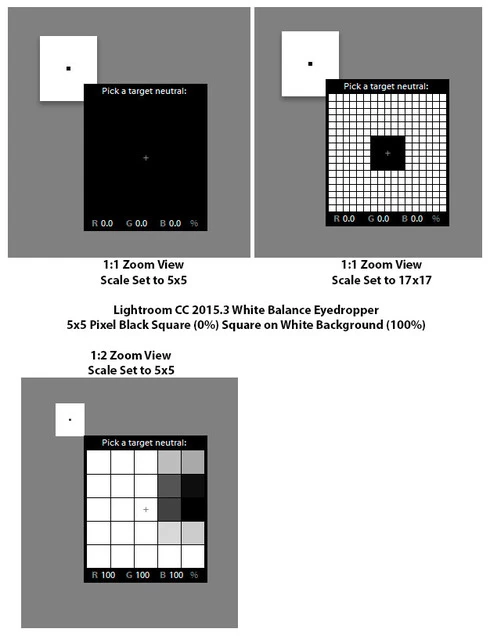
This topic has been closed for replies.

24 replies

ssprengel
Inspiring
August 9, 2016

Ok, you're right, the calculations from the above illustration would be:

So the result is a 5x5 average for the % both under the WB dropper area and under the histogram.

But the WB is still dependent on the full area, right?

And in the lower drawing in the first message, where it appears to be the central pixel is the value of the percentages, it is really that the zoom level of 1:2 is complicating things although it's unclear whether the zooming out is causing the eyedropper do use the non-zoomed pixels a couple out from the black so is in an all white 5x5 area at the original 1:1 zoom or something else, like using the central pixel is happening.

Todd Shaner
Legend
August 9, 2016
That is what I'm seeing as well. The eyedropper tool RGB display values are calculated using a central fixed 5x5 pixel area regardless of the Scale setting, which extends to 17x17 pixels.

Here's another example that better illustrates the issue, with the WB eyedropper is set to maximum (17x17 pixels). The central cross-hair is placed on the corner of a 5x5 pixel black square (0, 0, 0 RGB) with a white background (100,100,100).

If the display reads only a single pixel then it should display 0,0,0.

If it is averaging over a 17x17 area then it should display (17x17) - (5x5) / (17x17) = 91.4, 91.4, 91.4.
Bob Somrak
Legend
August 9, 2016
Continuing our discussion from the above forum link, Steve indicated that the white balance tool only displays the value for ONE pixel where the eyedropper is at.  I created a photoshop white square with a single black pixel to test.  The wb tool displays the values for a 5X5 sample and not just a single pixel.  Unfortunately it also displays the 5X5 sample if the tool is set for 17x17.  At least is uses the 17x17 sample for setting the WB when it is clicked.  This should be considered a bug or at least a bad design.
M4 Pro Mac Mini. 48GB
Todd Shaner
Legend
August 9, 2016
UPDATE: It appears only the RGB values displayed in the eyedropper tool are incorrect. The applied WB correction uses the actual Scale setting sample area. See this post: https://forums.adobe.com/message/8929708#8929708

It still can cause confusion and should be corrected to show averaged RGB values for the actual Scale setting sample area.