

valentinozegna
Known Participant
April 15, 2020

P: Will not remove Radial/Gradient filters when a preset with no Radial/Gradient filters is chosen

  • April 15, 2020
  • 20 replies
  • 932 views

This bug started happening to me probably after the latest 9.2 update. 

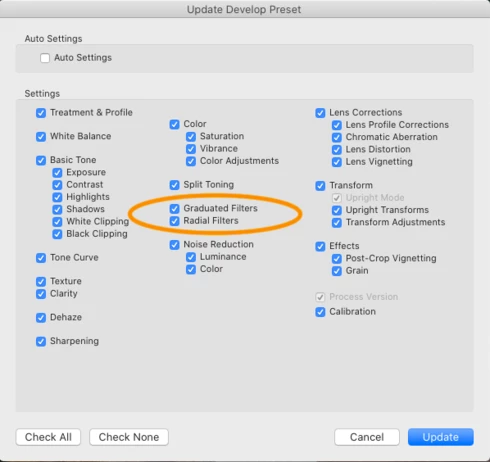
1) Prepare a flat preset, with all parameters set to their neutral position, and no local adjustments. Let's call this preset "Rawest". Make sure everything is selected when you save it, especially the "Graduated Filters" and "Radial Filters" options. Now, this preset is supposed to restore everything to flat and remove any Gradient and Radial filters when selected.


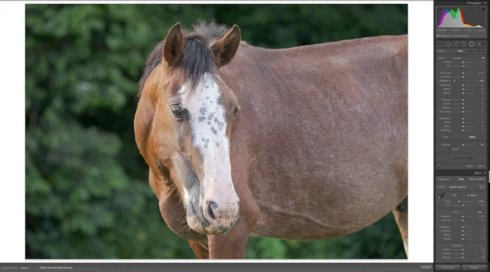
2) Pick a photo, and select the Rawest preset. As you can see, no local adjustments are present and everything is flat.


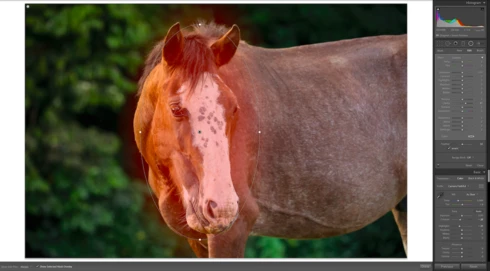
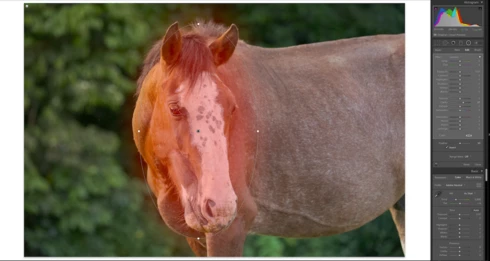
3) Edit the photo and add some Gradient/Radial Filters. Here I added 2 Radial Filters, one on the top-left corner, and one on the face of the horse.


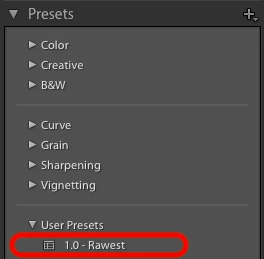
4) Now select the "Rawest" preset that you created in the beginning.


5) Look at the Radial Filters: they have not been removed. Parameters in various panels have returned to their neutral position as expected, but every the Radial Filters are still there. This was not happening in previous versions of Lightroom. This also happen with Gradient Filters as well.


System Info

MacOS Catalina 10.15.4

Model Name: MacBook Pro

Model Identifier: MacBookPro11,5

Processor Name: Quad-Core Intel Core i7

Processor Speed: 2.5 GHz

Number of Processors: 1

Total Number of Cores: 4

L2 Cache (per Core): 256 KB

L3 Cache: 6 MB

Hyper-Threading Technology: Enabled

Memory: 16 GB

Boot ROM Version: 197.0.0.0.0

SMC Version (system): 2.30f2

This topic has been closed for replies.

20 replies

Bob Somrak
Legend
June 18, 2020
Thanks Victoria.  This will solve Valentino's issue if he is still following this thread.  Unfortunately just disabling the creation of empty Grad and Radial filters is not what all commenters of the thread wanted but it eliminates the confusion. 
M4 Pro Mac Mini. 48GB
Victoria Bampton LR Queen
Community Expert
Community Expert
June 18, 2020
Yes it does, I did test it
Victoria - The Lightroom Queen
Todd Shaner
Legend
June 17, 2020
How is this a solution? All of the other settings in a Develop preset can be reset to 0 or removed. Why not Radial and Graduated Filters? Also Sync Settings and Copy & Paste Settings supports all of the Local Adjustments. Surely there's a way to implement this in a Develop preset with some additional coding......or is there something I'm overlooking?
johnrellis
Legend
June 16, 2020
It sure looks that way.
Bob Somrak
Legend
June 16, 2020
I see.  Adobe Default is essentially a one setting preset.  I wonder if you would add crs:Baseline="Adobe Default" to the Zeroed preset if you would have a new preset that would eliminate the two steps. For me its not worth the time to test.
M4 Pro Mac Mini. 48GB
johnrellis
Legend
June 16, 2020
Interesting. The new Defaults presets use a new tag in their .xmp files:

crs:Baseline="Adobe Default"
crs:Baseline="Camera Settings"


Bob Somrak
Legend
June 16, 2020
Lightroom 9.3 has two built in presets that will work for this. I am not sure about Zeroed but Adobe Defaults is new in LR

Adobe Defaults. -  This is like the old Reset(Adobe) which appears to reset everything back to the "Adobe Defaults", not the Default you set in import.  This preset resets the Local Brush, Radial etc.

Zeroed.  -   This Zeros all the slider values.

If you use them both on a photo, the photo is reset to NO edits.   Its a 2 step process but how many times would you need this.
M4 Pro Mac Mini. 48GB
johnrellis
Legend
June 16, 2020
I see that LR 9.3 now prevents you from creating a preset with Graduated Filters or Radial Filters checked unless there is at least one graduated or radial filter applied to the photo:


While this will prevent the confusion experienced by Valentino, I don't think it was the solution he was hoping for (creating a preset that clears graudated and radial filters).  

Rikk Flohr_Photography
Community Manager
June 16, 2020
Version 9.3, an update to Lightroom Classic, went live on June 15, 2020 and contains a fix for this issue. Please install the update and respond back if it does not cure the issue for you. Thank you for your patience!
Rikk Flohr: Adobe Photography Org
Rikk Flohr_Photography
Community Manager
May 14, 2020
This thread will be updated when there is information publicly available. 
Rikk Flohr: Adobe Photography Org