
valentinozegna
Known Participant
April 15, 2020

P: Will not remove Radial/Gradient filters when a preset with no Radial/Gradient filters is chosen

  • April 15, 2020
  • 20 replies
  • 932 views

This bug started happening to me probably after the latest 9.2 update. 

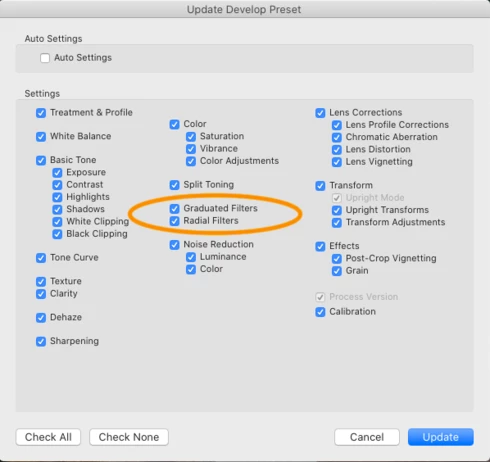
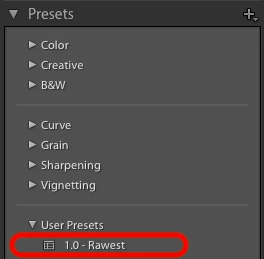
1) Prepare a flat preset, with all parameters set to their neutral position, and no local adjustments. Let's call this preset "Rawest". Make sure everything is selected when you save it, especially the "Graduated Filters" and "Radial Filters" options. Now, this preset is supposed to restore everything to flat and remove any Gradient and Radial filters when selected.


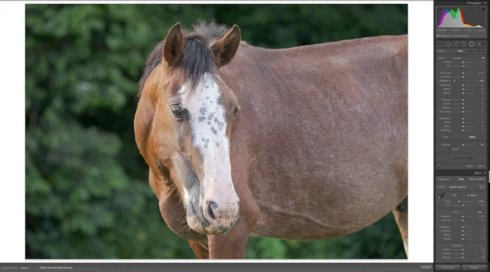
2) Pick a photo, and select the Rawest preset. As you can see, no local adjustments are present and everything is flat.


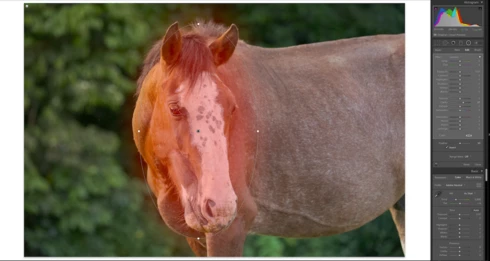
3) Edit the photo and add some Gradient/Radial Filters. Here I added 2 Radial Filters, one on the top-left corner, and one on the face of the horse.
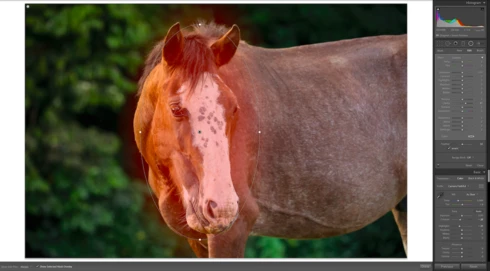


4) Now select the "Rawest" preset that you created in the beginning.


5) Look at the Radial Filters: they have not been removed. Parameters in various panels have returned to their neutral position as expected, but every the Radial Filters are still there. This was not happening in previous versions of Lightroom. This also happen with Gradient Filters as well.


System Info

MacOS Catalina 10.15.4

Model Name: MacBook Pro

Model Identifier: MacBookPro11,5

Processor Name: Quad-Core Intel Core i7

Processor Speed: 2.5 GHz

Number of Processors: 1

Total Number of Cores: 4

L2 Cache (per Core): 256 KB

L3 Cache: 6 MB

Hyper-Threading Technology: Enabled

Memory: 16 GB

Boot ROM Version: 197.0.0.0.0

SMC Version (system): 2.30f2

This topic has been closed for replies.

20 replies

valentinozegna
Known Participant
May 14, 2020
Thank you Rikk. Is there any update on this?
Rikk Flohr_Photography
Community Manager
April 17, 2020
A note on this thread: We currently have an issue open that will prevent customers from creating a default edit containing an empty local adjustment.  This thread will be updated when that change goes in to production. 
Rikk Flohr: Adobe Photography Org
valentinozegna
Known Participant
April 17, 2020
Thank you Paul, that is helpful. I must be blind, I completely overlooked the huge "Reset" button on the right hand panel 🙂 

It makes sense, for now I can workaround by hitting Reset and then selecting whatever preset I need. I still believe they should fix this Gradient/Radial filter bug.
Participating Frequently
April 17, 2020
Valentino

In the Develop Module the Reset button is at the bottom right of the right hand panel. Also while you are in the Develop Module, the keyboard shortcut, Shift-Command-R resets all settings as does the menu option: Settings - Reset All Settings.

Given that your objective to have a preset do all that you want is currently not possible, my suggestion would be a two-step approach, Reset followed by the preset that does all the other things you want.
valentinozegna
Known Participant
April 17, 2020
This seems to work, but I think we all agree that it's a pretty ugly hack, prone to mistakes, and that Lightroom developers should fix this bug, because the fact that a radial filter is stored in the preset and the absence of radial filters is not stored, it's simply bad design. If I create a preset that has no radial filters, I mean it, and I want that preset to have no radial filters.
valentinozegna
Known Participant
April 17, 2020
So I tried the Reset function (Shift+Command+R on Mac). Yes, it resets the picture, but it has drawbacks:
1) Either you remember the shortcut, or you have to go to the Library module and click on Photo -> Develop Settings -> Reset. I don't see any way of doing it from the Develop module without using a shortcut.
2) What if in my Rawest preset, instead of wanting everything flat I want everything flat but let's say, Saturation +20? I want this preset to default to all flat and Sat+20, and I want it to remove any Gradient/Radial filter.

I honestly don't think my ask is unreasonable. There is a reason why Lightroom asks you which parameters you want to update when saving a preset, and that is to control what the preset can touch. If I don't want the preset to touch Filters, I will uncheck them when saving the preset. Otherwise, if I check them, I want the preset to store whatever filters I saved, even "no filter present". Does that make sense?
JohanElzenga
Community Expert
Community Expert
April 16, 2020
The Reset button resets the image to the camera default settings, not to all zero. I would not expect anyone to have a graduated or radial filter in their camera defaults, but if they do, that button will not reset these filters.
-- Johan W. Elzenga
Participating Frequently
April 16, 2020
What is the difference between a preset that is setup to "restore everything to flat" and clicking Reset?

Reset will definitely remove all local adjustments, remove any cropping and transformations and restore all sliders to their default (neutral?) positions.

I am obviously missing the intent of your "Rawest" preset.
Inspiring
April 15, 2020
Thanks for both the post and the reply.

This both explains a stubborn graduated filter and gives a workaround. 
johnrellis
Legend
April 15, 2020
This bug also exists in LR 5. A hacky workaround:

Add a single, very small radial filter to a photo that's outside the upper-left corner of the image, e.g.

Untitledpng

Don't change any of the sliders for the filter.  Save it as part of your "Zero" preset.


Applying that preset will clear any other radial filters, and the dummy one added by the preset won't have any effect on the image.