

johnrellis
Legend
February 12, 2025

P: Win LR doesn't correctly open catalogs exported by Mac LR if the folders contain non-ASCII chars

  • February 12, 2025
  • 3 replies
  • 527 views

Windows LR doesn't correctly open a catalog folder exported with Mac LR with File > Export As Catalog, Export Negative Files, if the Mac catalog folder contains subfolders with non-ASCII characters (e.g. á or é).


To reproduce on LR 14.2 / Mac OS 15.2, Windows 11:


1. Download this .zip file containing a catalog and photos to your Mac desktop:

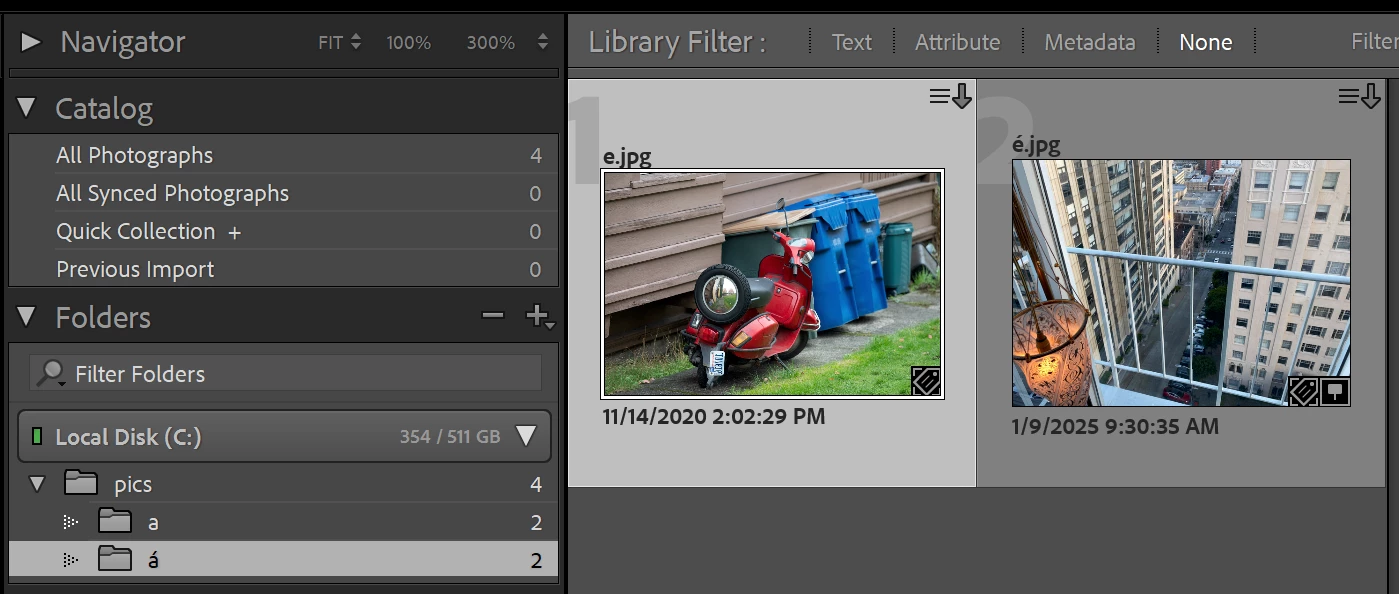
https://www.dropbox.com/scl/fi/stbx8iyfekqk9xkuri3fi/accents.2025-02-14.zip?rlkey=xt283tc32rjarroeu4bz90jlh&dl=0


It contains a catalog created with Mac LR by doing FIle > Export As Catalog, Export Negative Files.


2. Unzip and open that catalog in Mac LR. Observe that it contains four photos in two folders and none of the folders or photos are marked missing:
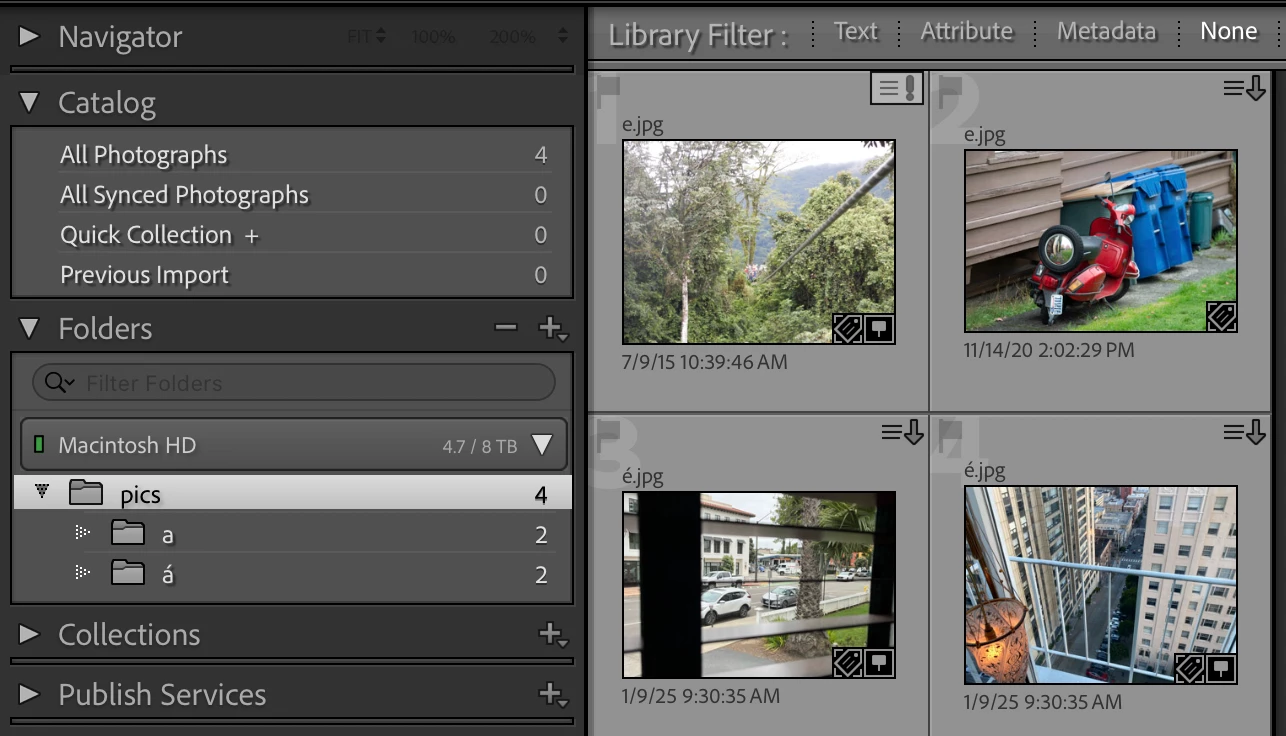
 

2. Download the .zip file to your Windows desktop.


3. Unzip the .zip using these exact commands:


cd Desktop
tar xfzv accents.2025-02-14.zip


Do not use the Windows ZIP built-in to File Explorer. It still doesn't correctly handle paths containing UTF-8 characters (hey, it's only 2025).


4. In Windows File Explorer, verify that the extracted catalog folder "accents" has this structure, the same as in the original catalog folder on Mac:


accents
    accents.lrcat
    pics
        a
            e.jpg
            é.jpg
        á
            e.jpg
            é.jpg


5. Open the "accents" catalog.


6. Click on All Photographs and observe that all four photos and the three folders are marked as missing (incorrect):
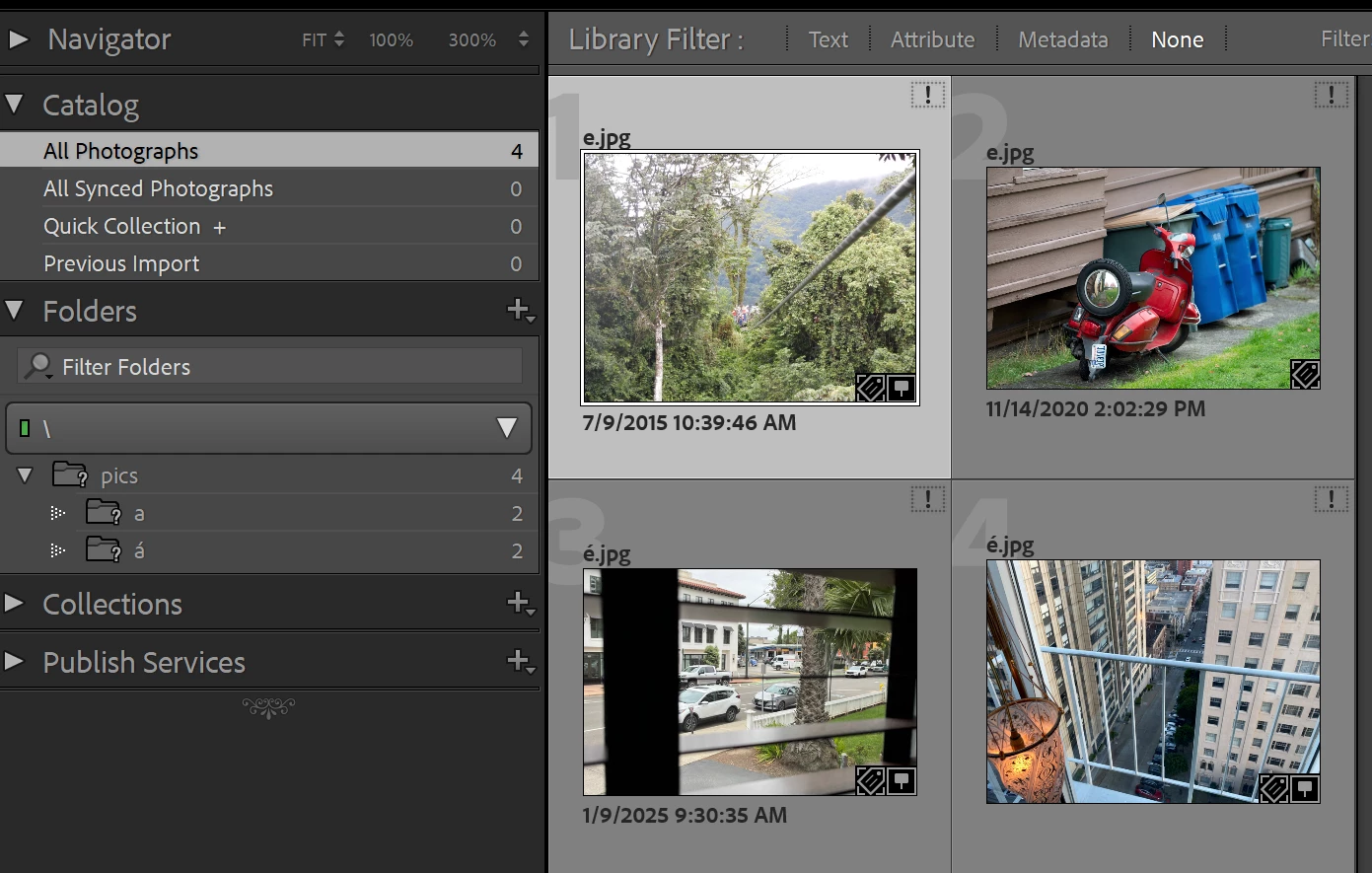
 

7. In the Folders panel, click on "pics" and observe that "pics" and "a" are no longer marked as missing, while three of the photos are missing and one is not (all incorrect):
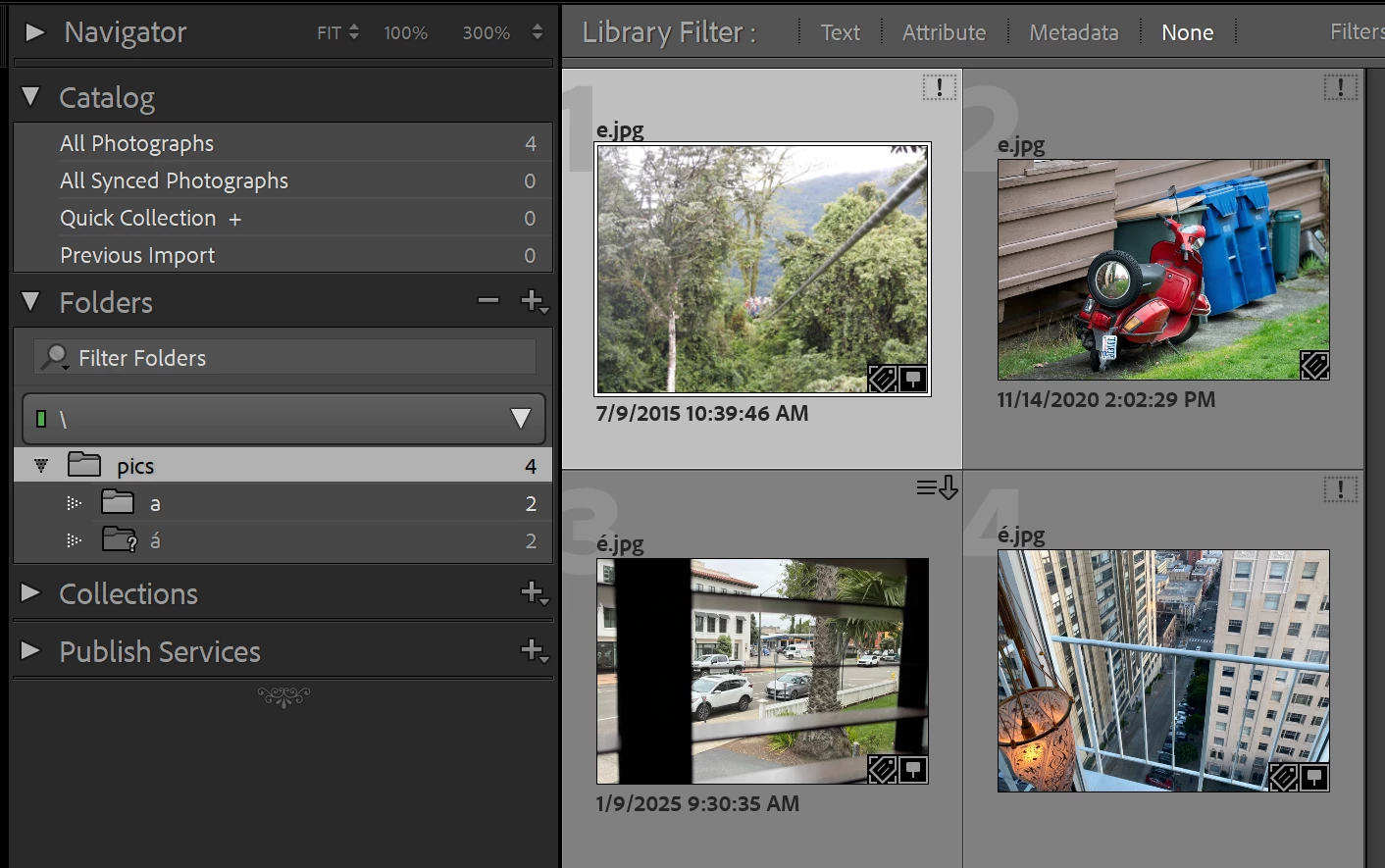
 

8. Click on All Photographs, and observe that "pics" and "a" are marked as missing again. You may have to adjust the thumbnail size larger or smaller a few times until that happens. The erratic behavior here clearly shows LR is confused.


9. Right-click on "pics" and do Find Missing Folder. Navigate to Desktop\accents\pics. Observe that "pics" and "a" are no longer marked missing (correct) but "á" is still marked missing (incorrect). Observe that the photos in "a" are no longer missing (correct):
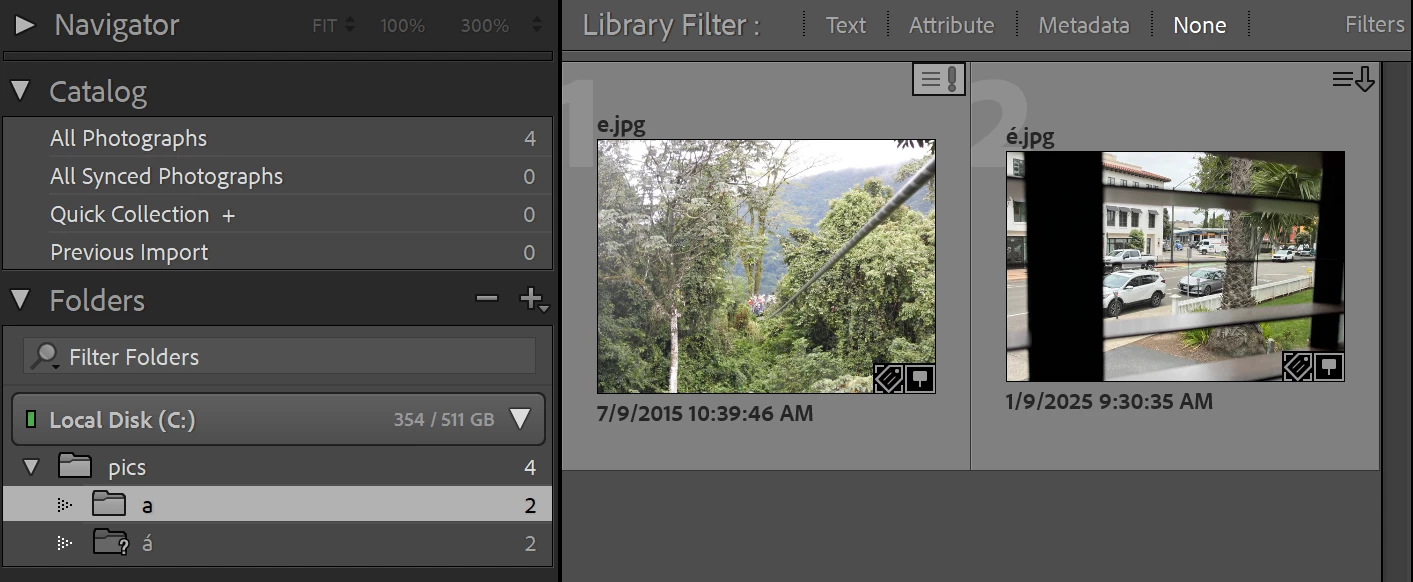
 

10. Right-click on "á" and do Find Missing Folder. Navigate to Desktop\accents\pics\á. Observe that "á" and its two photos are no longer marked missing (correct):


3 replies

Participating Frequently
February 8, 2026

Hi, I’ll have to use LR on my windows laptop for the next few weeks so I tried opening my mac catalog on windows and the bug is still there, I have dozens of missing folders to relocate.

So I’ll have to do them one by one again, but I hope the priority for this can be raised in order to be fixed soon, as it’s really annoying...

I see there is a “Needs More Info” tag at the top of this page, I’m not sure what more is needed since I gave all the steps and ​@johnrellis provided a zip file ?

For information, my original mac catalog was 14.1.1, and I had the latest LR 15.1.1 on windows, so I upgraded the catalog along the way.


Thanks !

johnrellis
Legend
February 8, 2026

[This post contains formatting and embedded images that don't appear in email. View the post in your Web browser.] 


@seb.lebreton I see there is a “Needs More Info” tag at the top of this page, I’m not sure what more is needed


At this point, if the developers need more information, they will get back to us.

Rikk Flohr_Photography
Community Manager
Community Manager
February 15, 2025

Thanks @johnrellis 
I've cross-referenced with the previous bug and alerted the team. 

Rikk Flohr: Adobe Photography Org
johnrellis
Legend
February 15, 2025

@Rikk Flohr: Photography, there's a related acknowledged bug for going the other direction, exporting from Windows to Mac:

https://community.adobe.com/t5/lightroom-classic-bugs/p-mac-catalogs-exported-by-win-when-source-folders-have-non-ascii-characters/idc-p/15149427


in case you want to merge this bug report into that and change the subject line.

Participating Frequently
February 12, 2025

I saw this first a few months ago with LR13 and it is still reproducible with LR 14.1.1.


Steps to reproduce:


1) create a catalog on mac, and place it at the same level as a folder for picture files. In this folder, create subfolders with or without accentuated characters (e.g. 'é', 'à', 'è') and add some picture files (with or withour accentuated characters). Import the main pictures folder in the LR catalog.

2) copy the catalog, associated LR files and the main pictures folder on a usb drive and open it on windows, with the same LR version


Expected result:

All the files and folders are successfully found since they are at the same level as the catalog file


Actual result:

Only the files and folders without accentuated characters are found.

The folders with accentuated characters have a "?" and corresponding images have a "!" icon

With a right click > "Find missing folder..." I can simply select the folder on my usb drive and it will "reconnect" it without having to rename it, but I have to do it manually for each folder or file missing.


Notes:

- Quitting the catalog, reopening it on my Mac, making changes (so that the catalog is saved again), and going back to windows doesn't break the connections I have previously restored.

- Creating a folder on windows with similar characters opens up fine on Mac

- I mentioned 'é', 'à', 'è' as the main characters I used, I haven't tried everything else but I suspect ç ù and maybe some special characters such as œ could trigger the same bug ?


For me this bug is problematic, as I'm working on a mac computer at home, but I have a windows laptop for my trips, so I have to fix it regularly for all the new folders I've created since the last trip.

Participating Frequently
February 14, 2025

I think I posted this in Bugs, but I see it is in Discussion, so maybe I messed up, or somebody moved it here ?

Either way, I'm pretty sure this is a bug, so can it be moved it (back) to Bugs ?