Arnold-Norway
Inspiring
May 20, 2015

P: Wrong numbering when using Export JPEG Slideshow from Slideshow

  • May 20, 2015
  • 45 replies
  • 1082 views

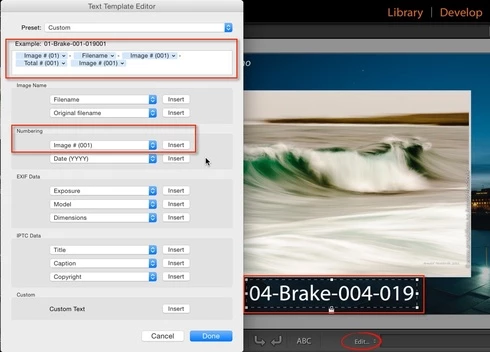
In the Slideshow module, I select Add Text Overlay from the Slideshow menu. Underneath the photo, I select Edit to customize the text overlay. I add theese fields: Image # (01)-Filename-Image # (001)-Total # (001).

The Text Overlay is correct on screen, but when I export the Slideshow from the menu Slideshow, Export JPEG Slideshow, all fields show the same data - total numbers of photos in the slideshow.

This topic has been closed for replies.

45 replies

Participant
August 25, 2015


With LR CC I have found that when creating a JPEG slideshow with Caption and Title from the metatdata used as text overlays, the overlay only uses the last image information for all the slides. To say it another way, all the slides have the same text as the last slide. The overlay worked fine in LR5. I use JPEG slideshows quite a lot, so this bug is debilitating.
Mithrandir_tf
Participant
August 23, 2015
Hi,

experiencuing the same issue on Win-7 and Adobe Lightroom 6.1 (standalone non-cloud version). As mentioned this kills the functionality of the slideshow module. Please fix asap. Lr 6.0 is the worst and most buggy Lr version ever.

Thomas F.
Participant
August 18, 2015
I was actually the second that posted a reply to this topic but its deleted..
Participant
August 18, 2015
LOL. I had an conversation with an Adobe employee who told me that this issue was going to be fixet with the next update, which was this?, i assume. But still nothing happened? So strange that Adobe even cant handle this tiny problem... So unsatisfied with their customerservice. Her is the copy of the transscript of the chat:
Known Participant
August 18, 2015
Still no fix. This pretty much kills the functionality of the Slideshow tool. Can't be important then
andrewc16073392
Participant
August 5, 2015
I have had the same problem; I last used the JPEG slideshow export facility without this issue on 12 January 2015, and it has persisted with LightRoom CC updates since then. Hopefully that information will help Adobe Engineering team find the problem.

I have reset Export, Auto Layout and Text Templates without managing to cure the problem.

Many hours waste. My thanks to Arnold for reporting the bug.
Legend
August 4, 2015
The engineering team is looking into this. Thanks.
Inspiring
August 4, 2015
This problem is a royal pain. I use the caption field to annotate exported jpegs of travel photos. I share these with family and friends. It worked in release 5 and stopped working in CC (6). The obvious work around is to go back to R5, however does anyone have a way to work around it in CC?
Inspiring
July 28, 2015


Lightroom 6: When exporting JPGs from slideshow with sequence numbers exports all with the final number of however many photos you are exporting. If there are 10 photos, it will show 10/10 on all of the photos. Same if you choose file names. It will show the last file name on all the photos instead of the correct filename.
johnrellis
Legend
July 15, 2015
Adobe says they read every post in this forum (which they treat as the official place to provide feedback), and over the years, it does seem that they do read much or most of the posts. But they don't reply to most posts.