Arnold-Norway
Inspiring
May 20, 2015

P: Wrong numbering when using Export JPEG Slideshow from Slideshow

  • May 20, 2015
  • 45 replies
  • 1082 views

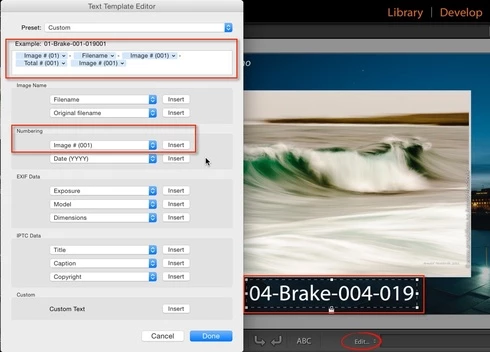
In the Slideshow module, I select Add Text Overlay from the Slideshow menu. Underneath the photo, I select Edit to customize the text overlay. I add theese fields: Image # (01)-Filename-Image # (001)-Total # (001).

The Text Overlay is correct on screen, but when I export the Slideshow from the menu Slideshow, Export JPEG Slideshow, all fields show the same data - total numbers of photos in the slideshow.

This topic has been closed for replies.

45 replies

Participant
July 15, 2015
Yea, annoying. Though, my current workaround is export as PDF (this works). Then convert PDF to individual JPGs. On the Mac, I use Automator (https://discussions.apple.com/thread/...).
Participant
July 15, 2015
Does this thread actually get monitored by Adobe staff? First time I have posted here (24 days ago) and nothing...no acknowledgment..no feedback from Adobe...

I worked around my issue last time by singly filtering to a single photo and exporting it to jpeg. This time I have 300+ photos to export, I'm not doing this one at a time.

I post my photos on a private share using the photo number as the order number for fund raising for my son's swimming club. This facility has always been the easiest way to get non-technical people to find the order number rather than them try and find the last 4 digits on a file name
Inspiring
June 30, 2015
Same issue on my Mac. Lightroom 6.1., Mac OS 10.10.3
PDF saves ok; JPEG Export dosen ́t work - same text-overlay on each slide.
Very frustating!

Adobe, please fix it immediately!
Inspiring
June 28, 2015
Precisely the same problem. Caption from last slide is on all slides see https://forums.adobe.com/message/7699... where I posted on this issue with more details.

I spent the whole of my Sunday from 8am until 1am in the morning (that is 17 hours on my weekend) adding meaningful captions to 688 photos to create a slideshow and the time has been completely wasted.

Please, please fix this bug quickly Adobe
Participant
June 22, 2015
I have the same issue as reported, though at one point yesterday it did work. However, no matter how I retrace my steps its not working now.
Participant
June 20, 2015
Same issue on Mac. Lightroom 2015.1. Annoying. PDF saves ok, JPEG Export, same text on each slide.
Inspiring
June 19, 2015
I have exactly the same issue.
Any news as to if/when it's being resolved?
Inspiring
June 17, 2015
Hi,

> I think ver 5.7.1 should be made available on cloud

You can download the installation executable from their FTP server:

ftp://ftp.adobe.com/pub/adobe/lightroom/win/5.x/Lightroom_5_LS11_win_5_7_1.exe

or

ftp://ftp.adobe.com/pub/adobe/lightroom/mac/5.x/Lightroom_5_LS11_mac_5_7_1.dmg
--Patrick
Participant
June 17, 2015
It's a real pain in the posterior. I had done a lot of work to the upgraded catalogue, which you can't use in 5.7.1, am presently sorting out hundreds of photos taken at an agricultural show. So, I am working on my computer in version 6.1, exporting the photos as plain jpgs onto an online drive (I put the files on an online drive anyway, for the show organiser to access for the websites, etc), accessing them on my laptop and exporting the slides using ver 5.7.1, as you can't use both versions on one computer at the same time. I think ver 5.7.1 should be made available on cloud since they have so mucked up the current version. I am still receiving error messages when carrying out a plain export, saying it can't access cr2 files too. Rather disappointed with adobe!
Inspiring
June 16, 2015
Not fixed in 6.1. Are you surprised?
--Patrick