


Crystal Visionary
Known Participant
November 9, 2017

P: Zooming very large images shows grey box

  • November 9, 2017
  • 49 replies
  • 2160 views

I am using lightroom Classic CC 7.0.1 and Camera Raw 10.0. Is there a limit to how large a file can be and still be able to create a 1:1 preview?  I have a 16 bit TIFF that is 26246 x 2899 pixels.  When I try to view it at 1:1 or any other size except "Fit" in the Library module, it refuses to draw (Fill works so long as I don't try 1:1 first).  I just see a grey box. I can view it in any size in the Develop module or Photoshop, but not the Library module.  Does the Library module have a size limit, and if so, what is it?  I also checked the Task Manager and it showed the CPU and disk had little or no activity, and memory was using 15GB which is not unusual on my system. I have 3.67 Terabytes of unused disk space. I have an i7 6700K processor running at 4.00GHz and 32GB of DDR4 Sdram memory and Windows 10 version 1703.
This topic has been closed for replies.

49 replies

johnrellis
Legend
November 10, 2017
This morning I see the rendering issue occur pretty quickly on Windows 10 with both a 16.5K x 2K PSD and a 20K x 13K PSD.  I don't observe Task Manager showing virtual memory increasing unboundedly like it does on Mac.  

However, it may be that on Windows, the hypothesized incorrect VM request from LR is being immediately rejected by Windows with an error, causing the grey screen -- if this is the case, then it definitely won't show up in Task Manager.  Or it could be that WIndows is allocated the VM but that Task Manager isn't reporting this allocated but untouched VM.

Or it could be that the VM leak on Mac is unrelated to the rendering issue on Windows.
Todd Shaner
Legend
November 10, 2017
Virtual memory is showing at ~0.5% usage with 12GB system memory and the Windows 7 Page File set to 12.5GB.

DirectX support was added in LR Classic and causing many different screen rendering issues. Perhaps this is another one caused by DirectX incompatibility. I used the below procedure (#2) to force LR Classic to use OpenGL and not DirectX, but the blank preview screen is still present with the 16500x2000 image file at 1:1 Zoom view with Use Graphics Processor checked or uncheked.

https://helpx.adobe.com/lightroom/kb/crash-gpu-directx-enabled.html

Do you see the same 1:1 rendering issue using a 16500x2000 image file?

johnrellis
Legend
November 10, 2017
" I don't think it has anything to do with memory."

It may have something to do with virtual memory.  As I described on Mac, I can pretty quickly get LR to allocate 62 GB of virtual memory before MacOS warns me it's run out.   LR isn't actually reading or writing this memory, since on a machine with 16 GB of physical memory, that would take a very long time, with lots of paging to and from disk.

My hypothesis: LR is incorrectly requesting that the operating system reserve very large blocks of virtual memory, but LR isn't actually using that virtual memory (not writing into it or reading from it). Maybe LR is getting an error from Windows when it requests more virtual memory and shows the grey box as a result.

It's been years since I read about Windows virtual memory, but I (very) vaguely recall that Task Manager may not show such reserved virtual memory until it is actually touched by the program.

Here's what the memory situation looks like on Mac:

Crystal Visionary
Known Participant
November 10, 2017
The file is 435 MB in size.
Crystal Visionary
Known Participant
November 10, 2017
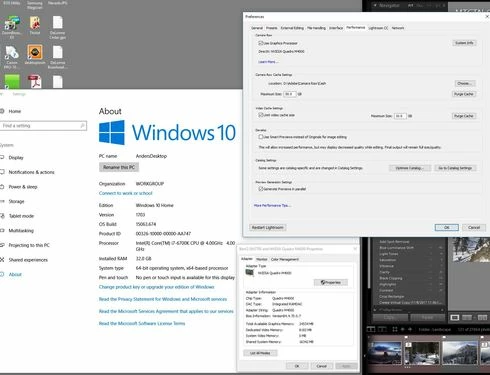
When I try to render the image at 1:1, I see no increase in CPU, Memory, or disk activity.  Virtual memory is set at 101 GB on Disk D, but with 32GB or RAM. I have never seen any evidence of paging or the use of Disk D.  I have added a screen capture to show you what I see.
Crystal Visionary
Known Participant
November 10, 2017
I have trouble the first time I try it.  I  have tried closing Lightroom and then reopening it and still had the problem right away.
Todd Shaner
Legend
November 10, 2017
John, I don't think it has anything to do with memory. A 10000x10000 (100 megapixels) file and 16000x2000 (32 Megapixels) file render at 1:1 Zoom view with  no issues, but a 16500x2000 (33 megapixels) file shows nothing in the Loupe with 9.1 GB memory available. Weird!

johnrellis
Legend
November 9, 2017
I observe the same behavior with a 20K x 13K PSD (260 megapixels) on LR CC 7.0.1 / Windows 10 running in a virtual machine, but only if I repeatedly and quickly click between Fit, Fill, 1:1, and 1:8.

On MacOS 10.12.6, I don't see the grey box, but I do get a huge virtual-memory leak after a minute or so of such clicking in Library Loupe:


Do you see a similar increase in virtual memory in Windows Task Manager? It may be that an allocation of virtual memory is failing on Windows, causing the grey box.
Todd Shaner
Legend
November 9, 2017
I'm seeing the same behavior using LR Classic on Windows 7. See this post: https://forums.adobe.com/message/9956218#9956218