


Crystal Visionary
Known Participant
November 9, 2017

P: Zooming very large images shows grey box

  • November 9, 2017
  • 49 replies
  • 2160 views

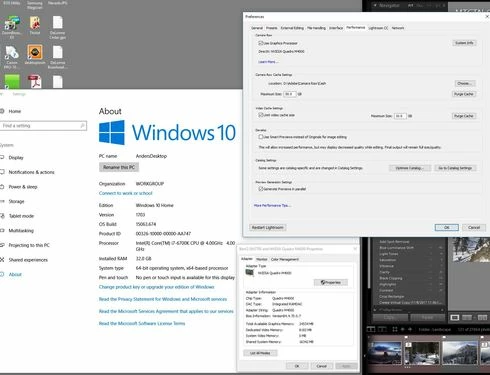
I am using lightroom Classic CC 7.0.1 and Camera Raw 10.0. Is there a limit to how large a file can be and still be able to create a 1:1 preview?  I have a 16 bit TIFF that is 26246 x 2899 pixels.  When I try to view it at 1:1 or any other size except "Fit" in the Library module, it refuses to draw (Fill works so long as I don't try 1:1 first).  I just see a grey box. I can view it in any size in the Develop module or Photoshop, but not the Library module.  Does the Library module have a size limit, and if so, what is it?  I also checked the Task Manager and it showed the CPU and disk had little or no activity, and memory was using 15GB which is not unusual on my system. I have 3.67 Terabytes of unused disk space. I have an i7 6700K processor running at 4.00GHz and 32GB of DDR4 Sdram memory and Windows 10 version 1703.
This topic has been closed for replies.

49 replies

Todd Shaner
Legend
February 8, 2018
I think they meant it was resolved when they unchecked Use GPU, which was one of the suggestions. Adobe is working on a fix, which will hopefully be in the next update.
Dwight McCann
Known Participant
February 8, 2018
Interesting ... I thought a couple of posters over in Family said it was resolved.  But you are certainly correct that my issue has not been resolved ... but now that I realize that it is not an issue that Adobe care about I'm just going to turn off GPU until I get another update.
Todd Shaner
Legend
February 7, 2018
The noise reduction issue in that thread has NOT been fixed and is still marked as 'In Progress.' So if related to your issue then your issue is not fixed either.
Dwight McCann
Known Participant
February 7, 2018
The issue in the noise reduction thread is apparently fixed but the problem I report below has not been fixed.
Dwight McCann
Known Participant
February 7, 2018


Lightroom CC Classic 7.1 [1148620], Win 10 Pro, Nvidia GTX 1050 [23.21.13.9077]. With GPU enabled, some very large images will not display 1:1 in the main window. They will display 1:1 in window 2 Loupe. They will display in Develop module. Turning off GPU acceleration resolves the problem. I have tried switching color monitor profiles to sRGB without effect.
Todd Shaner
Legend
November 11, 2017
That's true, but if 'Use Graphics Processor' in LR Preferences is unchecked the Library and Develop modules should use the same rendering and display path. Unfortunately doing that doesn't "fix" this 1:1 Preview rendering issue. Adobe added DirectX support in LR Classic, which may be the root cause of this issue. I found a similar issue at the below post, which is now marked 'In Progress' so Adobe is aware of the issue and working on a solution.

https://feedback.photoshop.com/photoshop_family/topics/lr-classic-noise-reduction-effect-not-display...
Crystal Visionary
Known Participant
November 11, 2017
My image is much smaller than the stated limit, but will not draw in the Library module, but it will in the Develop module.  My machine does not show any use of the virtual memory.  One interesting possible explanation may be that it has something to do with the graphics card.  Adobe documentation states that only the Develop module uses the graphics card for GPU acceleration.  So, there is a difference between how the library module renders images and how the Develop module does it, and how the GPU is used.
Todd Shaner
Legend
November 10, 2017
The 65,000 pixel per side limit appears to be an arbitrary decimal value and the 512 Megapixel limit the binary value 2^29 (536.870912 Megapixels).

Any size image file with a side >65,000 pixels or >536.870912 Megapixels will not Import into LR.
johnrellis
Legend
November 10, 2017
"the actual limits appear to be 65,000 Pixels/Edge or 536.870912 Megapixels (2_29th Power)"

Adobe's documentation says "Files with dimensions greater than 65,000 pixels per side or larger than 512 megapixels.".  I think they were thinking of "mega" defined to be 2^20, but as far as I can tell, nearly everyone else in digital photography defines it as 10^6.  The definition of 2^20 is still used by some (including Windows) when referring to bytes.  See here for more nerdliness: https://en.wikipedia.org/wiki/Megabyte
Todd Shaner
Legend
November 10, 2017
Regardless of what's causing the 1:1 Preview rendering issue in LR Classic I'm not seeing it in LR CC 2015.12. It displays the 1:1 Preview for all of these file dimensions including the maximum combined limits of 65000x8259 (536.835 Megapixels).

A file with dimensions of 65000x8260 or 65001x8259 will NOT open in LR CC 2015.12 or Classic so the actual limits appear to be 65,000 Pixels/Edge or 536.870912 Megapixels (2_29th Power).