


Participating Frequently
May 17, 2020

P Desktop: Brown and grey tiles in Library

  • May 17, 2020
  • 15 replies
  • 352 views

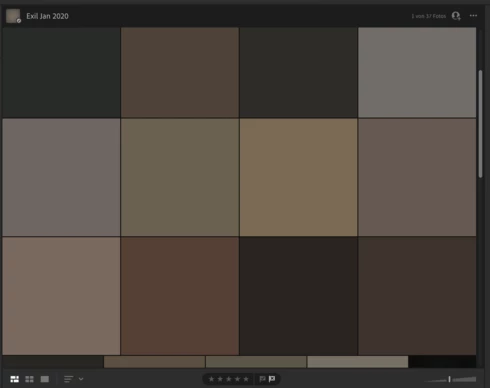
Hey everyone, some (not all) of my folders look like this. It is on all devices. (IPad, Windows 10 Laptop and Samsung Galaxy S8. This is even the case when I log on directly through lightroom.adobe.com.

However, when I edit a picture it appears normal again. Also when I export the picture is not broken. Any idea, how I can solve it. It appeared after I got a new IPad and reinstalled Lightroom. However, this could be a coincidence.

Screenshot of the problem below.


Thank you for your help and best,

Heiko
This topic has been closed for replies.

15 replies

Tack TurnAuthor
Participating Frequently
May 23, 2020
Any news?
Tack TurnAuthor
Participating Frequently
May 19, 2020
Yes, just did it

Rikk Flohr_Photography
Community Manager
Community Manager
May 19, 2020
Can you create an Album called "For Debug" and place several of these images in the album so that we can look at it on the back end?
Rikk Flohr: Adobe Photography Org
Tack TurnAuthor
Participating Frequently
May 19, 2020
Sure. Nikon Z6. Hope that helps?
Rikk Flohr_Photography
Community Manager
Community Manager
May 18, 2020
Can you confirm the camera manufacturer and model number that took the photos that show this issue?
Rikk Flohr: Adobe Photography Org