


Participant
March 1, 2021

P: Desktop: Discover Counts Discrepancy

  • March 1, 2021
  • 4 replies
  • 257 views

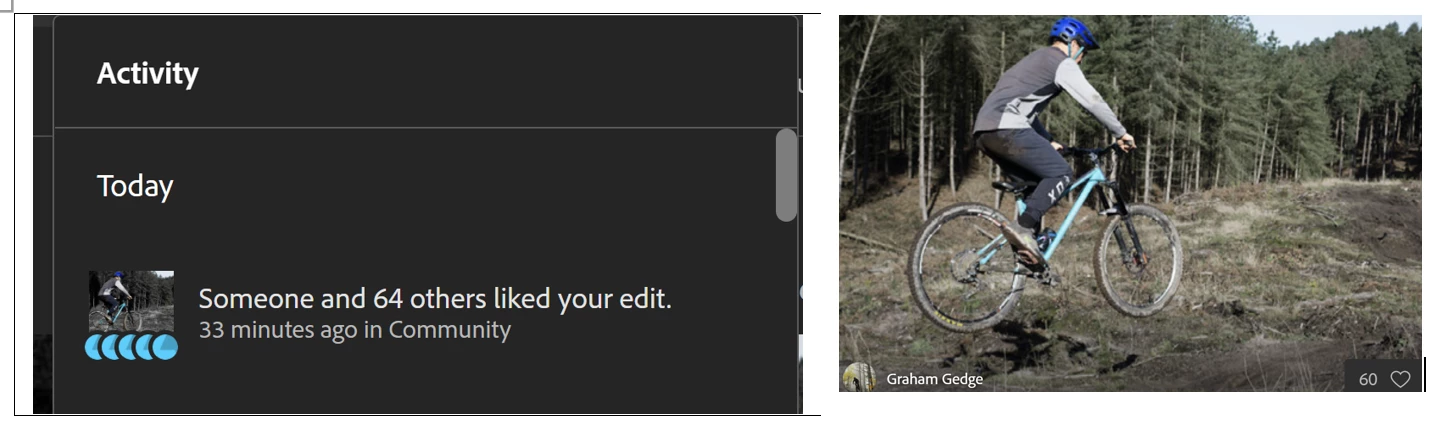
In Lightroom web there is a bell icon for activity which shows the number of likes and who liked a submitted edit.  This number is always higher than the number on likes shown on the photo.  The attached images show an example, the bell icon is often 5 more than on the photo.  The issue is browser independent.  Is there a reason for this?  

Cheers

Graham 
This topic has been closed for replies.

4 replies

Participant
March 2, 2021

Rikk

That would make sense.  But there are other odd things going on.  For example, the Bell currently shows "someone and 64 others liked your edit 1 day ago" so it is ignoring all those today.  On the photo the number next to the heart is 77!

Also on one photo from last autumn the main brower says 1.4k but the mobile 1.3K.

I don't suppose it is a big deal but it is one of those things than when you realise you always notice it.  

Cheers

Graham

Rikk Flohr_Photography
Community Manager
Community Manager
March 2, 2021

I spoke with folks on the team and if the discrepancy is small, it could be due to 'unliking'. We don't currently aggregate the removal of a previous like.

Rikk Flohr: Adobe Photography Org
Participant
March 2, 2021

Rikk

I use Lightroom on my desktop to edit the photos.  I then  share the edit to Discover via either the desktop or the browser.  I don't get any notification in the desktop app, only in the browser of mobile app. 

The number of notifications/likes shown if I click on the browser icon always differs from the likes shown by the heart icon on the photo. 

Cheers

Graham

Rikk Flohr_Photography
Community Manager
Community Manager
March 2, 2021

Can you clarify: Are you using Lightroom in a browser or Lightroom as a desktop application?

Rikk Flohr: Adobe Photography Org