


Inspiring
October 24, 2017

P: Error 67 - Sign in

  • October 24, 2017
  • 9 replies
  • 418 views

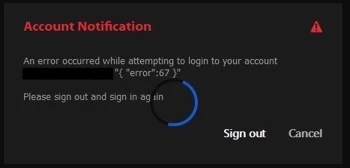
Just installed Lightroom CC, Classic and Photoshop still working fine. But Lightroom CC starts with "error 67".
"Account Notification"
"An error has occured while attempting to login to your account."
" My email "{ "Error":67 }"
"Please sign out and sign in again"

But, I have tried this many times... Unistalled... Reinstalled... and Nothing.

I need help... 😞
This topic has been closed for replies.

9 replies

Inspiring
August 13, 2018
I am having the same problem in that I have now spent over 7 hours of my time liaising with Adobe, and despite giving them remote access (x 4 times) to my PC they still haven't found the problem. Apparently it is a known problem stating 'my token has expired' but I am being bounced around here with no one taking any real ownership of the problem. My Mac works fine; my PC works ok with Photoshop and Lightroom Classic CC, but I cannot get into Lightroom CC.  HELP!!
axmelissarios1
Community Manager
Community Manager
March 13, 2018
Hi there,

We're wondering if any of you are using a virtualized environment?

As well, it would be really helpful if any or all of you could provide us with a PDApp.log file with us. Here are the instructions for finding that file. Analyze the Creative Cloud PDapp log You can just follow Step 1 in that anchor link and attach the file to an email.

If each of you can email me at rios [at] adobe [dot] com with that file, I can pass it off to the team to analyze and see if there is a common theme here.

Thanks,

Melissa

Melissa Rios, Product Manager, Community Experiences & Platforms | Adobe
Niknokq
Inspiring
November 20, 2017
Yes, I am on windows.
I tried that step by step several times and yes, I works, but only once. Next time I start Lightroom CC again there’s again error67..
I removed all adobe-products and cleaned the system with adobes creative cloud cleaner.. after a clean reinstall I have the same issue.
Also tried deactivating and deinstalling AV-Software (avira) witch had also no effect

Only by deleting „opm.db“ I can login once, the second start of lr cc leads again into error67

Tried all adobes troubleshooting advices, no effect

Running up-to-date software on updated win 10 Pro. AV scanner deinstalled

Any ideas?
I think the Programm needs update
Lr classic and ps running without problems
Thanks for help, Nikolas
Rick Spaulding -
Legend
November 19, 2017
Hi Nikolas,

Are you using Windows? If so this might help:

Another user reported success using these steps:

1. Log out of Lightroom CC, Adobe Creative Cloud

2. Close Lightroom CC & Adobe Creative Cloud

3. Open Task Manager -> Details

4. End any adobe creative cloud icon processes (Adobe CEF Helper, Adobe Desktop Service, CCLibrary, CCXProcess, etc)

5. Open Creative Cloud, Lightroom CC, everything works again


They are a slight variation of the steps I listed above except that they used Task Manager to end any other Adobe processes before signing in to Creative Cloud again. (Windows) 

Niknokq
Inspiring
November 19, 2017
Same problem every time i login. Tried everything, Reinstall, creative cloud cleaner, deleted AV Scanner, cleaned database..
That sucks. Update please
axmelissarios1
Community Manager
Community Manager
November 3, 2017
Hey Victor and Damien,

When opening the Creative Cloud app, are there any signs that there is an issue with the app? Any errors or loading icons or anything else that might be a concern. I'm trying to narrow down if this is being caused by the CC app or if it's specific to Lightroom CC.

To clarify, this error dialog pops up as soon as you attempt to launch Lightroom CC, correct? Not any other action?

Thanks,
Melissa
Melissa Rios, Product Manager, Community Experiences & Platforms | Adobe
Inspiring
October 27, 2017
Same error, running windows 10, sign in/out  order doesnt help. Works fine on my mac, failing on my windows laptop
Rick Spaulding -
Legend
October 25, 2017
Also, the order in which you log out, quit, and log in is important.  Follow these steps and see if that helps:

1. Sign out of Creative Cloud

2. Quit Creative Cloud

3. Start Creative Cloud

4. Sign in to Creative Cloud

5. Start LrCC

Rick Spaulding -
Legend
October 24, 2017
Try to re-launch the Creative Cloud app.

option, cmd, R for Mac

Ctrl, alt, R for Windows

Does that help?