
Known Participant
December 16, 2018

P: Error trying to reset all sliders error

  • December 16, 2018
  • 2 replies
  • 217 views

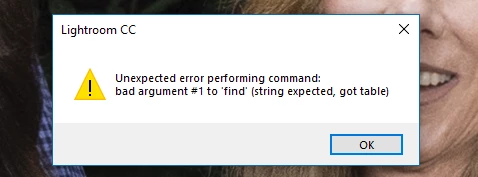
I am in the Brush tool and have brushed some part of my image and configured sliders. When I right click one of the slider headings and choose "Reset all sliders" it used to work correctly, but starting with version 2.1 of Lightroom CC I get the following error:
This topic has been closed for replies.

2 replies

Rikk Flohr_Photography
Community Manager
Community Manager
January 2, 2019
I am unable to duplicate what you are seeing on Mac but am seeing this error on Windows.  I will be logging a bug for this. 
Rikk Flohr: Adobe Photography Org
Inspiring
December 24, 2018
I'm getting this error as well.  Same user case, same error message.  I also see it with the linear gradient and radial gradient tools.