


Participant
February 1, 2024

P: Export as TIF ignores color space

  • February 1, 2024
  • 7 replies
  • 1878 views

Issue: Lightroom CC ignores color space when export as TIF

  • Lightroom Version: 7.1.2 arm64 [20231210-1901-9bac95f] (Dec 10 2023)
  • OS Version: macOS 14.2.1


Steps to reproduce:

  1. Export an image as File Type: TIF and Color Space: sRGB (see image)
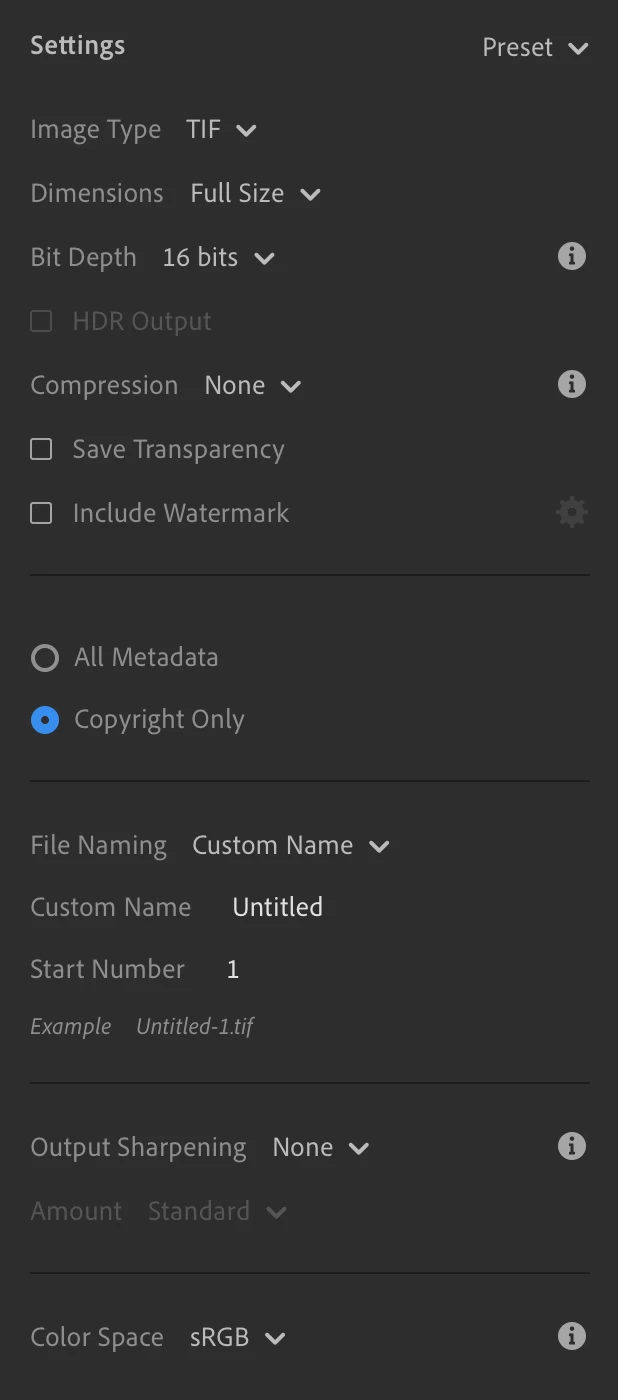


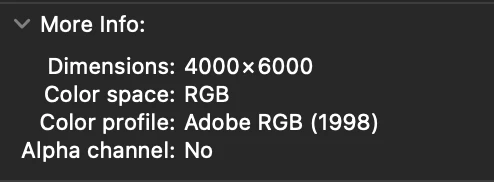
Expected result: Exported TIF to have Color Profile: sRGB

Actual result: Exported TIF has Color Profile: Adobe RGB (see image)
7 replies

Rikk Flohr_Photography
Community Manager
Community Manager
May 21, 2024

Greetings all, 


Updates for the Adobe Photography Products have been released.  The May 2024 updates contain an update for this issue. 

If you do not see the update in your Creative Cloud Application, you can refresh it by hitting [Ctrl/Cmd]+[Alt/Opt]+[ R ].

Note: It may take up to 24 hours for your update to be available in your Creative Cloud app.


Thank you for being so patient.

Rikk Flohr: Adobe Photography Org
Participating Frequently
May 14, 2024

M1 macmini OS13.6では問題ありませんん。sRGBで書き出されます。

yamato713108855
Community Expert
Community Expert
May 5, 2024

If you save in Tiff format, it will be changed to Adobe RGB.

Use Lightroom (7.2) to export RAW or JPEG in Tiff format.
Even if the setting is sRGB, the image will be exported using Adobe RGB settings.

Win11(Japanese Ver.)

Bridge↓


pascalscrAuthor
Participant
April 16, 2024

Any update on when this bug will be fixed?

Participant
February 26, 2024

I just installed LR cloud but local app. 

I did't use anything fancy just a filter 

As you can see in attached image on left is in LR on right is exported image; darker and dull highlight.

I export as tif file for max quality if I want to print in future. I tried various setting of color space and bit depth but didn't fix issue.


I used LR classic a long time ago and never had an issue like this. What is going on.?

Laastest version of app and mac os on M1 Mac mini and Dell P3 monitor

J0hi0
Known Participant
February 25, 2024

Exporting TIF with colorspace "ProPhotoRGB" generates a file with profile "AdobeRGB" embedded.

Pls. see attached video.


  • 14'' MacBook Pro 2021 M1 Max
  • LR latest (7.2)
  • PS Latest (25.5.0)
  • macOS latest (14.3.1)
Rikk Flohr_Photography
Community Manager
Community Manager
February 1, 2024

Thank you for the report. I was able to replicate the failure and have logged a bug with the team. 

Rikk Flohr: Adobe Photography Org