



Released
P: File renaming sequence applied incorrectly
At some point over the past few months, Lightroom updated the Filename options on export and completely broke how sequential filenaming worked. I’ve noticed each of the following behavior changes.
In 2025 and Prior:
- When exporting a sufficient number of photos at once, Lr would automatically add leading zeros. (EXAMPLE: If exporting at least 10 photos, the first photos would sequence as 01, 02, 03, etc., if exporting at least 100, the first photos would sequence as 001, 002, 003, etc.)
- When executing multiple exports at different times, Lr would recall the previously used filename AND remember what the last used sequence number was (EXAMPLE: After exporting 15 photos with the Custom Name - Sequence defined as “PhotoName” with a starting number of “1,” if another export was later begun, the options would be preloaded with “PhotoName” still in the Custom Name field and the starting number would update to “16.”
Now, when using Lightroom, both of these behaviors are completely broken.
- No matter how many photos are exported, the first exported filenames in a sequence will not have leading zeros, creating significant issues with ordinal file management. (EXAMPLE: The first 11 suffixes of an export batch, no matter the size of the batch, will be -1, -2, -3, -4, -5, -6, -7, -8, -9, -10, -11. As a result, sorting files by name, which is forced in some softwares, results in an order of -1, -10, -11, -2, -3, -4, etc.)
- The option fields in the Export panel are reset at every export. Whenever a new export is started, Lr does recall which type of filenaming scheme was used, but the fields are reset to “Untitled” for Custom Name and “1” for starting number, regardless of what was previously used. (Not only does this add the extra step of re-inputting the custom name, and any typos will destroy consistency, but it also requires the user to go back and manually recall / find what the next sequence number would be)
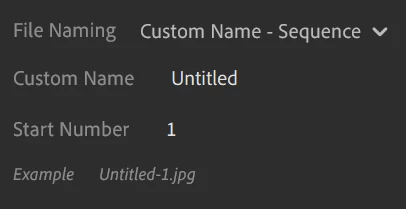
I can’t find any reason for why these behaviors would be intentionally changed, so I am certain this must be a bug. Sequential Filenaming used to be such a breeze in Lightroom that I never even thought of it because it worked so well, and now the whole workflow is completely ruined!
 AdChoices