


P: Lens Vignetting error and Lens Correction Check Box
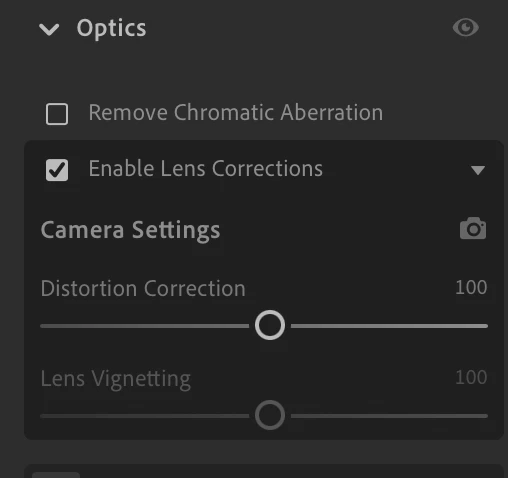
This happens with all my L Mount lenses. My camera is a Panasonic Lumix S5ii
Lenses:
Lumix S Pro 16-35
Lumix S 24-105
Lumix S 70-300
Lumix S 35 1.8
Lumix S 50 1.8
Sigma 28-70/2.8 DG DN
Tested on this machine: (but als on Apple Sillicon Macbook Pro)
Lightroom version: 8.2 MAS x64 [ 20250201-0700-1b12095 ] (Jan 31 2025)
NGL Version: 1.39.0.9
WF Version: 7.2 963a5a9
VF Version: 1.0.154
HIL Version: 40501
CAI Version: adobe_c2pa/0.9.3 c2pa-rs/0.31.0
PH Version: 5.0
Operating system: macOS
OS Version: macOS 15.3.2 (24D81)
Application architecture: x64
Computer model: iMac19,1 / Intel(R) Core(TM) i5-9600K CPU @ 3.70GHz
Logical processor count: 6
Processor speed: 3,7 GHz
Real memory available to Lightroom: 24.576,0 MB
Real memory used by Lightroom: 4.020,0 MB (16,3%)
Peak memory used by Lightroom: 8.997,0 MB
Memory cache size: 5.860,0 MB
The lens profile for for example the Sigma 28-70/2.8 the Vignetting is not enough corrected, but I can not use the slider in this correction field. The Vignette control in the Effects tab will act strangely giving me an inverted vignette at +1
 AdChoices