
Participant
March 1, 2025

P: Lightroom Lens correction not working

  • March 1, 2025
  • 2 replies
  • 1000 views

Hello, I would like to use lightroom to correct the distortion by the ETZ Adapter ring. And when I want to choose the profile manually, the select box only jump to "内置" , and can't change anymore. But I use the lightroom classic, it works well. Is it a bug on lightroom or my wrong operation?
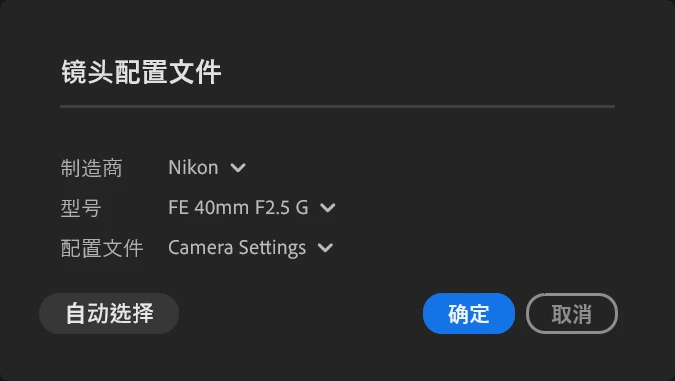
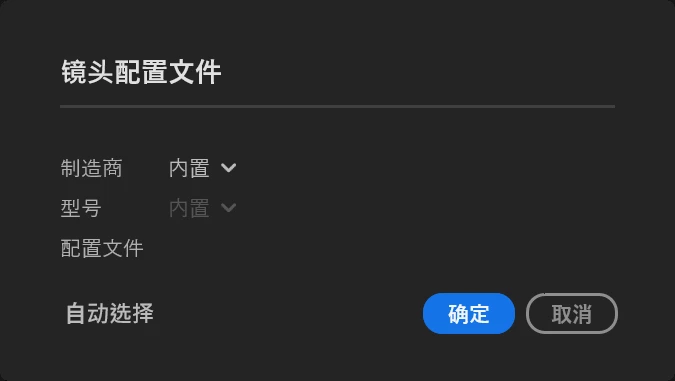


The normal on lightroom classic:
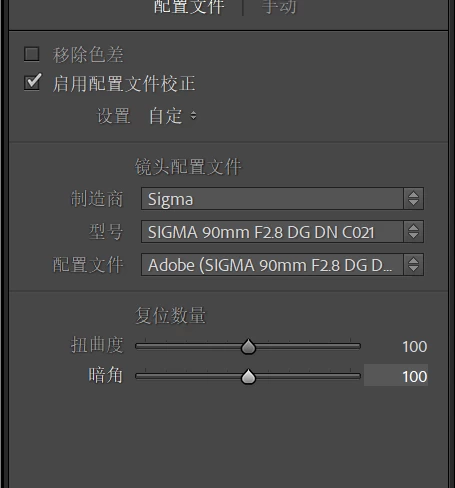


And by the way, is there a way that I can correct at jpeg by using profile manually? There are only few profiles at jpeg profile. However most profile (like sigma 90 dgdn can't be used at jpeg but it can be used at raw)  only can used at raw?


2 replies

Rikk Flohr_Photography
Community Manager
Community Manager
April 24, 2025

Greetings all, 


A new update for Adobe Photography Products has been released.  The April updates contain an update for this issue. 

If you do not see the update in your Creative Cloud Application, you can refresh it by hitting [Ctrl/Cmd]+[Alt/Opt]+[ R ].

Note: It may take up to 24 hours for your update to be available in your Creative Cloud app.


Thank you for being so patient.

Rikk Flohr: Adobe Photography Org
Sameer K
Community Manager
Community Manager
March 3, 2025

Hey, @sihong_6182. Welcome to the Lightroom Community. I've tried to recreate this with no success.


Please share a video of this behavior. Does it behave as mentioned after a specific set of steps? What troubleshooting steps have you tried already? 


The large collections of Lens Corrections are only available with supported RAW images, the list for JPEG is limited. 


Thanks! 
Sameer K

(Type '@' and type my name to mention me when you reply)

Participant
March 4, 2025

@Sameer K 

Hello, thank you for reply! Here is the video of lightroom and lightroom classic.

And when I use the sony camrea and sony lens(a7c2 + any sony lens), the feature is normal. But when I use nikon camrea and sony lens(zf + any sony lens), it occur this. 

However I don't any have any nikon lens, so I couldn't confirm the problem is because of the ETZ Adapter ring or nikon raw. But because the NEF and dng can't attach, it return `The attachment's 20250301-dsc_0149.dng content type (application/octet-stream) does not match its file extension and has been removed`. Is there anyway that I can put the NEF/DNG.

Thanks a lot again!

Sameer K
Community Manager
Community Manager
March 5, 2025

Thanks for including the video. I've tried to recreate this but with no success. Please upload a few of the RAW files to a cloud-file-hosting service & share a public link with me via direct message. 


Thanks!
Sameer K