


marcomartins
Known Participant
November 25, 2018

P: Local storage syncing forever 1723 photos after redirecting NAS

  • November 25, 2018
  • 20 replies
  • 412 views

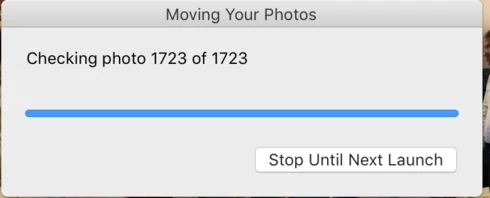
I've turned on the "store a copy locally" feature on, it download a copy of every photo to my NAS. I was connecting to my nas using the local IP address an them changed to use the local name. As soon as I've changed it, Lightroom thought that it had to move all the pictures from one location to another (wrong!) as it was a "new" destination. It moved all my 27k pictures except (or at least the app think is doesn't) 1723 photos. Now every time I start up the app it says that 1723 files are missing to move, I select to move them, and at the end, it says that wasn't able to move 1723 pictures.
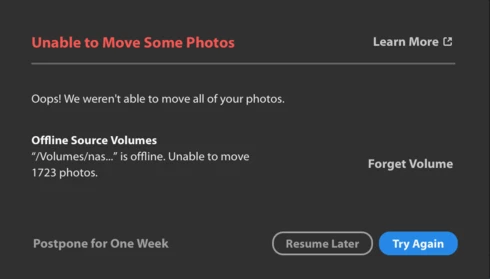
I've attached the screenshots.
This topic has been closed for replies.

20 replies

Rikk Flohr_Photography
Community Manager
December 4, 2018

Ultimately the issue is that Lightroom CC for desktop will think a NAS is a different drive depending on if it's connection via IP address or local name.

The simple work-around is to only connect to the NAS using IP, or only connect to it using the local name; don't switch between the two. If a user does alternate and ends up in a weird state, choosing "Forget Volume" will resolve the issue in almost all cases. This isn't recommended unless the account is fully synced.  If the account isn't fully synced, additional precautions must be taken to ensure no information is lost. 


Rikk Flohr: Adobe Photography Org
Rikk Flohr_Photography
Community Manager
December 4, 2018
Marco, I am sending you some detailed instructions via email. 
Rikk Flohr: Adobe Photography Org
marcomartins
Known Participant
December 3, 2018
Ok, and how will I know if I lost them or not?
Rikk Flohr_Photography
Community Manager
November 30, 2018
At this point, there isn't a way for you to tell - that is why the engineer recommended duplicating the entire folder. 
Rikk Flohr: Adobe Photography Org
marcomartins
Known Participant
November 30, 2018
But my originals folder and the destination folder is the same, only the network name changed. How can I see which are te 1700 photos that the apps refers?! It’s much easier to move only that than the 30k+ photos I have...
Rikk Flohr_Photography
Community Manager
November 30, 2018
From our engineer: "just to be extra safe I'd have the user copy the originals folder to some secondary location" . We don't anticipate that the recovery will be an issue when we address this but it never hurts to be 'extra safe' 
Rikk Flohr: Adobe Photography Org
marcomartins
Known Participant
November 30, 2018
And have any of my photos been lost/compromised?
Rikk Flohr_Photography
Community Manager
November 28, 2018
Marco, from your information we were able to discover an issue. We've logged this and will hopefully have this fixed in a future version soon. Thanks for your help.
Rikk Flohr: Adobe Photography Org
marcomartins
Known Participant
November 26, 2018
Did you lost photos?!
Known Participant
November 25, 2018
I paid the price.  Now, I NEVER, EVER let Lightroom move anything.  It simply isn't worth a tinker's damn at file managment.  Image management, possibly, but keep both eyes open and the your powder dry.