

Known Participant
February 12, 2020

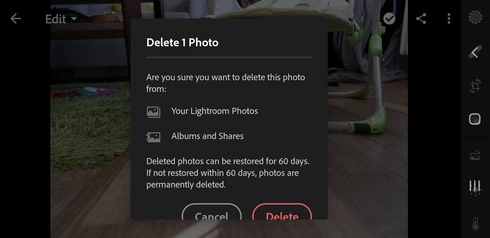
P: Mobile: Delete dialog on Android

  • February 12, 2020
  • 12 replies
  • 574 views

Just a GUI glitch. Samsung Galaxy S9, Android 10, landscape orientation.

This topic is closed to new replies. Start a new post to keep the conversation going.

12 replies

Known Participant
February 19, 2020
Rikk, are you personally happy with such as "solution"? I mean, look at that screenshot, can you tell me as a Quality Engineer the dialog is designed well with buttons cut just a millimeters at the bottom? Especially when it did not happen before upgrade from Android 9 to Android 10?
Rikk Flohr_Photography
Community Manager
February 19, 2020
The team has reviewed and closed the issue as as-designed.  The behavior is expected and does correct with a scroll.
Rikk Flohr: Adobe Photography Org
Known Participant
February 15, 2020
Great news, thank you!
Rikk Flohr_Photography
Community Manager
February 14, 2020
Good news, dwbmb,

We were finally able to reproduce the glitch and will log a bug with the Android team. 
Rikk Flohr: Adobe Photography Org
Known Participant
February 13, 2020
Yes, buttons are working even without scrolling down, just a cosmetic glitch.
Rikk Flohr_Photography
Community Manager
February 12, 2020
When I am back in my office on Friday, I have another Android device I can check. Hopefully another Android user will chime in on the thread.  Knowing you are in English on a Czech-configured device might be a clue. 

This is cosmetic only, correct? The dialog still functions?
Rikk Flohr: Adobe Photography Org
Known Participant
February 12, 2020
And are you absolutely sure you have an Android 10 on your devices? I did factory reset after upgrading to Android 10 to have a fresh start, so my settings are mostly on default. I took a look at my wife's phone, Sony Xperia XZ2 Compact, also with Android 10, and she has the same glitch as I have. See for yourself: 


Two out of two phones in our home have the same thing, how come you cannot replicate it? Can a system locale settings (Czech) be the problem, when app is English anyway?

Rikk Flohr_Photography
Community Manager
February 12, 2020
I am unable to reproduce on either of my Android Devices. Feedback is always welcome but I don’t have the reproducibility to acknowledge the issue as a bug. If that changes we will gladly update the status.
Rikk Flohr: Adobe Photography Org
Known Participant
February 12, 2020
Oh, you marked it as "not a problem" meanwhile. OK, feedback not appreciated, good to know.
Known Participant
February 12, 2020
I tried to set up the bigger screen resolution of 2960*1440 (default is 2220*1080) but it look exactly the same, so probably not screen resolution relevant issue.
On your screenshot I can see the dialog window is more narrow rectangle, while mine is more like square. 

I tried to set my phone system font size from default to the smallest. Buttons were visible then, but there was still a scrollbar with you could move the text inside a little and the text was very tiny anyway then. I had to set it back to default size.

Screenshot with smallest font size:


I did try both Google play nad Galaxy store versions, but it's the same.