

Known Participant
February 12, 2020

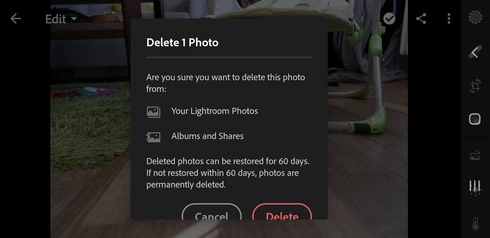
P: Mobile: Delete dialog on Android

  • February 12, 2020
  • 12 replies
  • 555 views

Just a GUI glitch. Samsung Galaxy S9, Android 10, landscape orientation.

This topic has been closed for replies.

12 replies

Known Participant
February 19, 2020
Rikk, are you personally happy with such as "solution"? I mean, look at that screenshot, can you tell me as a Quality Engineer the dialog is designed well with buttons cut just a millimeters at the bottom? Especially when it did not happen before upgrade from Android 9 to Android 10?
Rikk Flohr_Photography
Community Manager
February 19, 2020
The team has reviewed and closed the issue as as-designed.  The behavior is expected and does correct with a scroll.
Rikk Flohr: Adobe Photography Org
Known Participant
February 15, 2020
Great news, thank you!
Rikk Flohr_Photography
Community Manager
February 14, 2020
Good news, dwbmb,

We were finally able to reproduce the glitch and will log a bug with the Android team. 
Rikk Flohr: Adobe Photography Org
Known Participant
February 13, 2020
Yes, buttons are working even without scrolling down, just a cosmetic glitch.
Rikk Flohr_Photography
Community Manager
February 12, 2020
When I am back in my office on Friday, I have another Android device I can check. Hopefully another Android user will chime in on the thread.  Knowing you are in English on a Czech-configured device might be a clue. 

This is cosmetic only, correct? The dialog still functions?
Rikk Flohr: Adobe Photography Org
Known Participant
February 12, 2020
And are you absolutely sure you have an Android 10 on your devices? I did factory reset after upgrading to Android 10 to have a fresh start, so my settings are mostly on default. I took a look at my wife's phone, Sony Xperia XZ2 Compact, also with Android 10, and she has the same glitch as I have. See for yourself: 


Two out of two phones in our home have the same thing, how come you cannot replicate it? Can a system locale settings (Czech) be the problem, when app is English anyway?

Rikk Flohr_Photography
Community Manager
February 12, 2020
I am unable to reproduce on either of my Android Devices. Feedback is always welcome but I don’t have the reproducibility to acknowledge the issue as a bug. If that changes we will gladly update the status.
Rikk Flohr: Adobe Photography Org
Known Participant
February 12, 2020
Oh, you marked it as "not a problem" meanwhile. OK, feedback not appreciated, good to know.
Known Participant
February 12, 2020
I tried to set up the bigger screen resolution of 2960*1440 (default is 2220*1080) but it look exactly the same, so probably not screen resolution relevant issue.
On your screenshot I can see the dialog window is more narrow rectangle, while mine is more like square. 

I tried to set my phone system font size from default to the smallest. Buttons were visible then, but there was still a scrollbar with you could move the text inside a little and the text was very tiny anyway then. I had to set it back to default size.

Screenshot with smallest font size:


I did try both Google play nad Galaxy store versions, but it's the same.