


daniell11223644
Known Participant
June 27, 2019

P: Mobile (iOS/iPad): Won’t copy link

  • June 27, 2019
  • 4 replies
  • 134 views

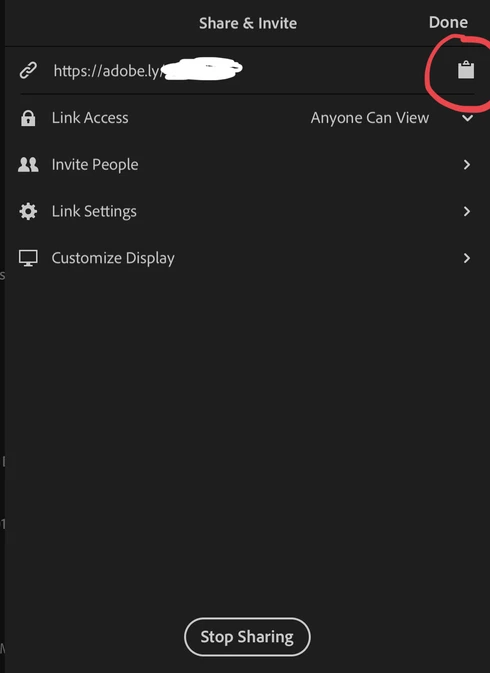
When I share an album and tap the link it opens and displays everything correctly in the browser, so no problem sharing. When I tap the clipboard icon it doesn’t copy the short URL for giving out to people.Running iPad Pro 11 inch
This topic has been closed for replies.

4 replies

Rikk Flohr_Photography
Community Manager
Community Manager
June 28, 2019
I can see that on Portrait mode as well. I would call that a bug and will file one with the team.  For now, your workaround will be to use Landscape mode to get the link copied. 

Thanks for reporting. 
Rikk Flohr: Adobe Photography Org
daniell11223644
Known Participant
June 28, 2019
It works in landscape orientation (never tried it until now) but won’t work in portrait orientation, can you confirm that’s normal?

Edit:
I know the touchscreen is registering those areas. Because if I touch once in portrait, then if I do nothing and rotate into landscape orientation the share dialog will appear. If I rotate back into portrait orientation the share dialog will reappear after rotating. But if I close it and try it no matter how many times I touch the clipboard in portrait orientation, it will never show up unless I rotate.
daniell11223644
Known Participant
June 28, 2019
I don’t, nothing happens when I tap it, also this morning I updated to latest public iOS version and its still the same. Tapping the link will open the browser.
Rikk Flohr_Photography
Community Manager
Community Manager
June 27, 2019
Daniel,

It appears to be working for me. When I tap the Clipboard icon, the iOS share dialog appears with one of the buttons being Copy.  I hit copy, go to a browser and it pastes as expected.

Do you get the iOS dialog when you tap on the Clipboard?
Rikk Flohr: Adobe Photography Org