


P: Open As Layers in Photoshop throws error under certain conditions
Using Lightroom version 9.5 on Windows 11, when in the Edit view, with multiple RAW files selected from Local storage, selecting from the menu “File::Edit In Photoshop::Open As Layers In Photoshop” throws this error:
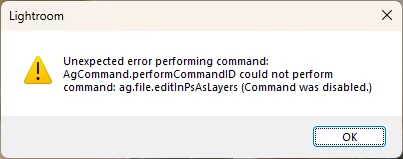
unexpected error performing command: AgCommand.performCommandID could not perform command: ag.file.editinPsAsLayers (Command was disabled)
This only happens in Edit view and only from the menu. I can right click on the selected RAW files in the filmstrip and select “Edit In Photoshop::Open As Layers In Photoshop” and it performs as expected with no error.
Other views don’t throw that error; for instance, if I’m in the Photos view to browse photos, the menu item (from the File menu) works without error. If I’m in the grid view it works without error as well. It only fails when in the Edit view and selecting from the menu “File::Edit In Photoshop::Open As Layers In Photoshop”.
I uninstalled Lightroom and reinstalled it. Problem persists.
The installed Photoshop version is 27.9.1
Attached is the error dialog.
 AdChoices