


Participating Frequently
December 13, 2025

P: Subtract from Mask not working on Android - Brush & Erase tools disappear
  • December 13, 2025
  • 4 replies
  • 1588 views

71510.jpg

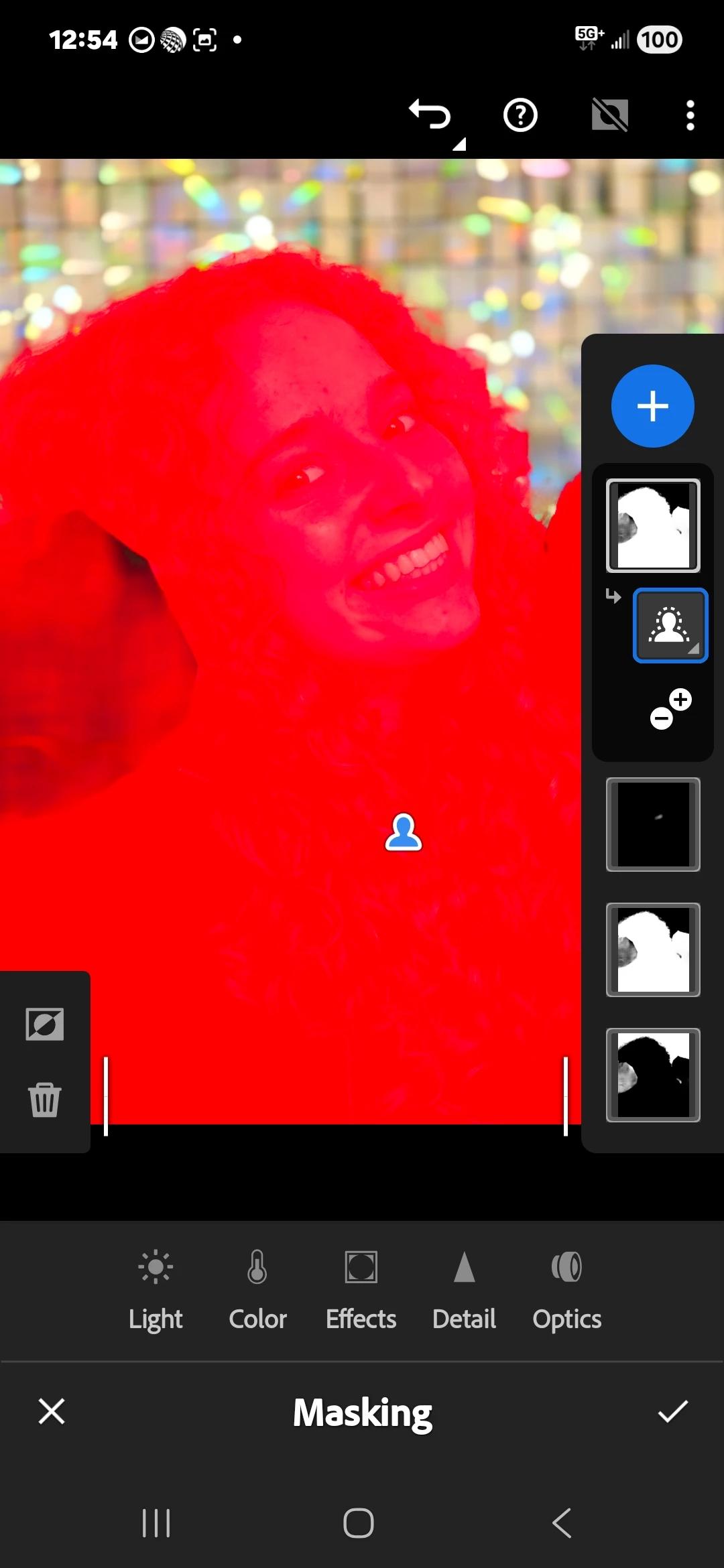
 hello my subtract from maskhas not been working for about a year and I'm using the Samsung Edge 25 and I've updated everything and I've been using Lightroom for years and never used to have an issue in the previous years. I've now given up and I am posting an example of when I highlight the subject and then I clicked on subtract from mask, but the options to erase or the brush on the left hand side disappears when I highlight the mask. 

4 replies

Anshul_Saini
Community Manager
Community Manager
January 9, 2026

Hi @ecseke and @ScopeOfPractice,


Thank you both for taking the time to share the screen recordings and details. I’ve forwarded both videos and your device details (Samsung Galaxy S25 series, Lightroom Mobile v11.1.x) to the Lightroom mobile product team.

The team is currently reviewing this masking behavior.


At this stage, there’s nothing further needed from either of you. We’re awaiting guidance or confirmation from the product team. I’ll follow up here as soon as I hear back from them with next steps or updates.


Thank you again for your patience.


Best regards,

Anshul Saini

ecsekeAuthor
Participating Frequently
January 9, 2026
  • Thank you so much 
December 27, 2025

So I want to use the adaptive blur on my suscribed version of Adobe Lightroom on my mobile however after the update i cannot edit the subject in the photo in anyway, not through masking(it lets me "add" to subject or "subtract" from background but nothing actually changes. It just adds another mask to what I brushed on but nothing changes if i try to say,  add to my subject because the AI accidentally places a part of my subject into the background. 


I have messed with this as much as my sanity will allow,  and have since given up on editing several photos because of it. i am a paid subscriber but if there is no solution to this that I am just somehow missing,  I am unsubscribing because not being able to make my own subjects is ridulous for a paid app. 


Thank you in advance for any help! 

Sameer K
Community Manager
Community Manager
December 29, 2025

Hey, @ScopeOfPractice. Welcome to the Lightroom Community. I'll help you figure this out. 


Please share more details, such as the exact version of Lightroom, mobile OS details, screenshots, and video recordings of what you see. 


Looking forward to hearing from you. 
Sameer K

(Type '@' and type my name to mention me when you reply)

December 30, 2025

Hello, 


I really hope you can help,  I am using a Samsung S25 phone and I put a screenshot of the version of Lightroom I use. And I put up a screen recording to best explain the issue I am having. So unless I am doing masking wrong somehow. I can't figure out how to add or subtract things I want blurred or unblurred specifically. Even using the regular lens blur option doesn't fix it. 


Hope this is enough for you to know a solution. 

Srishti_Bali
Legend
December 19, 2025

Hi @ecseke


Thank you for trying the steps so far and for sharing the screenshots. To move this forward and escalate it to the product team, we’ll need a clear screen recording that captures the exact behavior you’re seeing.


Step 1: Enable diagnostics in Lightroom

  • Open Lightroom

  • Go to Settings > Help & Support

  • Tap Enable Diagnostics


Step 2: Record your workflow
Please follow these instructions to record your screen: https://adobe.ly/4pM8sCF 

Follow all the steps of your current workflow. 


Step 3: Send the diagnostic report

  • Go back to Settings > Help & Support in Lightroom

  • Tap Send Diagnostic Report

  • Save the generated log file to your phone when prompted.

  • Upload the screen recording and the diagnostic log to Google Drive (or any file-sharing service you prefer)
  • Share the download link here so we can pass it along to the product team


Once we have both the screen recording and the diagnostic logs, we’ll be able to escalate this properly and investigate further.


Regards,

Srishti


ecsekeAuthor
Participating Frequently
December 21, 2025

Thank you I'll do this soon.

Anshul_Saini
Community Manager
Community Manager
December 22, 2025

Thanks for the update, @ecseke, and for letting us know. No rush at all. Whenever you’re ready, please go ahead and share the screen recording along with the diagnostic report.


Once we have those, we’ll pass everything to the mobile product team, so they can review the behavior on your device and investigate why Subtract > Brush isn’t appearing as expected on your Samsung Galaxy S25 Edge.


Appreciate your patience and the time you’ve spent helping us gather the right details. We’ll take it from there as soon as the files are available.


Best regards,

Anshul Saini

ecsekeAuthor
Participating Frequently
December 13, 2025

71510.jpgYou can see on the left hand side the erase tool and brush tool are not there they disappear right away. 

ecsekeAuthor
Participating Frequently
December 15, 2025

Hello when can someone reply? Thank you

Community Manager
December 16, 2025

Hi @ecseke, thanks for reaching out!
Could you let us know which Android version and Lightroom version you’re using? Also, please make sure you’re on a stable connection and, if possible, try testing on a different network to see if the issue persists.
It would also help to check if the same problem happens with the same photos in Lightroom Web: https://adobe.ly/3MwGn3J
If you can, a screen recording of the issue would be super helpful too.
Thanks so much!
Alek

*(If you mention me with an @, like @Aleke, I’ll get a notification and can respond faster.)*