


Inspiring
April 20, 2026

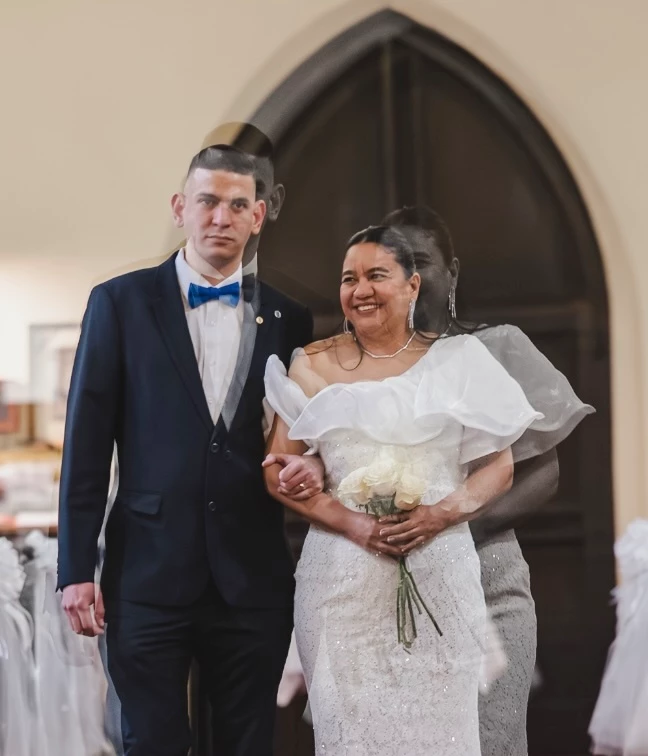
P: using arrow keys to navigate through images an image gets merged with the last one

  • April 20, 2026
  • 15 replies
  • 133 views

Arrowing through a number of images suddenly this image was overlayed with the previous one. Restarting Lightroom Desktop 9.3 on my MacBook Pro M2 Pro did not fix this. I was able to use the Versions tab to revert the image. Then I started arrowing through again and a minute later the same thing happened to a different image. At the time I wasn’t processing anything heavy on my MacBook, but the fan was running pretty fast so something was going on. A few minutes later and I now can’t duplicate the issue.


    15 replies

    alcdlm
    Participating Frequently
    May 9, 2026

    Hello,

    To be further confirmed: in my early tests version 9.3.1 seems to have fixed the ghosting issue (and maybe other issues).

    Best regards,

    Arnauld Le Carbonnier.

    Inspiring
    May 5, 2026

    I’m also seeing random images get rotated. I see them when scrolling in grid view and I have to open and rotate them back. So far I seem to be able to avoid the transfer of settings by going back to grid view after editing a photo. The thumbnail will quickly show the changes for a moment, revert to the previous settings, then update again to show the correct settings. Then it’s safe for me to open the next image.

    Known Participant
    May 5, 2026

    @plaiditude ​@alcdlm ​@Christian300812339wlx ​@redisred ​@nilkes 

    Curious if any of you are using an a7R IV/V, a7CR, or similar high resolution (60+ MP) camera?

    Inspiring
    May 5, 2026

    No, I use Nikon Z5ii (24mp) and Z50ii (20mp)

    alcdlm
    Participating Frequently
    May 4, 2026

    Additional information: I’m using Lightroom Desktop 9.3 on a MacBook Pro (Apple M1 Pro) 32 GB of RAM and operating macOS 26.4.1.

    alcdlm
    Participating Frequently
    May 4, 2026

    Hello,

    I’m using Lightroom Desktop since version 1 and I’m enjoying it!

    Recently I installed version 9.3.

    Since then I stumbled upon a few quirks never seen before.

    While processing my newest photos, I noticed bugs with :

    • picture orientation being wrongly interpreted 
    • cropping being forgotten
    • settings being corrupted (I had to copy the settings - reset the image - and paste settings to get back to the developed target result)
    • ghost image appearing within some photos

    I found it very disturbing and untrustworthy for my photos to process..

    Are those problems known and can we expect a fix soon?

    Of course I would be happy to help!

    Thanks for getting back to me.

    Best regards,

    Arnauld Le Carbonnier.

    Participant
    May 2, 2026

    @Rikk Flohr_Photography 

    I am suffering from this constantly on a Macbook Pro M4 Max AND on a Mac Studio M3 Ultra, both with online and offline files, on the current version of Lightroom Desktop (9.3). I work with .ARW photos from A7R IV (so very high resolution). It happens both with big cache and small cache and with lots of free SSD-space. It’s massively slowing down my editing, because if I switch too quickly between pictures with the arrow keys after doing any edits at all I risk coming back to find pictures like the above, with all edits replaced with edits from another, and even a weird overlay of the other picture, possibly denoise data applied to the wrong picture. It can only be fixed by resetting everything or Undoing back past the point where it happened (implying it is a reversible operation executed by Lightroom, not some kind of driver/hardware/external problem.)

    I suspect it is related to the long-living bug that happens if you adjust for example exposure after switching from photo 1 to photo 2 but before photo 2 loads properly, typically indicated by the histogram stil showing data for photo 1. If you do that, the slider will increment on the currently selected photo 2, and photo 2 will visually change, but the histogram stays stuck on photo 1, and as soon as you switch to any other photo, the adjustment you made is applied to photo 1, while photo 2 reverts to what it was before you first switched to it. The adjustment to photo 1 is not an overwrite, but happens as if you were always on photo 1. For example:

    Photo 1: Exposure +0,50
    Photo 2: Exposure +0,00

    Switch quickly from photo 1 to photo 2.

    Before histogram updates, adjust:

    Photo 2:  Exposure +0,00 → +0,10

    Switch to any other photo, then check photo 1 and 2. Result:

    Photo 1: Exposure +0,60

    Photo 2: Exposure +0,00


    I mention that because this seems related, happening if making adjustments too soon after switching. But that window is pretty long sometimes, and hard to notice when it happens.


    I attached a video showing the bug in action on some rejected photos! In the video I rest the mouse over the exposure slider and use the arrow keys to both quickly switch photos and adjust exposure, and then show the resulting buggy photos.

    System: MacBook Pro 16-inch, Nov 2024, M4 Max, Tahoe 26.3 (25D125)
    but also happens on Mac Studio M3 Ultra

    Rikk Flohr_Photography
    Community Manager
    April 27, 2026

    Greetings all, 


    The team is having difficulty reproducing this issue. If anyone on this thread has precise, step-by-step instructions for reproducing this failure, please post them. 

    Thanks!

    Rikk Flohr: Adobe Photography Org
    Inspiring
    April 27, 2026

    I’ve seen a few posts now by others experiencing this kind of issue with settings/masks being transferred to the next photo. One thing I’ll add is that I’ve only had this happen while using my arrow keys to gravitate through the images. If I click on the next photo in the filmstrip so far that seems to be safe, but using the arrow keys is my usual way so I forget and start arrowing through and suddenly it will do it again and copy the edits. On Local there is no easy way to fix so I have to reset and then copy and paste edits from another photo and that will apply the masks and everything properly.

    Another point is I don’t remember this happening if I just open Lightroom and start arrowing through the images. If I start doing any quick edits on some images like hovering over the exposure slider and arrowing up or down, or other kinds of edits, that’s when the transfer will be more likely happen, not necessarily on the next image but maybe after a few after as I arrow forwards.

    Inspiring
    April 27, 2026

    I posted something about this as well a few days ago. For me so far it has only happened while using the arrow keys on my keyboard to move through the photos. If I click on the next photo in the bottom filmstrip with my mouse I haven’t had it happen yet but I’m always wanting to use the arrow keys. This only started happening with the latest version of LR. I even tried uninstalling and reinstalling LR.

    Participating Frequently
    April 27, 2026

    Sometimes, when scrolling from one photo to the next, the two images combine in a bizarre way that can’t be undone except by resetting. This seems to be related to the orientation bug I also reported. Basically, the app is occasionally behaving terribly when going from one photo to the next.