



clairvoyant0101
Participating Frequently
March 3, 2022

P: (Win) Lr Export Bad argument #1 to stringByAppendingPathComponent (string expected, got nil)

  • March 3, 2022
  • 12 replies
  • 9328 views

Hello,

Issue:

I have a user experiencing an issue while trying to export photos using Lightroom. Not Lightroom Classic.

Lightroom Classic works as expected. 

I reinstalled Lightroom fresh, so it should be the latest version of the application.

Screenshot:
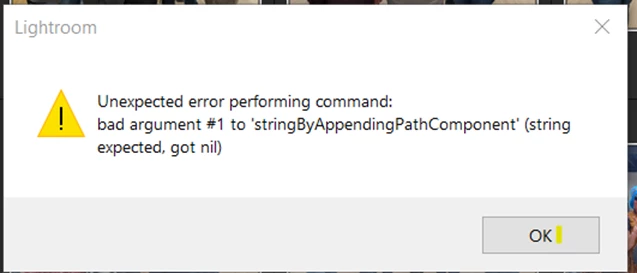


The user previously used the application on their home computer, but transitioned to their work computer and receives this error while attempting to export photos. I wonder if it has to do with where the application is trying to export files, but I have no idea how to change that. 


Any further information, I can provide. Any help is appreciated.

Thanks!


{Thread title modified by moderator}

12 replies

Participant
May 11, 2022

I had to export around 500 pictures and was getting the same error. None of the suggestions on this page helped.

It worked when I exported in smaller batches of 100. So I had to export 5 times the next batch/selection of 100.

Sameer K
Community Manager
Community Manager
March 4, 2022

Hi there,


Thanks for reaching out. We are here to help.

Could you please confirm the version of Lightroom & the exact version of the operating system(Windows + R > Winver & press OK) you are working on? Have you recently updated the operating system? Is Microsoft OneDrive backup enabled on this machine? Please share the location where you are trying to export.


Check the registry entries in the following location(might require IT authorization as this is on a work machine):

  • Press Windows + R > type in 'Regedit' and press OK to open Registry Editor.
  • Navigate to the following location in Registry Editor: HKEY_CURRENT_USER\SOFTWARE\Microsoft\Windows\CurrentVersion\Explorer\User Shell Folders
  • Check & ensure the data values for all the registries are as below on your computer.

(For a closer look)


After applying these changes, please restart the computer and export in Lightroom.


We hope this helps.

Regards,

Sameer K


clairvoyant0101
Participating Frequently
March 4, 2022

Hi Sameer,

Thanks for replying - I will have administrator access to the computer in question as they are a client of mine.

They are using OneDrive.

Current Windows version is 10.0.19044.

I cannot verify the version of Lightroom at this time as user is not available today and the computer is powered off, I cannot view it remotely. I will need to get back to you there.

I will also get back to you on verifying their registry entries.

The application I believe is attempting to export to "My Pictures" folder. This folder does not exist anymore which I think is the cause of the error. I think it has to do with the folder previously living within OneDrive.


Thanks. I will update again next week.