
P: (Win) LrD 10.0: Lightroom Desktop 10.0 fails to launch when Windows username contains multi-byte characters
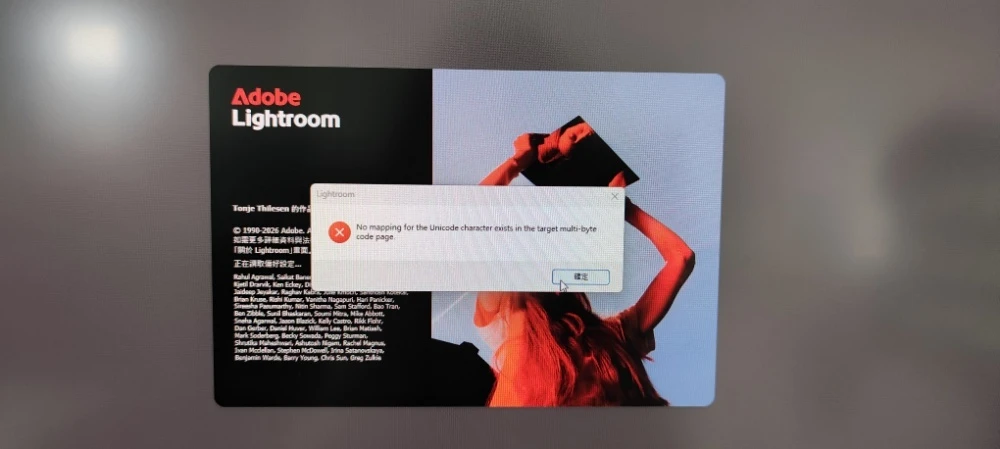
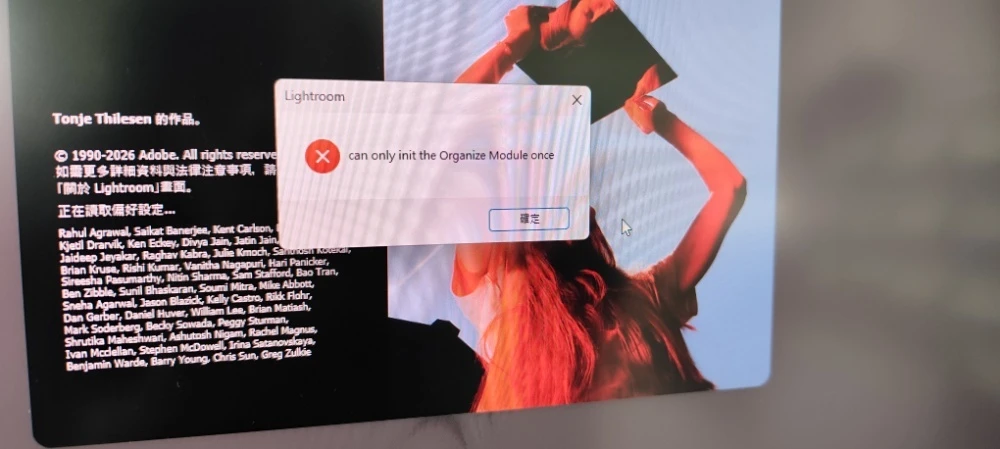
After updating Adobe Lightroom (Desktop) to the latest version (November 2026 release), the application fails to launch and crashes immediately during startup (at the "Reading preferences..." stage).
Error Messages (in order):
-
No mapping for the Unicode character exists in the target multi-byte code page -
can only init the Organize Module once(pops up right after clicking OK on the first error)
System Environment:
-
OS: Windows 11 (Traditional Chinese locale)
-
User Profile Path: Contains Traditional Chinese characters (e.g.,
C:\Users\[Chinese Username]) -
App: Adobe Lightroom (Cloud-based desktop version)
Workaround:
-
Rolling back to the previous version via Creative Cloud Desktop completely resolves the issue, and Lightroom launches normally under the exact same Windows user profile.
Please look into this issue and include a fix in an upcoming update. I have attached screenshots of both error dialogs for reference.
Thank you!
 AdChoices