

T20200914 on iPad Pro M4 with iPadOS 27 Beta 1 – all cloud photos fail to open

Environment:
- Lightroom for iPad 11.3.3
- iPad Pro 11-inch (M4)
- iPadOS 27 Beta 1 (24A5355q)
Problem:
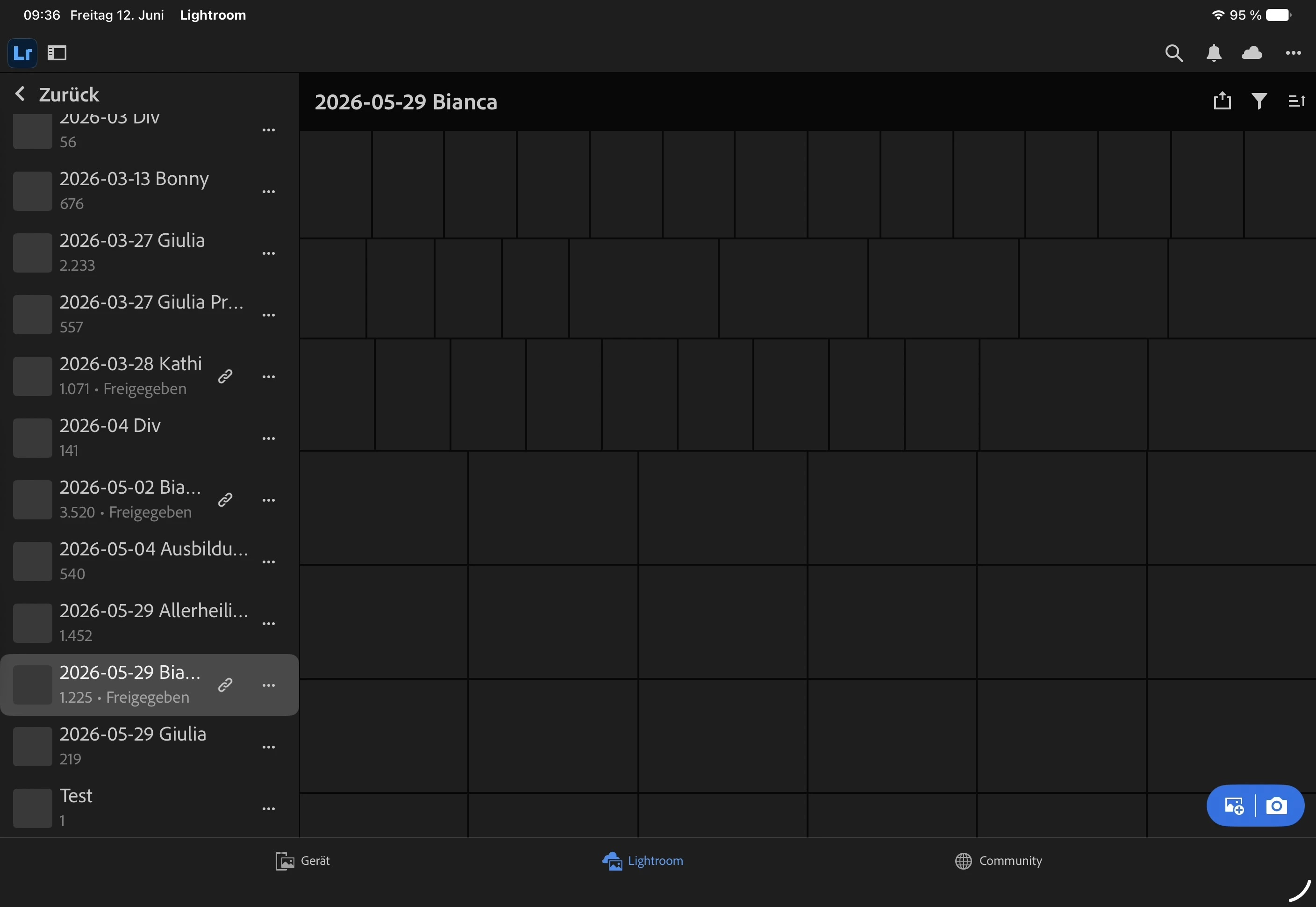
All cloud-synchronized photos fail to display and open on the iPad.
Symptoms:
- Albums synchronize correctly.
- Image counts synchronize correctly.
- Existing cloud photos appear only as gray placeholders.
- Opening any cloud photo results in error code T20200914 after approximately 2 seconds.
- Lightroom Web works correctly on the same iPad.
- Lightroom on iPhone and Mac works correctly with the same Adobe account.
- New photos imported directly on the iPad display correctly and upload successfully to Adobe Cloud.
Additional verification:
A new album and image were created on an iPhone after the issue started.
The album synchronizes to the iPad.
The image appears only as a placeholder and cannot be opened.
Error T20200914 is displayed.
Troubleshooting completed:
- Sign out/in
- Clear cache
- Reinstall Lightroom
- Restart device
Conclusion:
Cloud synchronization itself is functional.
The issue affects downloading or rendering cloud image data on iPadOS 27 Beta 1.
 AdChoices