


Known Participant
March 12, 2025

P: contextual task bar

  • March 12, 2025
  • 11 replies
  • 748 views

PS beta 26.5.0 20250306.m.3000, the  position of the contextual bar cannot be fixed, even after check-marking "pin bar position". After performing another step in processing the check-mark next to it disappears and the bar changes its location, even outside the PS working area. Win 10.
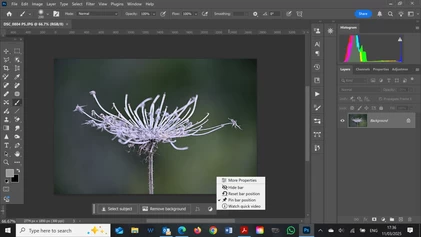


This is PS version 26.4.1 20250225. There's a check-mark next to "pin bar position" and the CTB won't move.
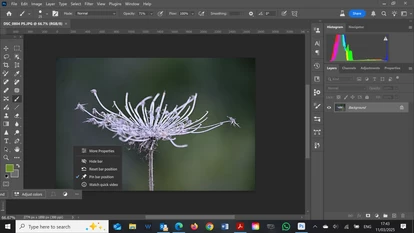
 

now the same file opened with Beta. Although "pin bar position" is selected, the CTB is misplaced to the left.
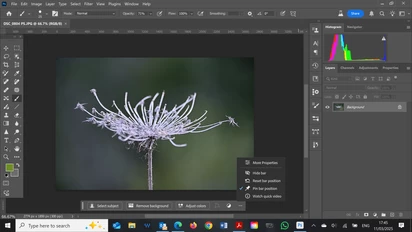
 

Now the CTB was reset, moved to the center and "pinned".
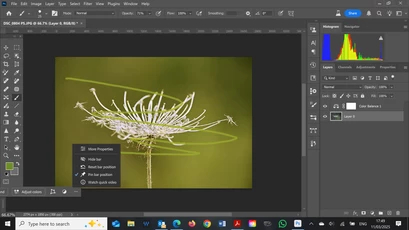
 

However after minor adjustments, upon moving back to the original layer, CTB is misplaced again, though still "pinned"

11 replies

Known Participant
June 25, 2025

Adobe Photoshop Version: 26.9.0 20250623.m.3121 9421737 x64

same problem!!!!!

Known Participant
June 20, 2025

no. same. Adobe Photoshop Version: 26.9.0 20250619.m.3117 986c8d7 x64. If I travel between adjustment layers, this does not happen. Once I return to any layer that contains images (background or not), the phenomenon still exists.

CShubert
Community Manager
Community Manager
June 20, 2025

Hi @Miron34664090c77b the link you shared was from Ps release version... r.16.  Do you see any improvement in the latest Ps Beta?


Adobe Photoshop Version: 26.9.0 20250619.m.3117 986c8d7 arm64


Thanks,

Cory - Photoshop Product Manager

Known Participant
June 20, 2025

Hello, almost 2 months later... the problem is the same...Adobe Photoshop Version: 26.8.0 20250611.r.16 96beaa5 x64

HELP

CShubert
Community Manager
Community Manager
April 30, 2025

@Miron34664090c77b the team is working on this and will release a fix when it is complete.


Thanks,

Cory - Photoshop Product Manager

Known Participant
April 30, 2025

This problem still persists in beta 26.7.0 20250427.m.3057 e97cdb2 x64

Is it just me or a problem common to many users?

HELP

Known Participant
April 3, 2025

The problem persists with beta 26.6.0 20250327.m.3022 26a0035 x64

Known Participant
March 18, 2025

The problem persists with beta 26.6.0 20250316.m.3011 c533cca x64

Known Participant
March 12, 2025

The same occurs with Adobe Photoshop Beta Version: 26.5.0 20250309.m.3003 e305078 arm64

CShubert
Community Manager
Community Manager
March 12, 2025

Hi @Miron34664090c77b the team is aware and working on this issue.


Thank you, Cory