Participant
May 23, 2023 8:09 PM UTC
Released

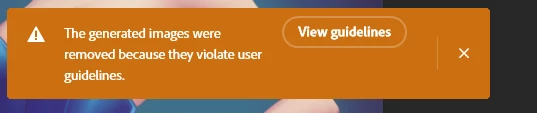
P: Generated images violate user guidelines

 

So as you can see, it's a PG-13 relatively inoffensive image of a woman in a bunny outfit. The top worked fine, and I was able to complete the top ear, which is cool. When I tried to extend the bottom with generative fill, though, I got this warning. They're just a pair of legs wearing stockings, and I wanted to extend it.

It feels like a false flag - though I could be wrong? I find myself thinking it would do the same for women in swimsuits.

Figured I'd share here.

This topic is closed to new replies. Start a new post to keep the conversation going.

1392 replies

Participating Frequently
May 25, 2023 4:49 PM UTC

the generated images were removed because they violate the user guidelines  when i use generitive fii in photoshop beta.the images are of ladies playing football

Translate
c.pfaffenbichler
Community Expert
Community Expert
May 27, 2023 10:22 AM UTC

Doesn’t the Beta version have a button specifically for giving feedback about Beta Features? 

Translate
meghandoll
Participant
May 25, 2023 4:47 PM UTC

I keep getting an error message saying:

I'm just trying to fill a spot on a pretty basic photo. 

this feels like a bug that i hope gets fixed soon. 

Thanks! 

meghan

Translate
Participant
May 26, 2023 9:42 PM UTC

Me too, even with a similar photo 😉

Translate
Participant
May 25, 2023 3:09 PM UTC

I watched a video demo with Aaron Nace who created some amazing fills with Generative fill. I can't get anywhere near that level of result? It even suggested my attempt was illegal assuming it was some kind of adult content. Very odd.

Translate
Participant
May 24, 2023 5:28 PM UTC

Photo of a group of people playing soccer (fully clothed!). One of the fingers looks warped from AI gen. I select the finger with the lasso tool, press Generative Fill, and then receive a warning that the Generative Images were removed because they violate user guidelines.

I think your moderation bot needs a lesson on hands and fingers.

It also doesn't like male biceps - man fully clothed (track pants, tank top) but bicep was cropped on the side of the image. Tried Generative Fill and received the same error, violation of user guidelines. 


Translate
masaharo
Participant
May 25, 2023 9:05 PM UTC

I have the same problem. With pictures with people fully clothed.

Translate
Known Participant
May 24, 2023 4:42 AM UTC

I tried to remove a tash from a picture of my brother. I got a warning saying it was against the rules ? Why ?

Translate
Zesty_wanderlust15A7
Known Participant
May 24, 2023 5:13 AM UTC

Everything p*rn might be "forbidden" — esp. removing an 80ies p*rn moustache! 😄 😉

I've been wondering why I've not yet seen this subject addressed anywhere...

Translate
Participant
May 23, 2023 11:33 PM UTC

As someone who plays a lot in Stable Diffusion, Mid-Journey and other AI platforms, Adobe's is excessively restrictive. For instance I tried to take a picture of a friend, generate a beach and girls in bikini's behind him. That was a "violation of policy" according to the application. Then I tried to create a environment of him standing next to dog poop, again that was a "violation of policy". None of the other platforms I deal with are this restricted. I believe Adobe is going to have a hard time with this level of restrictions.

Translate
Kevin Stohlmeyer
Community Expert
Community Expert
May 26, 2023 6:20 PM UTC

Hi @Nicholas3002874139el I wouldn't call it "excessive". I believe Adobe is trying to create a professional level solution that prevents misuse. The two examples you give are perfect examples of why the restrictions are in place.

Translate
Known Participant
May 29, 2023 11:09 AM UTC

I personally can't see why. I live near the beach. So Ippl in Bikinis , and unfortunaly dog poo, all the time. It's quite common for my photos to have bikini clad ppl in. But t hen the AI is not always the best. I've had violation warnings for thngs that the AI produced .

Translate
Participating Frequently
May 23, 2023 8:09 PM UTC

Hi,

I have been working with (or lack their of) the new the generative fill features in Photoshop 24.6.0. However, the feature is mostly unusable do to persistent user guideline violation warnings. This has occurred when I use generative fill on backgrounds, facial blemishes, hair, grass, etc. I am primarily using it to evaluate how well it works during photo restorations, but it's largely unusuable. The current file I'm working with is a portrait of three people which I own the rights to. I have successfully restored this image in every other AI assisted application without any issues. 

I have reviewed the user guidelines and I don't see how I could possibly be violating any terms. Is this a known issue? Is there any method to avoid this?

Thank you,
   Jesse

Translate
Kevin Stohlmeyer
Community Expert
Community Expert
May 23, 2023 8:13 PM UTC

Hi @Jesse Tyber White the violation could be due to your prompts you are entering. What are you using for prompts?

Translate