Ian Hylands DEITY
Participant
July 13, 2026
Released

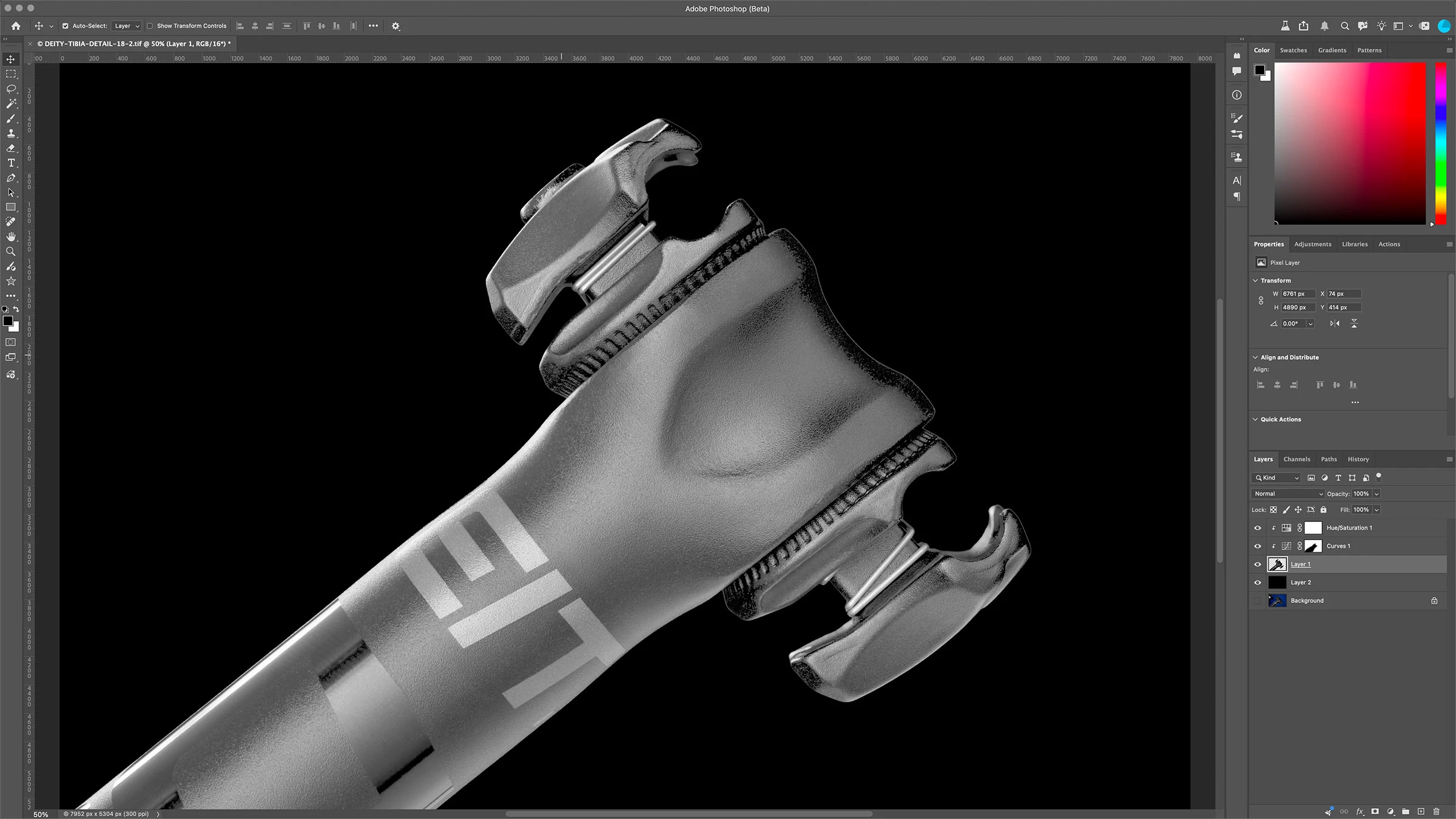
P: Images opened in Photoshop appear far brighter than they are.

Photoshop Beta 27.9 on Apple MBP M1 Max running OSX Tahoe 26.5.2

When I look at an image in Lightroom it looks as it should, however when I open it in Photoshop it appears very bright, as if a curves or gamma has been applied to it. If I open the “covert to profile” menu the preview looks normal. If I turn proof colors on it appears as it should. However with proofing off it returns to it’s very bright state. Same as with anything that shows a preview, preview looks normal. I tried Sony ARW raw files and tif’s, no difference.

It was ok on Friday, problem started with open today, July 13th.

See attached screenshots
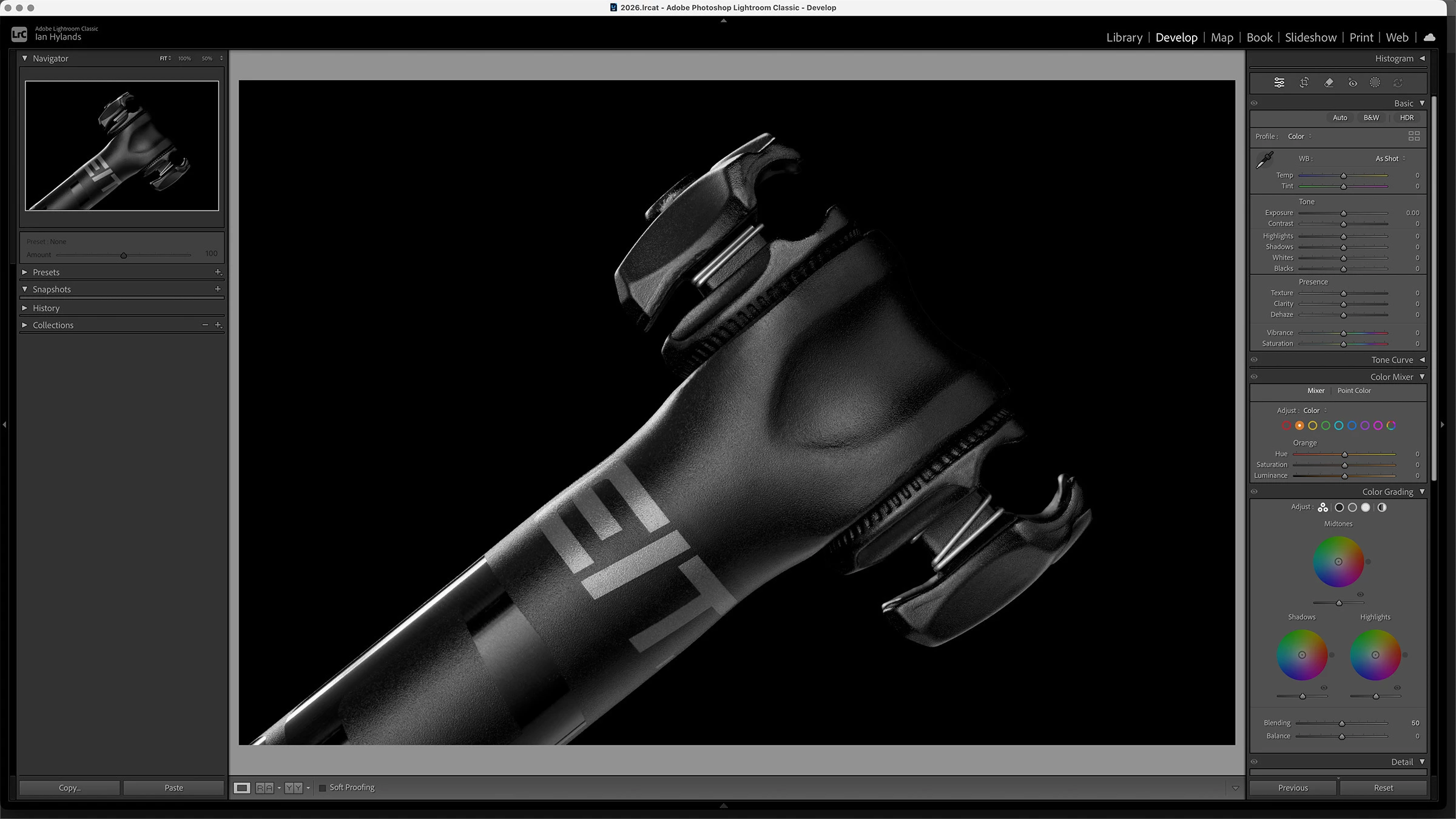
 

Any advice on how to resolve this would be greatly appreciated. Thanks!

    29 replies

    Known Participant
    October 6, 2026

    I have managed to find a way to resolve this which may help.  Like many i have an HDR capable system, but it is always switched off at the OS level.  With photoshop or beta opened, at the OS level i switched HDR on....problem dissapears 100%, no more saturation or contrast issues.  Switch it back off at OS level, then it returns right in front of your eyes.  Hope that helps, be interesting to see how many this works for

    Translate
    Participant
    October 5, 2026

    The error was fixed, but how did Adobe manage to ship a product with such a dumb, common error? 

    Translate
    Participant
    October 2, 2026

    I am having this problem still. I’m so frustrated. I’ve called adobe and spent over an hour on the phone with them. They did all that was suggested here and it still isn’t working on my end. I open a photo in camera raw/bridge and it looks great, then I open it in photoshop and within 2 seconds all my highlights blow out. Light pink dress loses all details and doesn’t even look pink. I’ve googled, I’ve read, I’ve checked and unchecked, restarted, and even bumped to a earlier version of Photoshop and NOTHING! It’s still there. I’ve downloaded the Beta version of photoshop off one of the suggestion and it works normal in there. To be honest I don’t even know what the beta version is? Is that a long term fix? I’m panicking on not being able to continue editing with all the work I have this season. Please help!

    Translate
    CShubert
    Community Manager
    Community Manager
    October 2, 2026

    Please share your system information: Help/System Info and we will try to see what might still be the cause for your issue.

    Thanks,

    Cory - Photoshop Product Manager


    Translate
    CShubert
    Community Manager
    Community Manager
    August 3, 2026

    Hi everyone… please update to the latest Ps Beta: Adobe Photoshop Version: 27.10.0 20260802.m.3625 and confirm this has solved this issue.

    Thanks,

    Cory - Photoshop Product Manager

    Translate
    Participating Frequently
    August 3, 2026

    Great! Quick question, can you tell us what they broke in this update? Would save a lot of time trying to find a workaround for whatever got screwed up in this latest release, thanks!

    Translate
    CShubert
    Community Manager
    Community Manager
    July 31, 2026

    Hi all, the update is on the way - in the meantime, the most correct fix in the current build is:

    1. Go to Preferences/Technology Previews
    2. ENABLE `Precise color management for HDR display`
    3. Restart Photoshop

    The name of the setting sounds counterintuitive, but it should be ON at this time even when HDR display or images are not involved. This will allow you to keep GPU acceleration and get the correct color management of the document to display the same as before this bug showed up.


    Thanks,

    Cory - Photoshop Product Manager

    Translate
    Participating Frequently
    July 31, 2026

    Why is it your “updates” are always in the other direction? Don’t you ever check your homework? Don’t you think this looks incredibly embarassing that you have to issue and update for your update?
     

    Considering the price of Adobe software, are you outsourcing your work to some sort of call center?

    Translate
    Participant
    July 30, 2026

    I also have this problem and my temporary workaround has been to export from Lightroom to Photoshop 2026 rather than the Beta version.

    Hopefully a proper fix will appear soon.

    Translate
    Participant
    July 30, 2026

    I also have this problem and my temporary workaround is to export from Lightroom to Photoshop 2026 rather than the Beta version. Hopefully a proper fix will come soon.

    Translate
    S.Guenther
    Participant
    July 29, 2026

    Just spend an hour on the phone with Adobe, in preferences the default is to have the BOX checked to have my Mac do the graphics processing, if I un-click the box it defaults to PhotoShop and the RAW file load correctly

    Translate
    Dogtoy4
    Participant
    July 30, 2026

    WOW! That worked! Never would have figured that out. Thanks big time!!!

    Translate
    Dogtoy4
    Participant
    July 29, 2026

    I am also having the same problem. Tahoe 26.5.2. - Photoshop 27.9.0

    Working on an important project! Help!!!

    Translate
    selondon
    Community Expert
    Community Expert
    July 29, 2026

    This is still present on the Full Release ​@CShubert 

    Translate
    Participant
    July 29, 2026

    Same here ​@CShubert . Auto updated to 27.9 today. I have to turn off Use Graphics Processor. Not ideal.

    Translate