


Participant
October 31, 2023

P: Photoshop Beta (BUG) Free Transform and Transform Selection no longer work

  • October 31, 2023
  • 41 replies
  • 10731 views

Repost from another forum post (I was told to repost over here).

Photoshop Beta, version 25.2 (latest)
OS: Windows 11

Troubleshooting steps:
- I have uninstalled ALL adobe products, rebooted and reinstalled. Still same issue
- Reset prefrences on quit

Steps to reproduce:
1. create new project
2. Select Rectangular Marque Tool
3. Select an area on the page
4. right-click, and chose either Free Transform or Transform Selection
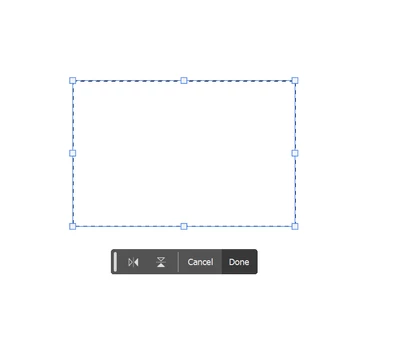


5. clicking and dragging on the handles does nothing, not even rotate works.

The only way to actually transform what you have selected is to change the values in the top bar, or by clicking on a vector (X:, Y:, W:, H:) and dragging.  Grabbing and dragging the box handles do nothing.

This works okay in Photoshop Beta 25.1 and the current version of regular, non-beta, Photoshop.

This topic has been closed for replies.

41 replies

Participating Frequently
November 13, 2023

Thank you Adobe Team,

Free Transform from menu Edit (Ctrl+T) working well,

but Free Transform Control are not working properly.

Participant
November 13, 2023

Yes, it solves the issue to use the menu and not the right click. Thank you for the temporary fix!

Participant
November 12, 2023

(after posting again, my first post appeared, didn't intend to double, and now triple post, maybe was a cache issue and wasn't showing an updated page until i left the new comment)

Participant
November 12, 2023

I don't know why my comment was removed... but as i said, you can get the functions to work through the regular menus (edit>free transform or select>transform selection) when the right click functions aren't working. For people who are stuck because of this, it may be helpful to know they can still work using this workaround rather than assuming the functions are broken and impossible to work with until the bug is fixed. There is no working once and it breaks again as some have reported issues of being able to make one change and then it's locked again. Make your selection and go to menu>select>transform selection and you can drag it all you want over and over, same with using menu>edit>free transform. If my comment is deleted again, it would be nice to know why since this seems like it could be very helpful for people who think their workflow has been halted (or if they don't want to have to go to regular PS with different history/recent files/etc just to get a couple tools to work).

CJButler
Community Manager
Community Manager
November 11, 2023

Not fixed yet. I'm hoping to get the fix in by mid next week.

Participant
November 11, 2023

They just updated so it might be fixed (im updating to 25.3 right now) but it seems only right click function doesn't work, the menu options still work for both of those commands if you go through the top menus, also the corresponding menu keyboard shortcuts work as well like ctrl+t (only right click options aren't working).

Participant
November 10, 2023

I think I figured out a pattern on when I can re-size my text box and when I cannot.  It seems as if when I click directly into the text with the text tool it will let me resize.  However if I double click on the layer to make the text editable then it will not let me resize

CJButler
Community Manager
Community Manager
November 10, 2023

Fix in progress. Thank you for the report.

Participating Frequently
November 10, 2023

Hi, I am using Photoshop Beta,

since yesterday free transform option working well without any problems but today all of a sudden I can't do it. when i try image for the first time working well, but only once. When I click somewhere other than the image and then click it again, it won't let me move, transform, or resize it.

When I do it with Ctrl+T, it lets me do it but only once. Then I need to click somewhere outside of the image again and then click again and ctrl+t to resize or move it Once again and it goes like this.


Participant
November 10, 2023