
reimundl1594886
Participating Frequently
Aug 9, 2023 8:25 AM UTC
Released

P: Photoshop Beta Startup Error (0xc0000142)
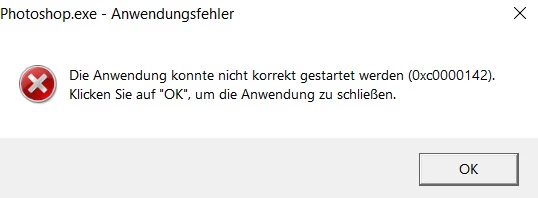
.


The program starts with an error message and then shuts down.

341 replies

AlexDSBR
Participating Frequently
May 2, 2024 5:01 PM UTC

Cory ... Any way to go back to 25.9.0? and not for 25.8?

Translate
jrcortez
Known Participant
Apr 30, 2024 12:59 PM UTC

Hello,
After updating P.S. (Beta) 25.9, the app no longer opens. An error appears (0x0000142) saying that the application cannot be initialized correctly!
Anyone having the same problem?
I went back to version 25.8 and it works normally!
Thank you very much!

Translate
Ged_Traynor
Community Expert
Community Expert
Apr 30, 2024 1:01 PM UTC

@jrcortez try reporting the issue on the Photoshop Beta forum

Translate
CShubert
Community Manager
Community Manager
May 2, 2024 4:50 PM UTC

Hi everyone, we have passed this on to the team to investigate.


Thanks,

Cory - Photoshop Product Manager

Translate
Participating Frequently
May 2, 2024 3:29 PM UTC

Translate
Participating Frequently
May 2, 2024 3:22 PM UTC

stessa cosa

Translate
JohnDG Photography
Known Participant
May 2, 2024 7:36 AM UTC

Beta 25.8 works fine, but after upgrading to 25.9 the application crashes

Win10 ver 10.0.19045 with intel i7-2600K, NVidea GTX980 latest driver 552.22  16/4/2024

Translate
AlexDSBR
Participating Frequently
May 2, 2024 8:04 AM UTC

yes and adobe not do nothing


Translate
Participant
May 1, 2024 10:02 PM UTC

erro 0xc0000142 ao iniciar o Photoshop no windosw 10 

Translate
Ged_Traynor
Community Expert
Community Expert
May 2, 2024 6:54 AM UTC
Participant
May 1, 2024 6:49 PM UTC

No pudo iniciar correctamente la actualizacion del Photoshop Beta 25.9 (0xc0000142)

Translate
Participating Frequently
May 1, 2024 7:44 PM UTC

I installed photoshop beta 25.9    3 days ago and it worked perfectly. Since yesterday it no longer starts and gives the attached message

Translate
reimundl1594886
Participating Frequently
May 1, 2024 8:59 AM UTC

When I try to update again, I get an error message. Error code 136.
Exit code: 136
-------------------------------------- Summary --------------------------------------
- 2 fatal error(s), 2 error(s), 0 warnings(s)

FATAL: Error (Code = 136) executing in command PATCH_FILE for package: 'AdobePhotoshop25-Core_x64', version:25.9.0.2603
FATAL: Error occurred in install of package (Name: AdobePhotoshop25-Core_x64 Version: 25.9.0.2603). Error code: '136'
ERROR: In place Patching file failed from C:\Program Files\Adobe\Adobe Photoshop (Beta)\Required\CEP\CEPHtmlEngine\libcef.dll with C:\adobeTemp\ETR9BA0.tmp\1\Application\Required\CEP\CEPHtmlEngine\libcef.dll.diff
ERROR: Brokered patching failed from C:\adobeTemp\ETR9BA0.tmp\PATCH\3C3AAB24A57B4552B4873D75240D042E with C:\adobeTemp\ETR9BA0.tmp\1\Application\Required\CEP\CEPHtmlEngine\libcef.dll.diff

Translated with DeepL.com (free version)

Translate
Participant
May 1, 2024 8:40 AM UTC

After updating Photoshop v.25.9, applications cannot be launched. An error message pops up - see attachment. Thanks for your help, R.Holman

Translate
Ged_Traynor
Community Expert
Community Expert
May 1, 2024 8:55 AM UTC

@RHolman Photoshop version 25.9 is still in Beta, try reporting the issue on the Photoshop Beta forum

Translate
reimundl1594886
Participating Frequently
May 1, 2024 8:24 AM UTC

Can the problem be caused by the graphics card? I still have an older G Force GT 640 installed. Perhaps it does not meet the requirements for the new 25.09 version.

Translate