
reimundl1594886
Participating Frequently
August 9, 2023

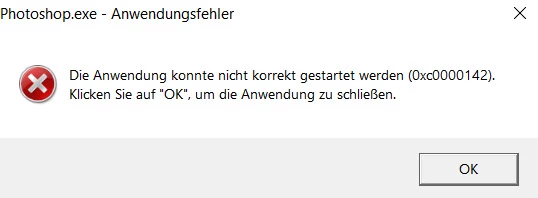
P: Photoshop Beta Startup Error (0xc0000142)
  • August 9, 2023
  • 258 replies
  • 64077 views

.


The program starts with an error message and then shuts down.

258 replies

Participating Frequently
May 20, 2024

adesso è ok finalmente

Participating Frequently
May 20, 2024

@Tjeerd66 I had the same issue. After I went to Help/Check for Updates in the Creative Cloud app, it showed that an update for Photoshop beta was avaible. I downloaded again an it worked finally

AlexDSBR
Participating Frequently
May 20, 2024


Finalmente funcionou!!! Fiquei feliz que todo nosso esforço valeu a pena, é pra isso que participamos do Beta certo? Para ajudar

Valeu!!! 

Mas eu realmente inveti em um PC novo,  isso tudo me fez ver como eu estava "PARADO" no tempo

Serviu para me motivar a melhorar!!

Valeuuu vamos em frente


Participating Frequently
May 20, 2024

¿Se supone que ya está solventado el error con una nueva actualización de la Beta?

Sigo viendo que la última versión es la 15.10, que me he descargado (por quinta vez) y con la que me sigue apareciendo el mismo eror de hace mes y medio.

Sigue sin correr en mi PC W10, 16Gb RAM, Procesador Intel(R) Core(TM) i7 CPU 920 @ 2.67GHz y Gráfica NVIDIA GeForce GTX 1650 (4,0 GB).

Participating Frequently
May 20, 2024

Just installed the latest version, but unfortunately the same problem.
Going back to 25.8 again.

Systeminfo:
Adobe Photoshop-versie: 25.8.0 20240411.m.2581 c235e07 x64
Aantal keer gestart: 522
Besturingssysteem: Windows 10 64 bits
Versie: 10 10.0.19045.4412
Systeemarchitectuur: Intel CPU-familie:6, Model:13, Stepping:7 met MMX, SSE Integer, SSE FP, SSE2, SSE3, SSE4.1, SSE4.2, AVX, HyperThreading
Aantal fysieke processors: 6
Aantal logische processors: 12
Snelheid processor: 3200 MHz
Ingebouwd geheugen: 24490 MB
Beschikbaar geheugen: 15693 MB
Hoeveelheid beschikbaar geheugen voor Photoshop: 18568 MB
Geheugen in gebruik door Photoshop: 70 %
Crash Handler: Adobe
DCX Version: 7.13.2
SAM SDK Version: 7.7.0-fio
ACP.local Status:
- SDK Version: 3.4.0
- Core Sync Status: Reachable and compatible
- Core Sync Running: 7.1.2.2
- Min Core Sync Required: 4.3.66.28
Live Edit Client SDK-versie: 4.0.4
Open Color IO-versie: 2.3.2
C2PA-bibliotheekversie: adobe_c2pa/0.7.6-2 c2pa-rs/0.25.2-patch
NGL-versie: 1.37.0.8
Informatie Sophia:
- Ps_Feature_Flag, Feature Flag URL (AEM) campaignID:70023 variationID:215771
Krijtbord: Uitgeschakeld.
D3D12Warp-renderer: Uitgeschakeld.
Aliaslagen: Uitgeschakeld.
Grootlicht: Ingeschakeld.
Wintab Digitizer Services
Spec Version 1.4
Impl Version 1.39
Num Devices 1
Blokgrootte van afbeelding: 1024 kB
Niveaus voor afbeeldingscache: 4
Lettertypevoorvertoning: Normaal
HarfBuzz-versie: 7.3.0
TextEngine: Unified Text Engine
======= GPU
Native API stabiel: Juist
OpenGL API stabiel: Juist
OpenCL API stabiel: Juist
GPUDeny: 0
GPUForce: 0
useGPU: 1
useOpenCL: 1
isGPUCapable: 1
isGPUAllowed: 1
GPUName: Radeon RX 570 Series
GPUVendor: AMD
Radeon RX 570 Series UNKNOWN, AMD
IsNativeGPUCapable: 1
IsOpenGLGPUCapable: 1
IsOpenCLGPUCapable: 1
HasSufficientRAM: 1
GPU accessible RAM: 4,074 MB
Required GPU accessible RAM: 1,500 MB
UseGraphicsProcessorChecked: 1
UseOpenCLChecked: 1
Windows remote desktop: 0
Windows available feature level: 12.0
Windows required feature level: 12.0
Windows has required feature level: 1
Scherm: 1
Grenzen weergeven: (0, 0) -> (1920, 1080)
Weergaveschaal: 1
Weergavetype: SDR

Participant
May 20, 2024

The latest update fixed the error and the program runs flawlessly. Thanks @Noel.Carboni 

Inspiring
May 20, 2024

io seguito ad avere errore nell'avvio della versione beta.

queste le caratteristiche del mio computer


Intel Xeon E5620 @ 2.40GHz 45 °C Westmere-EP 32nm Technology Intel Xeon E5620 @ 2.40GHz 47 °C Westmere-EP 32nm Technology RAM 24,0GB Triple-Channel DDR3 @ 533MHz (7-7-7-19) Motherboard LENOVO Lenovo (1366-pin LGA) 23 °C Graphics S22E390 (1920x1080@60Hz) DELL S2421HS (1920x1080@60Hz) 4095MB NVIDIA T600 (Dell) 42 °C Storage 2794GB Hitachi HUS724030ALE641 (SATA ) 33 °C 223GB KINGSTON SA400S37240G (SATA-2 (SSD)) 34 °C

Fadamia
Inspiring
May 20, 2024

Applied the new update and I'm able to open PS Beta now thanks 

Participating Frequently
May 20, 2024

Is there a way to get rid of this "Time to update" screen (see beneath)?
As you can see it's blocking part of my tools.

I've had to go back to 25.8.0 because of the 0xc0000142 error!
Maybe it has something to do with the latest Win10 updates?

Participating Frequently
May 20, 2024

It works now!