
reimundl1594886
Participating Frequently
August 9, 2023

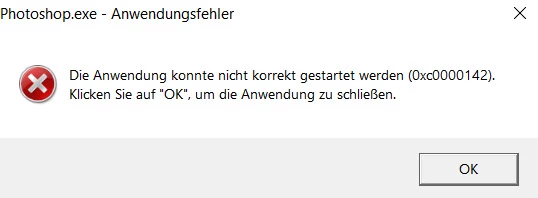
P: Photoshop Beta Startup Error (0xc0000142)
  • August 9, 2023
  • 258 replies
  • 64077 views

.


The program starts with an error message and then shuts down.

258 replies

Participant
May 20, 2024

Nice. I updated the newest version (25.10). It worked, guys. Thanks, adoube team

Noel.Carboni
Adobe Employee
Adobe Employee
May 20, 2024

You can sometimes speed things along by choosing "Help >> Check for Updates" in the Creative Cloud Desktop application.


NoloSQ
Participant
May 20, 2024

Updated and opened Photoshop Beta, we will see how its development is going with some images. Greetings

Inspiring
May 20, 2024

Havent received todays update yet, but will be sure to try it out right away when its availab;e


Noel.Carboni
Adobe Employee
Adobe Employee
May 20, 2024

Today's (5/20) Photoshop Beta distribution, 25.10 20240519.m.2625, should fix the code 0xc0000142 issue for you, as we have restored the ability to run Photoshop on a non-AVX2-equipped machine.

If you still have any issues starting Photoshop once you've installed today's Beta, please let us know more detail about your computer system.

Known Participant
May 20, 2024

@Jon5FE2 I've had similar problems after I updated PS Beta to 25.10. My fix has been to uninstall the released version  PS 25.7 and Bridge. Then turn off the computer for a few minutes. Power up and re-install PS 25.7 and Bridge and you should be able to bring up your images from Bridge. It's worked for me several times.

Inspiring
May 19, 2024

I now discover that in Bridge (Beta OR "normal") I cant open images even if I have designated PS 2024 (not BETA) as the prog to open to.   So now I cant use PS Beta, Bridge Beta or Bridge 

clemson70@gmail.com
Participant
May 19, 2024

I am running Windows 10 and have Lightroom Classic and Photoshop 2024 installed as well as Photophotoshop Beta. A few weeks ago, I tried to open Photoshop Beta and was given not following error message:  0xc0000142.  I had previous to this point been working just fine.  What is wrong and what can be done?

Inspiring
May 19, 2024

I now cant open anything from Bridge when I have specified Adobe Photoshop (NOT Beta) as the prog to use.  So I'm paying for these things now (Bridge) but am unable to use them!

jane-e
Community Expert
Community Expert
May 19, 2024


@peters88929131 wrote:

but we can't get into photoshop because it won't let us in because of error messages and we can just close it.
I don't care about ecosystems


According to the Pinned Reply (top of the page) from an employee, it's not the messages themselves that won't let you run Photoshop. Instead it's that you have a computer with a CPU that does not have the AVX2 instruction set. Here's a screenshot of the pinned reply if you didn't see it.


It appears that you responded to a reply I made specifically to @Donald370576064kh5 who wrote:

"Please return support for the old processors"


  • An earlier post from another Community Expert had sent him to UserVoice. Following those links would send Donald on a wild goose chase. Posting to Ideas is the correct place for his request.


  • The term Photoshop Ecosystem was created by the Photoshop team for the forum that includes Photoshop for Desktop, Web, iPad, etc. It's okay if you don't care about it.
  • I'm aware that some folks cannot open Photoshop Beta, but don't know if that applies to the Released version for @Donald370576064kh5 . Photoshop and Photoshop Beta are two different applications. Donald said "Photoshop won't run" and I asked him to clarify.


I'm sorry that my reply to Donald struck a chord with you. My apologies for that.


Jane

Forum volunteer