

cesar.cintron
Inspiring
December 22, 2023

P: Photoshp Beta (25.4.0.2439) Program Error when Duplicating Layer to different document

  • December 22, 2023
  • 41 replies
  • 7046 views

Photoshop Beta 25.4.0 Release.


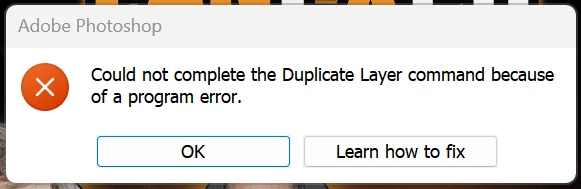
Right clicking on layer and selecting "duplicate" then setting the destination to a different document results in a "Could not complete the Duplicate Layer command because of a program error.


However, the duplication does occur correctly.


This topic has been closed for replies.

41 replies

Participant
January 12, 2024

I'll probably do this wrong but...  using latest Photoshop beta (updated today in fact) I have always been able to join scanned or cropped photos and documents together using the image merge tool (file, automate, photomerge) but recently it is failing with an error message (attached) The "normal" version works fine so I am not stuck but its a bit annoying to find a feature I have been using for years suddenly stop. 


Participant
January 5, 2024

Trying to drag and drop a file into another in Photoshop Beta - says there is a program error preventing this action.  Links to irrelevant article about updating Photoshop.  Beta is the current version.  Thought this error was with just with HEIC files.


I know it works properly in the current Photoshop version, so I saved the two files, closed all files in Photoshop Beta and tried to close the program.  I get the same stupid error box with the same two options, learn how to fix and OK.  Program will not close as the loop is to this error message.


Very frustrating.


Photoshop 25.4.0

Windows 11 22H2 (os Build 22624.2861)


Community Manager
January 5, 2024

Hi default50nakpdk04pn,

This sounds like a known issue that we are currently working on.  Please test again in the upcoming beta release. Thank you for reporting this bug.

Related thread: https://community.adobe.com/t5/photoshop-beta-bugs/p-photoshp-beta-25-4-0-2439-program-error-when-duplicating-layer-to-different-document/idi-p/14315524

Participant
January 3, 2024

I went and downloaded just Photoshop to see if the same result happens and it didn't it worked fine. Just the beta which is buggy.

Inspiring
January 3, 2024

@Bog22 On Windows try zipping (or copying to some other path) the Photoshop installation folder ("c:\Program Files\Adobe\Adobe Photoshop (Beta)") before updating to the newest beta. If the current beta is broken, rename the install folder (keep it, don't remove!) and copy back the latest known working version. Before trying to update again move the folders so that the broken version is in the original folder. I've "rolled back" the beta that way several times, but it's risky and might cause more issues than it solves, including breaking your PS installation.

davescm
Community Expert
Community Expert
January 3, 2024

That is fairly standard across all the apps (release and beta). I don't know why the older beta versions are still downloadable at all as there is little value to Adobe in having users test and feedback on old beta verions.


Dave

Known Participant
January 3, 2024

@davescm Hello Dave! Exactly my point, when selecting "Other Versions" to downgrade in case something is wrong with the current release, you can only pick the "base" version. In this case 25.3.0 and 25.2.0. More granularity here would be nice, especially since I noticed upgrades for same "decimal" version, for example 25.3.1 had multiple minor updates.


It would be nice to be able to switch from 24.0.0.2050 to 24.0.0.2010 or whatever code that would have.


Thanks!

davescm
Community Expert
Community Expert
January 3, 2024

@jane-e No problem Jane, your point on the purpose of the beta is well made. 🙂

Dave

jane-e
Community Expert
Community Expert
January 3, 2024


@Bog22 wrote: Is there a way to downgrade to the exact previous version? When I select "other versions" I only get 25.3, which then prompts me with an unremovable notification right on top of the documents bar, that I need to upgrade.


This is intentional. The purpose of the Beta version is to find and report bugs to the product team, so using older versions of the beta does not make sense and is unhelpful to them. What you can do instead is use the released version.


EDIT: The post from @davescm showed up after I replied. Sorry Dave.


Jane


davescm
Community Expert
Community Expert
January 3, 2024

@Bog22  v25.3.1 is the latest release (as opposed to Beta) version and does not show this issue


Dave

Known Participant
January 3, 2024

I have this problem as well, making this version completely unusable for my workflow.

Is there a way to downgrade to the exact previous version? When I select "other versions" I only get 25.3, which then prompts me with an unremovable notification right on top of the documents bar, that I need to upgrade. An option to roll back to the previous version (not like 5-6 releases back) would be nice.

Participant
January 3, 2024

Using Adobe Photoshop Beta 25.4.0, I can no longer use the move tool to select a photo and drag it into a different photo.


Copy/Paste seems to be the only option.


Have tried resetting the preferences and using the text tool as someone mentioned and so far nothing works.

davescm
Community Expert
Community Expert
January 3, 2024

@Aussiejf  It is a known issue with the beta. I'll merge your post with the existing thread on the issue