

cesar.cintron
Inspiring
Dec 22, 2023 1:18 AM UTC
Needs More Info

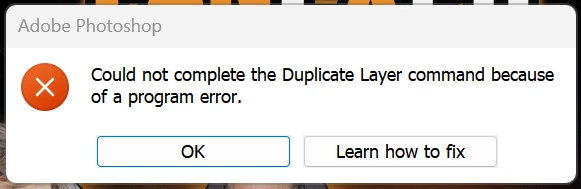
P: Photoshp Beta (25.4.0.2439) Program Error when Duplicating Layer to different document

Photoshop Beta 25.4.0 Release.


Right clicking on layer and selecting "duplicate" then setting the destination to a different document results in a "Could not complete the Duplicate Layer command because of a program error.


However, the duplication does occur correctly.


This topic is closed to new replies. Start a new post to keep the conversation going.

57 replies

lutka
Participant
Jan 2, 2024 9:01 PM UTC

Yes. Hope it gets treated soon. Not sure but it might start giving error messages as well if you just keep trying to drag and drop several times... though this might be caused by something else as well, since error msg is not specified.

Translate
Sameer K
Community Manager
Community Manager
Dec 29, 2023 5:36 PM UTC

Share this internally & the team is working on it. Please add your votes from the top of the post.

Translate
Inspiring
Dec 28, 2023 8:40 PM UTC

Well, by choosing not to use the Beta, you won't be doing your part to correct the problem.  🙂

Translate
Trevor.Dennis
Community Expert
Community Expert
Dec 28, 2023 8:34 PM UTC

The way it has been explained by Adobe employees on this forum in the past, is that Photoshop is made of a library of modules.  A whole series of smaller apps which combine to make a whole.  Changing one can have unforeseen affects on another, and because of the complexity of an app like Photoshop, it might need an army of testers (us) to uncover bugs.  We have a choice don't forget.  Right now I am choosing not to use the beta version, mainly because of the Pen tool issue, but I'll got right back to making it my default version when that has been fixed.

Translate
Inspiring
Dec 28, 2023 8:18 PM UTC

Oh I understand just fine, but it makes no sense whatsoever when a beta is working in harmony with the way the regular Photoshop versions work, and then it is changed without rhyme or reason.

Translate
jane-e
Community Expert
Community Expert
Dec 28, 2023 7:44 PM UTC


@Stu32314935j7it  wrote: that's not what we expect from Adobe (beta or not)


Possibly you don't understand the purpose of a public beta, Stu. It's to find and report bugs and other issues to the product team so they are less likely to make it into the released version.


Jane


Translate
Participant
Dec 26, 2023 12:45 PM UTC

After latest update to Ps beta, I am unable to drag and drop layers from one open file to another. Not sure if this function is currently under update or what, but it diesn't work for now (Dec 26). Anyone else have this issue?

Translate
Participant
Dec 26, 2023 4:32 PM UTC

Same..

Translate
Participant
Dec 25, 2023 6:38 PM UTC

25.4.0 Adobe Photoshop Beta - when trying to use the move tool with the alt key (Windows) to create a copy and move it to a different file, I get the error message: "could not use the move tool because of a program error"

Translate
Trevor.Dennis
Community Expert
Community Expert
Dec 26, 2023 9:38 AM UTC

This is a known issue.  It is possible to Duplicate to a New document, but not to another open document.  Fortunately, we can still drag a layer up to the tab of another open document, which is the way I think most of us do it anyway, because it is quicker.

Translate
Known Participant
Dec 23, 2023 8:28 PM UTC

Can't move my text png to my open image that i'm editing. Only happens since Beta update.  Error says I can't use the move tool. 

Translate
Ged_Traynor
Community Expert
Community Expert
Dec 24, 2023 10:51 AM UTC

@davidg51 try reporting the issue in the Photoshop (Beta) forum

Translate
Trevor.Dennis
Community Expert
Community Expert
Dec 23, 2023 5:50 AM UTC

This is the second post I have seen on this.  I tested and had the same result, so we should consider it a known problem that is being worked on.  


I usually work with the beta version, but between this and other issues — mainly that the Pen tool is not working properly — the beta version is currently unusable!

Translate