


JohnDG Photography
Known Participant
September 15, 2026

P: Selection of colours mixed up in Hugh / Saturation
  • September 15, 2026
  • 7 replies
  • 66 views

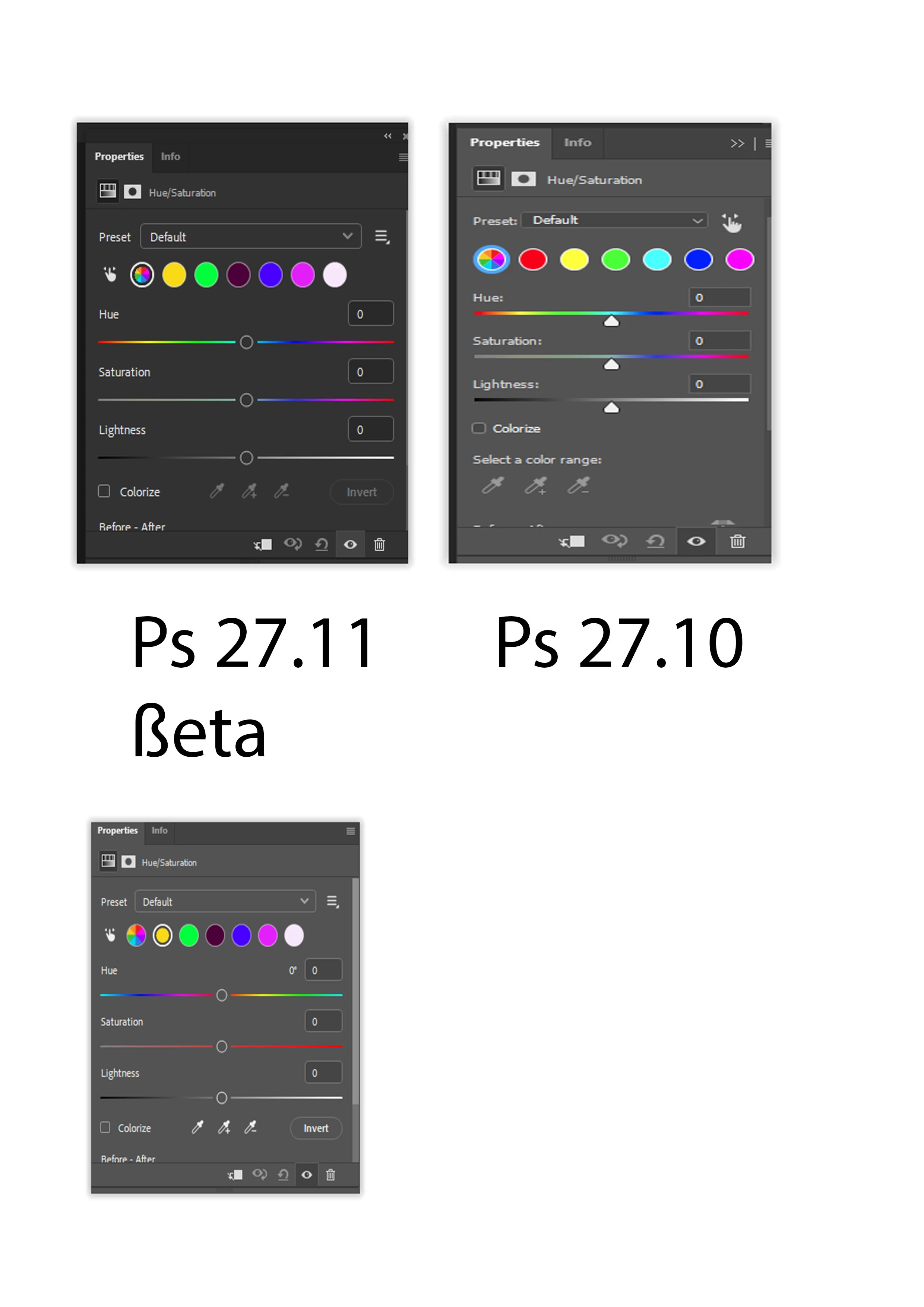
Hugh / saturation:
The selectable colours shifted 1 to the left
yellow = red
green = yellow
….

Example: select the yellow button and the red slider appears. The colour red changes in saturation or lightness, depending on the slider used.
In the released version 27.10, red is the first button (correct) 
In the ßeta 27.11, yellow is the first button, but it changes still red

It's very confusing to use. 

    7 replies

    CShubert
    Community Manager
    Community Manager
    September 29, 2026

    Hi ​@JohnDG Photography this issue has been released.  It is either in the latest Ps Beta build or will be in the day or so.


    Adobe Photoshop Version: 27.12.0 20260927.m.3691 5144a9c  arm64 (beta, PublicBeta)


    Thanks,

    Cory - Photoshop Product Manager

    JohnDG Photography
    Known Participant
    September 30, 2026

    looking forward to the next ßeta build
    (not yet in 27.12.0 2026927.m.3691 54144a9c

    CShubert
    Community Manager
    Community Manager
    October 1, 2026

    Try the build today: Adobe Photoshop Version: 27.12.0 20260930.m.3694 a296bd6  arm64 (beta, PublicBeta)

    JohnDG Photography
    Known Participant
    September 17, 2026

    ßeta 27.12, still the same
    caption even states yellow is red


    CShubert
    Community Manager
    Community Manager
    September 21, 2026

    Hi ​@JohnDG Photography , are you still seeing this with today’s Ps Beta build?

    Adobe Photoshop Version: 27.12.0 20260920.m.3683 7bd5f80  arm64 (beta, PublicBeta)


    Thanks,

    Cory - Photoshop Product Manager

    JohnDG Photography
    Known Participant
    September 22, 2026

    Yes, still the same
    In 27.10 (released version), the first button is red
    in  27.12.0 20260920.m.3683 7bd5f80 first button is yellow, slider is red and it affects the red colours.