
Nicolas Vasquez C
Participating Frequently
September 4, 2023

P: Text Box issue in curves properties

  • September 4, 2023
  • 12 replies
  • 804 views

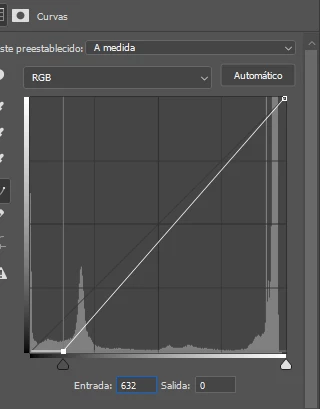
I'm having trouble typing a value into the first text box of the curves modifier. For example, I need to enter the value 236 and the cursor changes place and the written value remains 632 or 623. Can you review it please? Thank you.
 

Desktop W10

Photoshop beta v25.1

This topic has been closed for replies.

12 replies

Nicolas Vasquez C
Participating Frequently
December 1, 2023

Hello @Hannah Nicollet. I've turned off contextual task bar and there's no difference. The issue persist. I'm using Photoshop in spanish.

Thanks.
Nicolas

Hannah Nicollet
Community Manager
Community Manager
November 28, 2023

Hi Nicolas,


Are you still seeing this issue? It's under investigation and so far we haven't been able to reproduce it. Are you seeing this behavior with the contextual task bar visible? Can you try turning it off and see if that makes a difference with this issue please? Windows > Contextual Task Bar 

Thank you!
Hannah Nicollet
QE, Photoshop

CShubert
Community Manager
Community Manager
October 31, 2023

@smsaq4u this forum is for Ps beta issues so we don't confuse issues, if you feel this is happening in Ps release version, please start a thread on the Ps forum so the team can look into it.


FYI, testing with the latest Ps release: Adobe Photoshop Version: 25.1.0 20231016.r.120 ca99df2 x64 and we do not see this issue.


smsaq4u
Participating Frequently
October 27, 2023

This issue still exist in 25.1 Release of photoshop.. if you want the value of 236 you have to input it backward 632..!!!

Nicolas Vasquez C
Participating Frequently
October 10, 2023

Hello Cory, Is there any news about this bug?


Thanks.

CShubert
Community Manager
Community Manager
September 19, 2023

Thank you @Nicolas Vasquez C we will have the team look into this.


Nicolas Vasquez C
Participating Frequently
September 19, 2023

Hi Cory, thank you for sharing the link. I'm currently attempting to input values using the keyboard, but I've encountered an issue. When I try to enter a specific value (236 in my case) into the input text box, the cursor moves to the beginning of the text box, and I end up with 632 or 623 instead of 236. This problem doesn't occur in the output value text box. I've tried switching keyboards, and I even used an on-screen keyboard, but the bug persists. This is happening in v25 and above in beta and final version. Thanks.

CShubert
Community Manager
Community Manager
September 19, 2023

@Nicolas Vasquez C  please review this doc as we think you are trying to do something that is not valid in curves... have you set it this way before?

https://helpx.adobe.com/photoshop/using/curves-adjustment.html


Nicolas Vasquez C
Participating Frequently
September 18, 2023

Hi Cory, that's right, I have 22H2 W10 version. In addition, the same issue is now happening in last update of Photoshop 2024 (v25.0). Thank you.

CShubert
Community Manager
Community Manager
September 18, 2023

Curious @Nicolas Vasquez C is your Win10 updated to 22H2?