Participant
September 15, 2023

P: The color triangle is broken

  • September 15, 2023
  • 39 replies
  • 6887 views

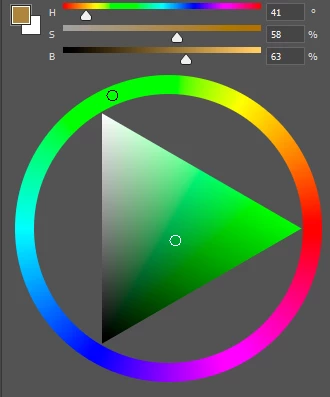
The colour triangle is broken in the new version of photoshop, now it doesn't respond to the pipette colour selection.

 

This topic has been closed for replies.

39 replies

Mohit Goyal
Community Manager
Community Manager
November 29, 2023

Hi all,


We are happy to announce the release of Photoshop version 25.2 (public version), which incorporates the resolution for this particular problem. To see the list of all fixed issues, click here


To update Photoshop to 25.2, click "Update" in the Creative Cloud desktop app next to Photoshop. More detailed instructions for updating


Let us know if the update resolves the problem for those affected, and share your feedback.


Thanks,

Mohit

jimm7497115
Inspiring
November 20, 2023

I just had to open Adobe on my old computer I'd updated it to 25.1 when testing before. If you still have the bug on your colour picker in the public release then remove your 'AppData\Roaming\Adobe\Adobe Photoshop 2024\Adobe Photoshop 2024 Settings' folder and put it somewhere safe/handy like your desktop. Back it up.

downgrade to 25.0.  Replace your Settings folder with a copy of your back up with everything except the file Adobe Photoshop 2024 Prefs.psp. Restart PS from the CCDesktop app. If this doesn't work then try restarting using ctrl+shift+win+alt and put your replace your Settings folder again. The stop where you restart with CCDeskopt app definitely seems to be important. 

jimm7497115
Inspiring
November 12, 2023

and you've mentioned me and told me to waste a load of time today signing out restarting my computer and having to open up again all the work I had open for a wild goose chase. I said in my reply above that I DON'T USE BETA and I was more than happy using the version I managed to fix. I have no need of an update. I'm using CAPS because you set the precedence for it in your uncalled for reply to me. I'm really tired of being spoken to this way. I'm the customer! I thought Americans were known for the customer service skills. Clearly not at Adobe. Who do you Adobe forum staff think you are? Please don't CC me in on any more replies on this subject unless it's a genuine apology. I didn't ask for my time to be wasted today nor did I ask to be rubbed up the wrong way yet again by Adobe Staff thinking they have the right to boss their customer around. I have having a nice afternoon until I came to this forum! You all need to go on a customer service course! Remember who's paying here!

jimm7497115
Inspiring
November 12, 2023

I just googled the issue I was having with my Adobe software, this is where the solution was. Frankly as long as I got my Adobe Software working as I need it I don't care what the forum is. Without looking right at the top of the page you can't tell which forum it is and as an Adobe customer I don't think I should be ticked off not not noticing a tiny bit of text. thanks for the ticking off though. Nothing warms your heart about a company than a good telling off.

CShubert
Community Manager
Community Manager
November 9, 2023

@jimm7497115  and @biggeek what happens if you log out of CCD, restart your computer then log back in and click on the Apps/Updates/Check for updates.... do you then get the notice of the new version?  The current version as of today is: Adobe Photoshop Beta Version: 25.2.0 20231104.m.2388 fdf2b8a arm64


If you are taking about Ps release, that version is: Adobe Photoshop Version: 25.1.0 20231016.r.120 ca99df2 arm64


This is the Ps beta forum so all threads should be about Ps beta and NOT Ps release, there is a seperate channel for those.


biggeek
Participating Frequently
November 9, 2023

Hi Cory, the update isnt available within CreativeCloud, still stuck on version 25.1. Is it a beta release?


jimm7497115
Inspiring
November 4, 2023

I'm in the UK, it's still showing as 25.1 for me but, as soon as I see 25.2 I'll update and let you know. I'm fine with 25.0 though, after fixing the update and it's color pane issue which was a problem. I'll let you know. (I don't use beta anmore)

Participant
November 4, 2023

Exact issue as others have stated. Adobe Photoshop is up to date on the newest version. I use it daily and started experiencing this issue a few hours ago with no solution. Restarting both program and the computer has done nothing.

Participating Frequently
November 3, 2023

It works! Thanks, Beta update this morning.

CShubert
Community Manager
Community Manager
November 3, 2023

@daniela6C15 are you talking about Ps release or Ps beta? Ps beta has been at 25.2 since 10/13 so we are not sure why you would not be seeing this yet.  Please check and make sure you are looking at Ps beta.