Inspiring
December 27, 2023

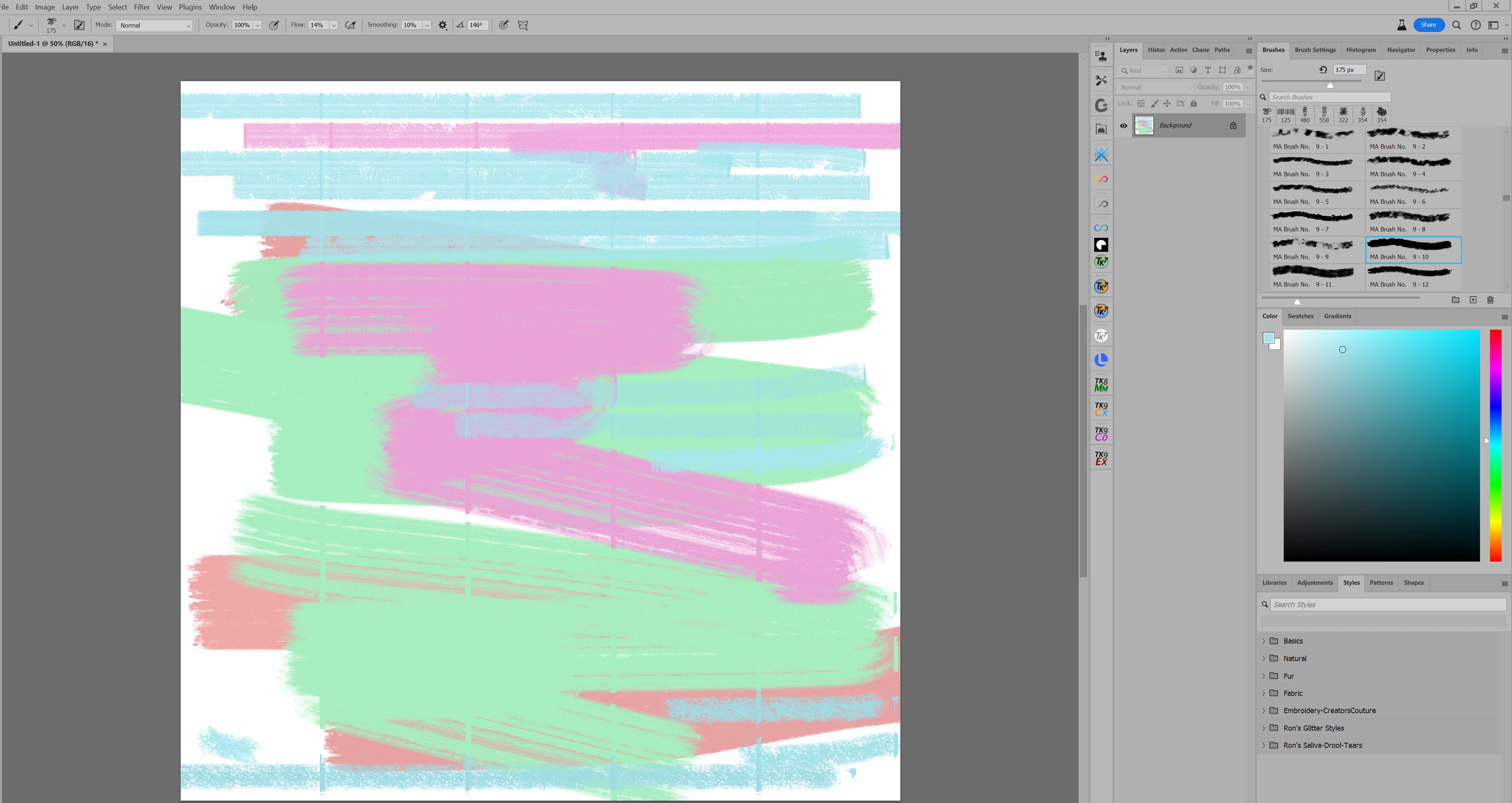
P: Vertical lines appear when using a brush.

  • December 27, 2023
  • 49 replies
  • 6346 views

I make a 12X12 inch canvas, and paint with a brush. It appears to make vertical lines on the canvas.

This topic has been closed for replies.

49 replies

Trevor.Dennis
Community Expert
Community Expert
January 8, 2024

Vicki, the Photoshop beta forum ios followed by at least two members of the Development Team.  I also tagged Cory Shubert in a post to this thread after I was able to duplicate the issue.  


FYI Any time you want to ensure a particular user sees one of your posts, add an @ followed by their Adobe ID and — depending on their notification settings — be emailed with a link to your post.  So if I add @vickim68445947  you should recieve an email.


The beta versions are pre-release and time limited, so there are regular updates (monthly ?).  If you ignore the update requests, the beta version will eventually stop working.  The two biggest issues with the prior to today's update version were that we coulldn't drag or duplicate a layer to another open document, and the Alt/Opt modifier when using the Pen tool changed the cursor to the eye dropper tool.  The former issue appears to have been fixed, but the Pen tool appears to still be broken.  That makes the beta version unusable for me, and I know a lot of regular beta version users are currently using 25.3.1 full release.


Is there a particular reason you want to use the beta version?


Inspiring
January 8, 2024

Well, to my dismay, this issue was not fixed with the update today. Did anyone report this bug? I would, but I am not sure to report it.

Trevor.Dennis
Community Expert
Community Expert
December 29, 2023

This is a variation of one of my presets tweaked to show the issue.  You cab see the canvas in 2500 pixels wide, and the artifacts sit at 1000 pixels and a touch over 2000 pixels.  Brush and canvas size make no difference.  There is a vertical line approximately every 1020 pixels.

Trevor.Dennis
Community Expert
Community Expert
December 29, 2023

Blimey!  I can duplicate it.  This is the beta version  25.4.0 m.2439 


I looked though brush settings looking for a likely candidate to cause the glitch and didn't find one.  So I turned settings off one at a time, and it was Color Dynamics that stopped it.  Checking that tab isolated the cause to Hue Jitter.  0% stop has no glitch.  It kicks in at 1%, and stays the same through to 100%.  I have no idea what is going on here, but I'd say you have found a bug.  It's not happening in 25.3.1


@CShubert  What do You think?


Inspiring
December 28, 2023

OK, I found a brush I would like you to test for me, please. It is called "butterfly" and it is in the legacy brushes/special effects category. It is the last brush in that category for me. Make the brush nice and big, maybe 400 px, and the key is to lower the flow. Around 50-60% or so. Lower the opacity, it works fine. Lower the flow, and you will see the lines. Try it in Beta and regular Photoshop.

Inspiring
December 28, 2023

I did reset my prefs, and tried to uncheck different brush settings such as dual brush and texture. It still happens. Hopefully it will be fixed in a new update.

Trevor.Dennis
Community Expert
Community Expert
December 28, 2023

Google has found this set from Gumroad, but I am not going to spend 20 Euros to test them 🙂


https://michaeladamidis.gumroad.com/l/QIgaB


So this only happens with the Beta version?  I can't think why that might be, but if they work OK in the full release version, can you use that?  I usually use the beta version myself, but am not doing so currently because of the Pen tool modifier issue.


Two things you can try are uncheck first Dual Brush in Brush Settings and then Texture.  Dual Brush has the most chance of affecting the brush stroke as the vertical lines might be the second preset.  However, this would be the same in thge full and pre-release versions _unless_ the Brush tool has its knickers in a twist, and this can definitely happen.


So try Reset Tool in the Pre-release version )with Brush tool selected.

If no change, then it's definitely worth trying a Preference reset.  It seems to be a reality that the beta version gets out of sync more often than the Full Release.


Otherwise, avoide using the beta version for now.  It will no doubt start working again in a future update.


BTW  What sort opf work do you do?  The MA brushes suggest and oil paint look.  I was going to suggest Kyle Webster's Impasto brush kit, but I am getting a bunch of Page Not Found errors.  Anyone know what happened to those brushes?  John Derry put out an Impasto brush set about eight years ago, and they don't seem to be available anymore ether.  You might find some of the Aaron Blaize brushes interesting.  They are only a few dollars as well, and used by some of the big names in the Photoshop world.


I would still like to know if Kyles Impasto brushes are still available anywhere?


Inspiring
December 28, 2023

I am using the MA oil and Acrylic brushes. Not brushes from PS. I am using a Wacom Intuos Pro tablet with the pro pen, but it happens with the mouse too. I am using the brush in normal mode, at an opacity of 65% and a flow of 65%. Now here is the interesting thing: when I am using the non beta version of PS this does NOT happen. I have screenshots. I used the same brush preset, same canvas, same settings for each screenshot. Yeah, I know the colors are different, but it happens in all colors. It does not happen with all brush presets, but not sure why it happens with some and not others. All I know is that it is UGLY, and should not be happening. Yes, i know it is a beta version, but just wanted to bring it to attention of someone.

Trevor.Dennis
Community Expert
Community Expert
December 28, 2023

Is it only happening with one particular preset, or all brush presets?

Is this one of the standard brush presets, or in one of the Get More Brushes sets (i.e. Kyle Megapack)?

Are you using a mouse or tablet?  If tablet, which one?