


Participant
Oct 28, 2026 9:13 AM UTC
Open for Voting

Art pen (1 and 2) from Wacom doesn't work fine (for 10 yeas.. and it still not fixed). Pressure dynamics make each brushstroke tremble, with sharp breaks.
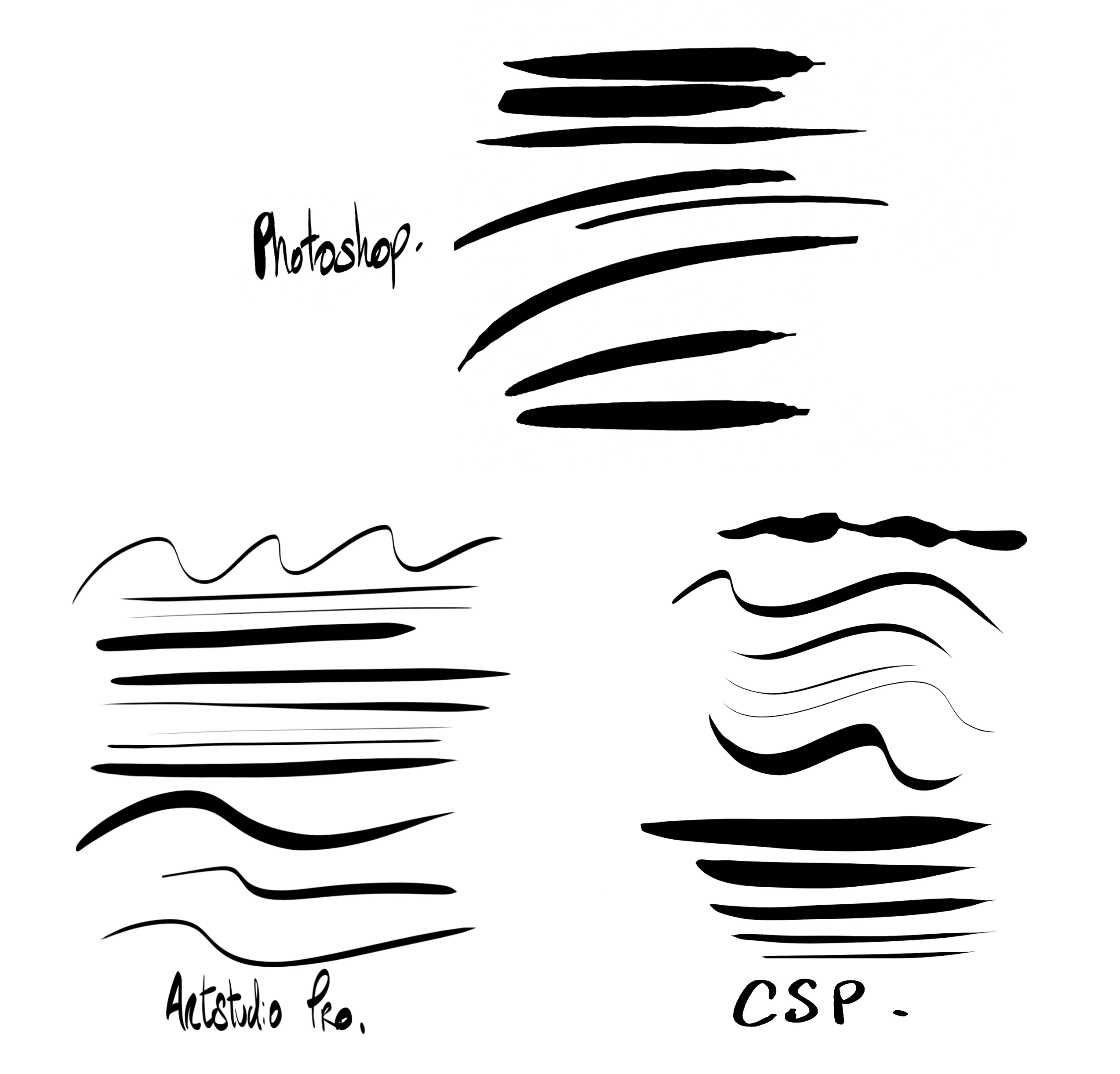
This problem is here for 10 years.

The combo Art pen 1 + cintiq 27QHD works, but art pen 1 combined with 2016 or newer Wacom tablet, not.

I’ve just updated my art pen from the new one : Art pen 2. I bought a new cintiq (24 touch). And this is what happens in photoshop. CSP is almost fine, while a tiny little 17$ app makes the job perfectly…


Please fixed this. I read a user reporting this like 6 years ago. 6 . YEARS

Lots of people are complaining on reddit about this.

    2 replies

    Srishti Bali
    Community Manager
    Community Manager
    Oct 28, 2026 2:30 PM UTC

    Hi ​@nicolab 


    Thank you for sharing your experience and highlighting this longstanding issue with the Wacom Art Pen in Photoshop. I understand how frustrating it must be to encounter inconsistent pressure sensitivity and broken brushstrokes, especially when the pen works as expected in other applications.

    To help us investigate this further, could you please share the following details?

    1. System Info: In Photoshop, go to Help > System Info, copy the information, and paste it into your reply. This will help us better understand your system configuration, Photoshop version, and hardware setup.

    2. Wacom driver version: Which Wacom tablet driver version are you currently using?

    3. Tablet and pen models: Could you confirm the exact models of your Cintiq and Art Pen?

    4. Brush behavior: Does this happen with all brushes, including Photoshop's default brushes, or only when pressure dynamics are enabled?

    5. Troubleshooting: Have you tried updating or reinstalling the Wacom drivers or resetting Photoshop's preferences? If so, did you notice any difference?


    Also, could you share a short screen recording demonstrating the issue in Photoshop? This would help us better understand the behavior.

    Translate
    Thanks, Srishti Bali | Community & Engagement Strategist, Digital Imaging | Adobe
    nicolabAuthor
    Participant
    Oct 30, 2026 10:58 AM UTC

    Hi ! thanks for asserting me quickly. And sorry for the delay of my response, but I takes me some time to prepare everything and explain things in details.

    I recorded a video showing the behavior of 3 Wacom pens : Pro pen 3, art pen1 and art pen 2. I made this video using a Wacom cintiq 24 touch connected to a Mac mini m2 pro 32go ram( may 2023) running on Mac OS Tahoe 26.6.2

    I have to mention that this “pressure issue” is not related to a specific version of photoshop, it’s here since the day I connect a 8192 pressure level tablet (since 2017 with the first cintiq 16inch) on my computers

    I recorded this video using Photoshop 25, (the 26 version crashes randomly, while the 25 seems stable). To compare with other softwares, I  used the last version of Clip studio (ver.5), and Artstudio Pro (5.2.9)

    Here is the private link to see it : 


    Now, this is a link with a rtf file with the system info > https://drive.google.com/open?id=1ec4pHMudjcHCIU4jxvjd8-AKueA4Uwjs&usp=drive_fs


    Wacom driver : Every Wacom driver for cintiq since 2016 including the last one : macOS Driver 6.4.15-1


    Tablet and Pen model : I experienced this problem with every Wacom tablet I bought or tested since 2017


    - CINTIQ 16 - DTH-1620

    - last CINTIQ 24 touch - DTH246K0B

    - Art Pen 1 (KP701E2)

    - Art Pen 2 (ACP70000DZ


    Once again, this problem seems appeared with the high sensitivity Wacom tablet model. 8192 pressure level

    With the - CINTIQ 27 QHD - DTK-2700, (2048 pressure levels) or CINTIQ 22HD - DTK-2200 and the art pen 1 (KP701E2) (2048 levels), there was no issue.

    The problem doesn’t happen with « Pro »  pens (1, 2 and 3).

    The problem happens only with Art pens models (1 and 2) with High sensitivity tablet ! (The specificity of the Art Pens is the Rotation barrel support.)


    BUT !


    With the same configuration, the issue does not occur in other applications, such as Clip Studio Paint or Artstudio Pro. So, this conclusion let me think that there’s a problem with Photoshop.


    Brush Behavior :

    The problem occurs with very basic brushes. Like a sharp circle, or every other brushes (included default, or custom ones)

    When I set the size variation with the pen pressure. Strokes made with the Art pens stylus completely lack precision, causing lines or curves to appear "wobbly."

    Once again, this behavior does not occur in Clip Studio Paint or ArtStudio Pro with the same Art Pens 1 & 2 Stylus.


    Troubleshooting :

    I think that… for almost 10 years, I worked with a lot of different settings, with brand new computers, I installed and updated every Wacom driver severals times hoping this will be fixed. I think I reinstall entirely every computer I got (for other reasons), and this problem has been always here. I worked for years with the cintiq 27 and the Art Pen 1 because this combo worked fine, But cintiq 27 is not supported anymore with wacom drivers who only runs on last Mac OS systems… So I decided to move on and buy a new Wacom setup.


    And now… I can’t paint or draw anymore in photoshop because of this problem. I’m a comic artist, so… If I can’t trust my brushes behaviors, it becomes quite complicated for me to continue working with Photoshop.

    And By the way… I don’t really remember when was the last «BIG » update for artists in photoshop. Maybe 2006, when we have been able to rotate our canvas? A lot of softwares like procreate, Art studio Pro, or Clip studio paint are doing a lot, like automatic shapes, perspective tools, advances brushes option and so more…

    What did adobe ? I mean, expect putting useless AI tools everywhere.

    I know that it’s another subject, but I'm taking this opportunity to say what I feel about Adobe’s politic.


    Thanks. Hope this issue will be fixed very soon, because I can’t use photoshop anymore. Since january, I work this Clip studio paint, and Artsudio Pro on iPad.


    Translate