Burapon32961912ehqk
Participating Frequently
October 18, 2024

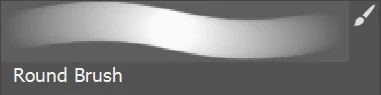
brush select boarder looking different

  • October 18, 2024
  • 6 replies
  • 235 views

Hi, 


just wondering why the brush select is now randomly looking different
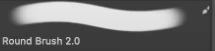
 

   - Old

 - New


I don't like the look of the new border. Any suggestions on reverting it back to old?

6 replies

Burapon32961912ehqk
Participating Frequently
October 20, 2024

no, same effect just darker or lighter

Jeff Arola
Community Expert
Community Expert
October 19, 2024

Looks like you have two different Color Themes.


In Photoshop go to Edit>Preferences>Interface>Color Theme and see if one of the choices is right.

Burapon32961912ehqk
Participating Frequently
October 19, 2024

dosent seem like it. the brushes are how they are meant to be and work fine. Its just the cosmetic aesthetic oc the boxes around them that irritates me

its a small thing. I know. but i want it too look like the left one but now i somehow got the right one

Jeff Arola
Community Expert
Community Expert
October 19, 2024

Maybe the Brush Settings got changed somehow.

(Window>Brush settings)


The bottom one looks like Opacity Jitter with Pen Pressure in the Transfer settings.

Burapon32961912ehqk
Participating Frequently
October 19, 2024

26.0 (both from the same version) one day it just changed. i reverted back to older versions as well but to no avail

Jeff Arola
Community Expert
Community Expert
October 19, 2024

What version of Photoshop and Windows are you using?


Are those screenshots from two different Photoshop versions?