
Participant
June 19, 2026

Can't install Photoshop "Remove Tool advanced components" – installation error in Creative Cloud
  • June 19, 2026
  • 5 replies
  • 87 views

Phothoshop 27.8 (same error previously with 27.7).
 

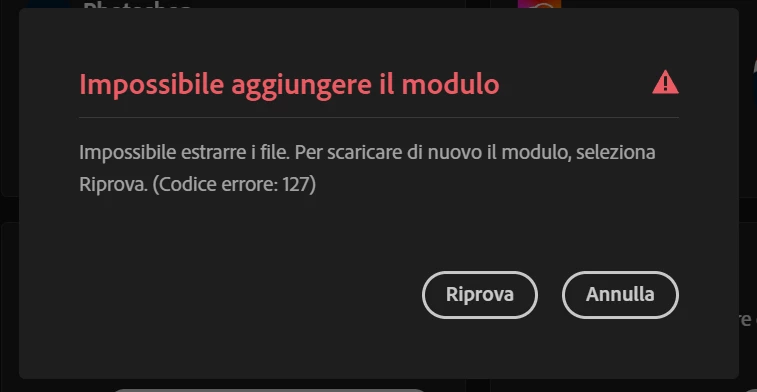
I'm trying to install the "Remove Tool advanced components" add-on through Adobe Creative Cloud (to use the new local remove tool), but the installation keeps failing with an "Installation Error" message (see attached screenshot), with error 127.

Same bug if I try to install it inside photoshop.

What I've already tried:

  • Restarting Photoshop

  • Restarting my PC multiple times

  • Installing it from both Creative Cloud Desktop and directly inside Photoshop

  • Retrying several times over the last 24 hours

  • Unistall creative cloud with repair tool

  • Delete adobetemp

  • Increse permissions to adobetemp folder

I'm using:

  • Windows 11

  • Latest version of Photoshop (27.8)

  • RTX 4090

  • Photoshop settings with image elaboration faster and performance with “use graphic processor”

Has anyone found a fix for this, or knows what could be causing it?

    5 replies

    BrennanWest_Photog
    Participating Frequently
    June 21, 2026

    I just spend around 2 hours with an Adobe Remote Support technician Mohammed and we tried everything under the sun to try and resolve this issue, to no avail.  The issue persists.  Error Code: 127

    the technician said they will follow up with me via email when/if he hears back from his backend team regarding this issue.

    BrennanWest_Photog
    Participating Frequently
    June 21, 2026

    Getting the same error - June 20th 2026 on both Photoshop Bets (27.9) and Photoshop 2026 (27.8)


    Tried add-on download through both CC Application and directly on Photoshop app. Fails everytime after about 20mins {or ~ 60%) of downloading Ai model contents from Adobe servers.


    Error code: 127.


    AMD 9950x3d

    64GB RAM ddr5

    Nvidia RTX 4090  - 24GB VRAM

    GPU Driver:   610.47

    Anshul_Saini
    Community Manager
    Community Manager
    June 19, 2026

    Hi ​@Francesco277711048b98,

    Thanks for sharing the details. Error 127 generally indicates that the installer is unable to extract or write files during installation.

    I can see you’ve already tried many of the common fixes, so let’s try to narrow this down further.

    A few questions:

    • Are you the administrator of this machine?
    • Is this a personal PC or a company-managed device?
    • Do you have any antivirus, endpoint protection, or security software installed (Bitdefender, ESET, CrowdStrike, SentinelOne, Defender for Business, etc.)?
    • Does the same error occur on a different internet connection (for example, a mobile hotspot)?

    One thing I’d like you to test before going deeper is to create a na brand-new local administrator account and test the installation there before running additional cleanup on your main profile:

    https://support.microsoft.com/en-us/windows/manage-user-accounts-in-windows-104dc19f-6430-4b49-6a2b-e4dbd1dcdf32

    This helps us determine whether the problem is specific to your current Windows profile.

    In that case, we can look at a deeper cleanup of the existing profile.

    Also, although you’ve already worked with the AdobeTemp folder, could you confirm:

    • Does C:\adobeTemp currently exist?
    • Do both SYSTEM and Administrators have Full Control permissions on that folder?

    The new admin-account test is the most valuable next step here because it quickly tells us whether we’re dealing with a profile-specific issue or something broader.

    Best,
    Anshul Saini

    Participant
    June 19, 2026

    Are you the administrator of this machine?
    -Yes

    Is this a personal PC or a company-managed device?
    -Personal

    Do you have any antivirus, endpoint protection, or security software installed (Bitdefender, ESET, CrowdStrike, SentinelOne, Defender for Business, etc.)?
    -Just windows defender (i tried to disable defender and firewall during installation but didn't work)

    Does the same error occur on a different internet connection (for example, a mobile hotspot)?
    -Yes I tested with my mobile hotspot (after delete adobetemp folder content)

    Does C:\adobeTemp currently exist? 
    -yes, it exists and i tried to delete all files inside it

    Do both SYSTEM and Administrators have Full Control permissions on that folder?
    -yes, they both have, i checked

    One thing I’d like you to test before going deeper is to create a na brand-new local administrator account and test the installation there before running additional cleanup on your main profile:
    -I created a new user with the admin role. It was strange because it usually stops at around 49%, sometimes around 60%. This time it stopped at over 90%, but in the end it gave the same error.

    D Fosse
    Community Expert
    Community Expert
    June 19, 2026

    This is apparently a work in progress. With an RTX5060 Ti 16GB I should be ready for business.

    • At first the advanced components didn’t want to install.
    • Then later they did install, but the “Device” option was still grayed out and unavailable.
    • Now, after the 27.8 update, it has become active and available - but when I click it, I get a notification that my GPU isn’t supported.


    So we’re getting there, slowly 😊


    Not a big deal for me, it’s not something I want to use, I just keep tabs on it since there’s a lot of posts about this.

    Ged_Traynor
    Community Expert
    Community Expert
    June 19, 2026

    @Francesco277711048b98 your issue may be related to this thread


    Participant
    June 19, 2026

    Hello, no the author of that post says “After the the complete reinstallatiom I saw the missing “Remove Tool advanced components” anr installed manually the Photoshop plug-in through the Creative Cloud app. So the issue should not be caused by missing Remove Tool Advanced  components.”.

    So he has no problem with the installation of “Remove tool advanced components”. But when I try to install that component the createive cloud app gives me the error.