


Participant
September 3, 2024

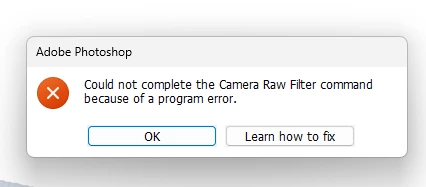
“Could not complete the Camera Raw Filter command because of a program error”
  • September 3, 2024
  • 98 replies
  • 18035 views

i m facing issue in letest photoshop..
i try all the ways, like reinstallation, older version, but still not working 

any buddy knows solution ???
please Help me...
Bhargav


[subject renamed for clarity]


98 replies

D Fosse
Community Expert
Community Expert
November 20, 2024

Nope. We're back 😞 Took over an hour this time...

But I didn't really expect it. Considering that this is a bug that doesn't come up right away, but pops up after a long time running, it's likely that it requires extensive tracking to pinpoint the event that triggers it.

D Fosse
Community Expert
Community Expert
November 20, 2024

It seems to be fixed in 26.1 here - so far.


I'm holding my final judgement a few more hours, and I also have to test on my home machine later today.


@leslies89564874 - if you're willing to use Lightroom Classic to open your raw files, it has never been affected by this. "Edit in Photoshop" has worked correctly the whole time, probably because it doesn't call the ACR interface. So for me it hasn't been a problem for raw files, only the ACR filter in Photoshop.

Participant
November 20, 2024

Kjell says that it has been fixed today but not on my system it hasn't. Tried at least thirty times this morning & not been able to open a single RAW file.

When will the likes of Adobe & Microsoft etc finally realise that they are to all intents & purposes in the service industry & it is their customers who actually provide their employees with a salary & the directors & share holders with their obscene profits whilst still having to put up with constant "updates" that supposedly fix bugs (which should have been sorted before launch) that just end up causing more problems than they solve.

It seems that the tech industry in general are more interested in moving on to the next big thing (in this case AI), rather than trying to perfect what they already have first, just to justify their own existance.

You can have the best super car on the market with leather upholstery, mahogany dash & surround sound entertainment but if the ignition key doesn't work you just have an overpriced ornament.

At least with a car you still have something to loook at but with Photoshop you have nothing.

Participant
November 20, 2024

After an update that came to day 20 nov it look like  Photoshop works as normal again 🙂

Known Participant
November 20, 2024

Pareil pour moi CR ne fonctionne pas sur la V26 de Photoshop. Se pourrait-il que ce soit un problème avec l'IA de Photoshop? CR fonctionne sur deux autres versions de Photoshop qui n'ont pas l'IA.

Participant
November 20, 2024
My problem is intermittent. I opened a previously edited JPEG photo in Photoshop V26, then I attempted to open several unedited CR3 files. Photoshop V26 eventually opened a CR3 file. I hope this helps. I just kept trying until a CR3 file opened.
D Fosse
Community Expert
Community Expert
November 19, 2024

OK, thank you! I'm very happy to put that to rest. Just how it appeared at the beginning.


Won't mention it again 🙂

Participant
November 19, 2024

I have just returned from from four weeks travelling with thousands of photos only to find that photoshop will not open my Raw files (Olympus EM1 Mk111) due to "a program error".

I notice that this problem has been dicussed before but I can't find out what the final solution (if any) was. 

TBH I didn't understand 99.9% of the answers. I have a PC because I need it for photography but I don't expect to have to know what is "under the hood" or where to find it.

I have tried most of the things that Adobe suggest or at least those I do understand but to no avail. It worked fine for about two days & then I started getting this issue which I initially got around by constantly closing & reopening PS but now even that doesn't work. 

Historically I have been using PSE 11 & LR 5 since going digital years ago but I am planning some voluntary work next year which involves photography & the latest version of LR classic & PS is a requirement so I reluctantly subscribed in June to get familiar with it but now I have this issue just when I need it for an annual calendar & with only three weeks before I go away again until the New Year.

Does anybody have a simple answer to this? 

I could use LR for my basic RAW editing but that also says that to use the latest update they need to change my catalogur in some way & it won't be compatible with older versions. Not something I'm willing to do in case I decide to go way back to ver 5 which has never given me any problems. 

Even if I did this I still need layers for the calendar (possible update to PSE  but even that now has a three yr limit).

I have Affinity but have not yet familiarised myself with it & time is short. Plus if I cancel my subscription I won't be able to do the voluntary stuff.

So, basically any suggestions that a simpleton can understand that will fix this problem.

I have a new (6 months) PC  with Win 11 with 64 GB Ram, intel i9-14900k, 3.20 Ghz processor.  Intel (R) UHD Grapics 770 & NIVIDIA GeForce RTX 4060 Ti.  I have a 2TB ssd "c" drive & 2 TB ssd storage but my images are stored on an external drive (HDD). Both my internal drives have lots of space remaining. 

By the way I don't understand about 80% of those figures/ stats I've just typed. I just looked at previous answers & googled where to find the info.

This is having a negative affect on my interest in photography so any help appreciated.


Peru Bob
Community Expert
Community Expert
November 19, 2024

I've moved this from the Using the Community forum (which is the forum for issues using the forums) to the Photoshop forum so that proper help can be offered.


Scroll down here to see a list of the forums:
https://community.adobe.com/

Participating Frequently
November 19, 2024

I'm in the US and I have both US/UK language packs so the error definitely affects machines on English.

D Fosse
Community Expert
Community Expert
November 19, 2024

What bothers me about this is that it seems, for some weird reason, the US/UK users don't get this.


I know it's crazy to think language/region should have anything to do with it, but I have seen that before. But that means it can easily go under the radar and will seemingly not be reproducible.


I'll have to start asking people where they are. I hope I'm wrong so that it can be fixed quickly.

Ged_Traynor
Community Expert
Community Expert
November 19, 2024

@D Fosse my bad, I thought it was related to version 17.01, I should have read through this thread first 😉